Preview









Description
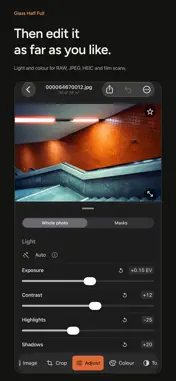
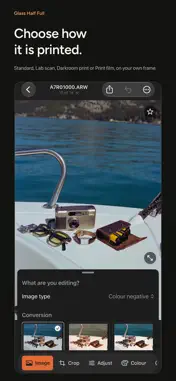
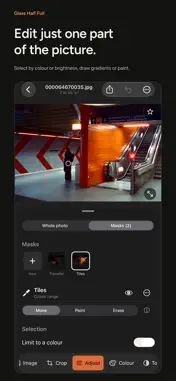
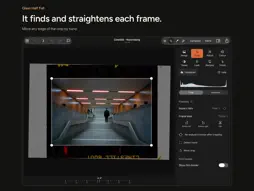
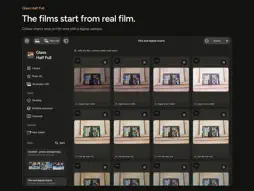
Glass Half Full converts your negatives into photographs, a whole roll at once, and gives any photo the colour of real film. Underneath is a full photo editor for RAW, JPEG and HEIC files. Buy it once, with no subscription and no account. Everything happens on your device. CONVERT YOUR NEGATIVES Photograph your negatives with a camera over a light, or with your phone over a light box, then import them. Glass Half Full finds each frame, crops and straightens it, and converts it, one frame or a whole roll at once. Colour negatives, black-and-white negatives and slides each have their own conversion. Choose how a colour negative is printed from previews of your own frame: Standard, Lab scan (measured from a real lab scanner), Darkroom print or Print film. Save a roll's conversion as a short video for your stories. BUILD YOUR UNIQUE LOOK Pick a film and see it on your own photo first. You don't need to shoot film: the films work on phone photos, JPEGs and camera RAW files. Natural films are modelled on real film stocks, starting from colour charts photographed on film and on a digital camera. Each has the film's grain and halation, and can be shot under or over, pushed or pulled. Nostalgic films are softer and dreamier, for a light, airy feel. A FULL EDITOR UNDERNEATH Every tool works on a phone photo, a camera RAW and a converted negative alike. RAW files are developed from their sensor data. Start with Auto, then adjust exposure, contrast, highlights, shadows, whites, blacks, clarity and dehaze. Set white balance, shape tone and colour with curves, fine-tune eight colour ranges with the colour mixer and grade shadows, mid-tones and highlights with colour wheels. Crop, straighten and correct perspective. WORK ON JUST ONE AREA Brighten a face, darken a distracting background or bring back a bright sky with masks. Draw linear and radial gradients, paint with a brush, or select by colour or brightness. CHOOSE A LOOK Each look renders the whole picture its own way, tone and colour together. Choose from the Signature and Cinema rows or the black-and-white prints, from selenium to lith, with a colour filter. Looks work on film scans and slides too. FINISH IT LIKE A PRINT Add grain measured from real film scans, halation, bloom, light burn and a vignette. Sharpen, reduce noise, take out colour fringes and remove dust. Put the photo on a strip of film, with natural edges or a full-sprocket border, or print it on paper, from cotton and baryta to newsprint. MORE TOOLS Lay photos and text across slides for seamless carousel posts. Layer up to nine photos into a multiple exposure. Plan, time and log your film development, with times from the makers' data sheets. ORGANISE EVERY ROLL Keep film scans together in rolls and gather photos into folders. Sort by date, film stock or camera. Mark picks and rejects, copy settings across a set and export in batches. Save your settings as recipes to reuse, or share them as files and recipe cards. Recipes and your development log sync with iCloud. KEEP YOUR ORIGINALS Edits are saved separately and never change your originals. Compare with the original and undo any change. Export a JPEG to share or a 16-bit TIFF for further editing. Back up your library as a ZIP archive and restore it at any time. RAW support depends on your camera. Glass Half Full is also on the Mac, built for it, with the same one-time purchase. BUY IT ONCE Import and edit as much as you like for free, and export 12 photos at full quality with no watermark. Re-export those photos whenever you like, including in other formats. A one-time Full Unlock removes the export limit. One purchase covers iPhone, iPad and Mac, with Family Sharing included. No subscription, no account, no expiry. I'm Sam. I shoot and scan film, and I built Glass Half Full for my own photographs. If something gets in the way of yours, I'd like to hear about it. You can reach me through Help & about in the app.
What's New
Version 1.29 2026-11-14
Colour negatives convert better, your recipes and development log sync with iCloud, and light burn is now its own effect with a choice of colours. Technical Analysis
Package Overview Basic metadata
Bundle ID
com.glasshalffull.reversal Current Version 1.29
Minimum iOS 17.0
Package Size App Store Size
Package Metadata 0 / 0 version records
Detailed binary, privacy manifest, framework, and Info.plist results have not been indexed for this package yet. The verified App Store and archive metadata above remains available.
Developer Information
Known Version Records
0 version records with stored package metadata
Stored metadata does not guarantee a package is currently available to download.
| Details | Version / IDs | Version date | Action |
|---|