
Preview


Description
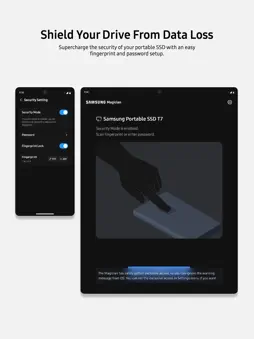
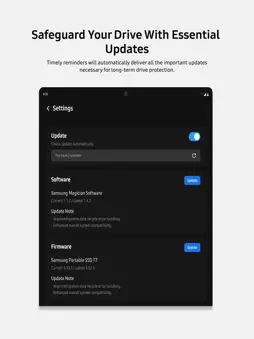
Software that’s so powerful you‘ll wonder if it’s… magic. Quickly and easily manage your Samsung Portable SSDs through Samsung Magician. [App Features] With Samsung Magician, you can, - Access real-time information of your drive anytime, anywhere and keep your drive's health in check. - Unlock the performance that only comes from genuine Samsung memory products by verifying them through remarkably simple steps. - Inspect the health of your drive and detect failures before they happen using S.M.A.R.T check. - Supercharge the security of your drive with an easy fingerprint and password setup. - Receive timely reminders for important updates so as to update the firmware of your drive. [App requirements] - Supports only devices running iPadOS [Requires iPadOS 16.0 or later]. - Exclusively available only on iPads equipped with an M-series chip. - To know whether your iPad is supported, visit https://developer.apple.com/support/required-device-capabilities and select "driverkit" under "Choose a capability" - The app requires Samsung Magician Driver to be enabled. Follow the in-app guide or manually go to the app's settings page to turn it on. [Troubleshooting] [Known Issue - Toggle to enable/disable Samsung Magician Driver does not appear in App Settings] We are aware of an issue where the toggle to enable Samsung Magician Driver may occasionally not appear in the app's Settings page on some iPadOS versions. The driver enable/disable option is provided and managed by iPadOS, and is not controlled by the app. We have reported this behaviour and are investigating into this issue. A potential fix will be identified and released in a future version of the app, where applicable. Meanwhile, here are a few steps you can try currently to restore this option: a. Check and try whether the toggle appears and manually updating it from these locations - On older versions of iPadOS, the option to enable Samsung Magician driver can be found under Settings > Samsung Magician > Drivers. On newer versions, this option is located under Settings > Apps > Samsung Magician. b. Try updating your version of iPadOS or reinstall Samsung Magician and follow the steps again [Known Limitation - P-Series Portable SSD detection over USB4] Samsung Magician v9.0.2 currently supports Samsung P-Series Portable SSD devices over USB3 only. These devices can be detected on iPad models with USB-C ports using either USB-C or USB-4 compatible cables. However, on iPad models with USB4 ports, the device may not be detected when connected using a USB4 cable and so it is advised to use a USB-C cable for the same. USB4 support will be added in a future version of the app.
What's New
Version 9.0.2 2026-09-08
- Support added for newly launched P-Series range of Samsung Portable SSDs in USB3 mode Technical Analysis
Package Overview Basic metadata
Bundle ID
com.samsung.magicianios Current Version 9.0.2
Minimum iOS 16.0
Package Size App Store Size
Package Metadata 2 / 4 version records
0.0 / 5.0 (0 ratings)
Detailed binary, privacy manifest, framework, and Info.plist results have not been indexed for this package yet. The verified App Store and archive metadata above remains available.
Developer Information
Known Version Records
2 version records with stored package metadata • 4 known version records
Stored metadata does not guarantee a package is currently available to download.
| Details | Version / IDs | Version date | Action |
|---|---|---|---|
 43.11 MB | v9.0.0 App Store ID: 876170638Build: 900 | 2025-11-11 08:02:34 | Get Version |
| Not archived | App Store ID: 871291576 | Unknown | Request Version |
 31.55 MB | v8.2.0 App Store ID: 868672123Build: 850 | 2024-09-02 08:38:48 | Get Version |
| Not archived | App Store ID: 867684324 | Unknown | Request Version |