
Preview






Description
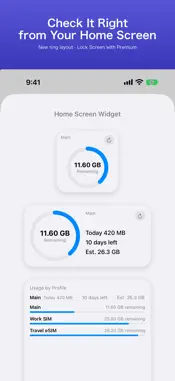
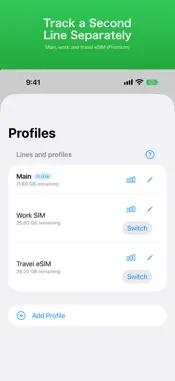
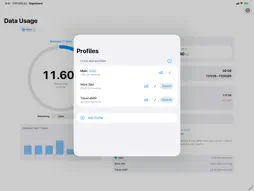
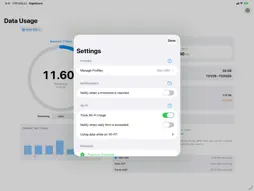
See your remaining data at a glance — right on your Home Screen. No ads. No subscription. No VPN. A data usage widget you can match to your carrier's numbers. [Now on iPad] Cellular iPads track their plan just like iPhone. On Wi-Fi iPads, Wi-Fi usage is recorded day by day, and you can manage a pocket Wi-Fi or tethering data cap as a plan. TIRED OF… • Trackers that never match what your carrier says? • Ads, or features moved behind a subscription after you paid? • Apps that count Wi-Fi as mobile data? • Billing cycles stuck on the 1st? WHAT GIGAGUARD DOES • Calibrate to your carrier — on-device measurement always drifts a little. Type in the usage shown in your carrier's app and GigaGuard matches it. • Widgets for the Home Screen and Apple Watch (Lock Screen widgets with Premium). Choose from four layouts, including a ring, show today's Wi-Fi usage, and refresh without opening the app. • Cellular and Wi-Fi tracked separately — only mobile data counts toward your plan. • Any billing day from the 1st to the 31st, rollover data, and day passes for prepaid or travel eSIMs. • Pace forecast: see where you'll end the cycle and the day you'd hit your cap. • A daily limit alert, plus alerts at the percentages you choose (Premium). • Daily usage history as bars, a line or a running total, with Wi-Fi alongside cellular, plus per-cycle history (Premium). • Up to 20 lines — main, work and travel eSIM — each with its own plan (Premium). • Siri Shortcuts: "Check remaining data in GigaGuard". PRIVACY • No VPN. GigaGuard never sits in the middle of your connection. • No carrier login, no account. • Your data stays on your iPhone. Nothing is sent to a server. PRICING Free to use. Premium is a one-time purchase — never a subscription. No ads. PLEASE NOTE iOS doesn't let apps read your carrier's official usage, so GigaGuard measures on-device and lets you calibrate. Usage is updated when you open the app or refresh the widget. Per-app usage is not available. For billing, always check your carrier's official app or website.
What's New
Version 2.0.0 2026-11-17
• [Premium] Record Wi-Fi usage per network (SSID). See home, work and pocket Wi-Fi separately in History, and set a monthly limit with alerts for each network •...• [Premium] Record Wi-Fi usage per network (SSID). See home, work and pocket Wi-Fi separately in History, and set a monthly limit with alerts for each network • New "Unlimited Plan" option for plans with no data cap • Now on iPad. On iPad and the wide screen of iPhone Duo, the gauge, a 7-day chart and the cards sit side by side in two columns • On Wi-Fi iPads, Wi-Fi usage is recorded day by day. Turn on "Manage a pocket Wi-Fi or tethering data cap" to track your router's data as a plan • A new app icon • Settings now apply as you change them, and longer explanations open from the "?" buttons • "Detect SIM switches" is no longer a beta • Better layouts at large text sizes, and a refreshed Apple Watch app Technical Analysis
Package Overview Basic metadata
Bundle ID
com.explorerslabinc.datausagetracker Current Version 2.0.0
Minimum iOS 17.0
Package Size App Store Size
Package Metadata 0 / 0 version records
Detailed binary, privacy manifest, framework, and Info.plist results have not been indexed for this package yet. The verified App Store and archive metadata above remains available.
Developer Information
Known Version Records
0 version records with stored package metadata
Stored metadata does not guarantee a package is currently available to download.
| Details | Version / IDs | Version date | Action |
|---|