
Preview





Description
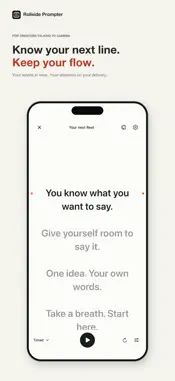
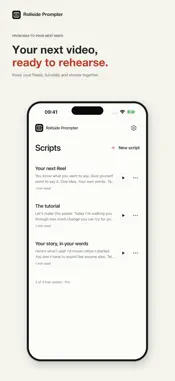
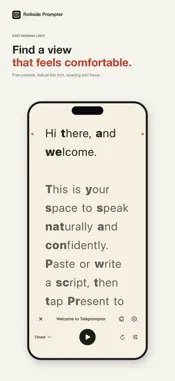
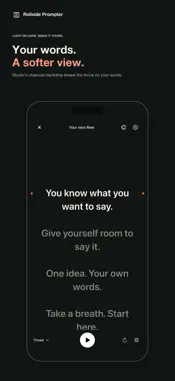
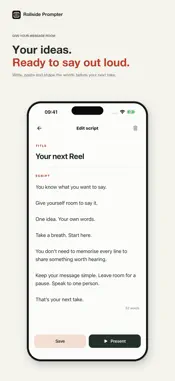
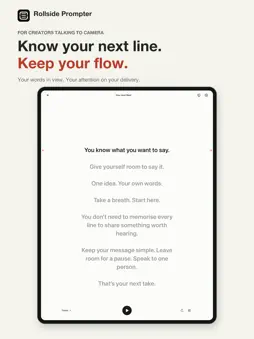
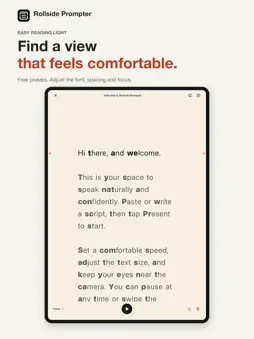
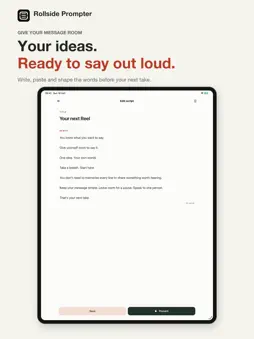
Filming Reels, tutorials or YouTube videos? Keep your next line in view, so forgetting a word doesn’t mean starting the whole take again. Rollside Prompter gives creators a clear, comfortable script to follow on iPhone and iPad. Write or paste your words, rehearse at your own pace and give your attention to the person watching. KEEP YOUR PLACE • Keep one, two or three lines in focus, with softer text around them. • Two coral guide dots show you where to read. • Set a comfortable scrolling speed. Play, pause and restart whenever you need. • Use a starting countdown to give yourself a moment before speaking. FIND A COMFORTABLE VIEW • Try free Easy reading Light and Dark presets, then adjust them to suit your preferences. • Pick any background, text and focus colours with Apple’s colour picker. • See each adjustment in a preview that stays in view. • Adjust your font, text size, letter and word spacing, reading width and position. • Try optional word emphasis if you prefer bolder word beginnings, or leave it off. • Read in portrait, landscape or mirror mode. Easy reading is about personal comfort. It does not promise faster reading or proven benefits for dyslexia. YOUR NEXT VIDEO, READY TO REHEARSE Keep your Reels, tutorials, speeches and stories together in a clean script library. Write and edit on your device, then open the reader when you’re ready. On iPad, enjoy more space for your scripts and comfortable playback controls. Rotate or resize your window and keep your place. LEAVE ROOM FOR A PAUSE Voice follow moves the script as you speak and pauses when you stop. Speech is processed on your device and audio is not saved. Voice follow needs iOS 18 or later, a supported device and an available on-device speech language. Microphone permission is required, plus Speech Recognition permission on iOS 18–26. A language-model download may be needed. Timed scrolling remains available when Voice follow is unavailable. REHEARSE YOUR WAY Set an optional rehearsal target from 30 seconds to ten minutes. Compatible keyboard-style Bluetooth remotes and foot pedals can control playback, page jumps and timed speed. Learn buttons in Remote controls settings. Support depends on the key events delivered by iOS. FROM YOUR MAC TO YOUR READER An optional Rollside Mac companion can send a script by QR code or import link. QR handoff requires both devices on the same trusted local network and the Mac sender panel open. You can write and use scripts entirely on your iPhone or iPad. YOUR WORDS STAY YOURS Scripts and settings are saved on your device. No app account, ads or tracking. Read and edit offline; Apple purchase services and initial speech-model downloads may need a connection. START FREE Save up to three scripts and use the full reader, including supported Voice follow. A one-time Rollside Prompter Pro purchase unlocks unlimited saved scripts. No subscription. Prompter displays scripts. Use your camera app or filming setup to record video.
What's New
Version 1.2.2 2026-10-21
Enjoy smoother Voice follow, an easier way to go back a sentence, and more control over your starting countdown. You can now share scripts and recover your prev... Technical Analysis
Package Overview Basic metadata
Bundle ID
com.samwysockwright.teleprompter Current Version 1.2.2
Minimum iOS 16.4
Package Size App Store Size
Package Metadata 0 / 0 version records
Detailed binary, privacy manifest, framework, and Info.plist results have not been indexed for this package yet. The verified App Store and archive metadata above remains available.
Developer Information
Known Version Records
0 version records with stored package metadata
Stored metadata does not guarantee a package is currently available to download.
| Details | Version / IDs | Version date | Action |
|---|