Preview





Description
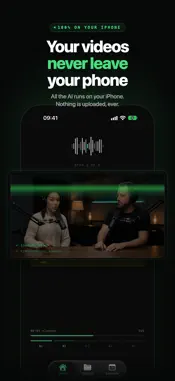
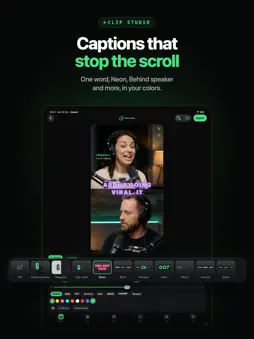
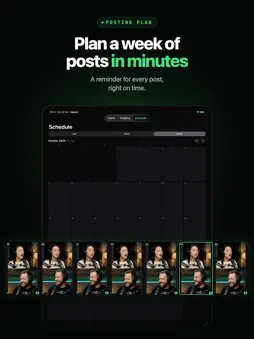
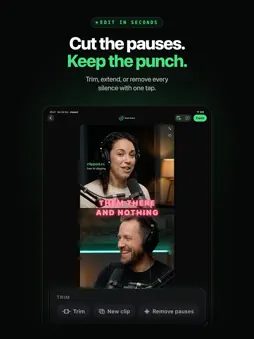
Clipped turns long recordings (podcasts, interviews, lectures, livestreams) into short, ready-to-post clips, entirely on your iPhone. No uploads. No account. No monthly credit limits. Because every model runs on-device, Clipped works in airplane mode and never sends your footage anywhere. HOW IT WORKS 1. Import a long video: podcast, interview, lecture, livestream, or vlog. 2. Pick an AI engine on Home: Apple Intelligence, a downloadable model for the best picks, or No AI to choose moments yourself. Apple's on-device Speech engine transcribes the audio in up to 14 languages, depending on your device. 3. The AI reads the whole video, finds the strongest moments and gives every clip a viral score. 4. Style it in the clip studio: 10 caption styles with a live preview, your colors, cinematic looks, a title bar and your @handle. 5. Reframe from 16:9 to 9:16 with face detection and tracking. Pick a layout: a crop that follows the speaker, split-screen, or blur-fill. 6. Polish and plan: trim or extend any clip, remove every pause in one tap, fix caption words, then schedule each post and get a reminder when it's time. 7. Export straight to your Camera Roll, ready to post to TikTok, Reels, or Shorts. NEW IN 3.0 - Clip studio with One word, Neon, Behind speaker and more caption styles, plus looks and title bars - Viral score on every clip, picked from across the whole video - Remove pauses, trim and extend, and caption editing - Posting plan with reminders for every post - Louder, cleaner exports and a layout made for iPhone Duo WHY ON-DEVICE MATTERS - Your footage never leaves your phone. No cloud, no server, nothing to leak. - Works anywhere: airplane mode, no signal, remote shoots, sensitive client footage. - No account required. Open the app and start clipping. - No monthly credit limits. One podcast or fifty, clip as many as you like, every day. PERFECT FOR - Podcasters turning full episodes into shorts - Streamers and YouTubers clipping long VODs and streams - Interviewers, coaches, and course creators repurposing long recordings - Anyone who wants full control over sensitive or unreleased footage HONEST PRICING Clipped is free to use. Every export includes a small watermark until you remove it with a single one-time purchase. That's the whole model: no subscription, no monthly credits, no "Pro" tier, no paywalled features. Most apps in this category charge a monthly subscription or meter you with credits. With Clipped, what you pay never changes, whether you clip once or every single day. Privacy: https://www.clipped.cc/privacy Terms: https://www.clipped.cc/terms https://www.clipped.cc/
What's New
Version 3.0.0 2026-10-27
Clipped 3.0: our biggest update yet. Clipping is still free. NEW • Clip studio: caption styles like One word, Neon and Behind speaker, with a live preview, you...Clipped 3.0: our biggest update yet. Clipping is still free. NEW • Clip studio: caption styles like One word, Neon and Behind speaker, with a live preview, your colors and an automatic bleep for swear words. • Looks and title bars: give every clip a cinematic look, a title bar and your @handle. • Viral score: the AI now reads your whole video, picks the strongest moments and scores every clip. • Remove pauses: cut every silence in one tap. • Trim and extend: fine-tune any clip, even past its original start or end. • Edit captions: fix any word before you export. • Posting plan: schedule each clip for your favorite platforms and get a reminder when it's time to post. • iPhone Duo: a layout made for the bigger screen. BETTER • Exports sound louder and cleaner, at the volume the big platforms expect. • Clips now start and end on full sentences. Everything still runs on your iPhone. No uploads, no credits. Technical Analysis
Package Overview Basic metadata
Bundle ID
com.castedev.offlineclipper Current Version 3.0.0
Minimum iOS 26.0
Package Size App Store Size
Package Metadata 2 / 3 version records
Detailed binary, privacy manifest, framework, and Info.plist results have not been indexed for this package yet. The verified App Store and archive metadata above remains available.
Developer Information
Known Version Records
2 version records with stored package metadata • 3 known version records
Stored metadata does not guarantee a package is currently available to download.
| Details | Version / IDs | Version date | Action |
|---|---|---|---|
| 20.11 MB | v2.0.0 App Store ID: 889150327Build: 2.0.0 | 2026-08-06 23:06:37 | Get Version |
| 20.11 MB | v2.0.0 App Store ID: 884999620Build: 2.0.0 | 2026-08-06 23:06:37 | Get Version |
| Not archived | App Store ID: 884823504 | Unknown | Request Version |