
Preview




Description
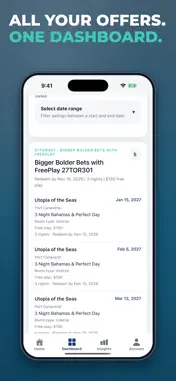
SailQuery organizes your Royal Caribbean Club Royale casino offers into one clear dashboard, then shows you which sailings are the real deals. Instead of digging through emails, the offers page and spreadsheets, capture your offers once and see every sailing available to you, with the details that matter for choosing one. FEATURES Upgrade Finder (new) See what it would cost to move up from the cabin your offer includes. SailQuery compares Royal Caribbean's public fares for every sailing and flags the deals: an Ocean View offer where a Balcony costs only a few dollars more per guest, or a Balcony offer where a Suite costs nothing extra. Upgrade costs are estimates only, not a quote or a guarantee: they're based on Royal Caribbean's public fares at our latest check, fares change constantly, and your casino host sets the actual upgrade price. Ports of Call and Estimated Taxes & Fees Open any sailing to see its ports of call and Royal Caribbean's estimated taxes, fees and port expenses per guest. Day-by-Day Itinerary (new) Follow each sailing day by day, with arrival and departure times and sea days. Side-by-Side Compare (new) Pick two sailings and compare them line by line: ship, dates, ports, room type, free play, redeem-by date, taxes and fees, and upgrade costs. Smart Search Find sailings the way you think about them: by ship, port of call, departure port, cabin type, number of nights, month or date range, or offer code. Try "balcony cozumel march" or "7 nights from miami". Offer Dashboard Browse by offer or as one list of every sailing. Sort by redeem-by date, sail date, ship, port, value or free play. Sailings Royal Caribbean no longer lists are flagged, so you don't chase sold-out dates. Cruise Analytics See your top ships, ports and sailings across hundreds of offers. Export to Excel Download every sailing to a spreadsheet. Sync in the App, View Anywhere Capture and sync your offers on iPhone, iPad or a Mac with Apple silicon, then view your dashboard on any device at sailquery.com. HOW IT WORKS 1. Sign in to your Club Royale account inside the app's secure capture view. 2. Wait for your offers page to load. 3. Tap Capture. SailQuery reads the offers shown on the page and syncs them to your dashboard. SailQuery never sees or stores your Royal Caribbean login. SailQuery is an independent app and is not affiliated with Royal Caribbean International or Club Royale.
What's New
Version 1.0.2 2026-09-27
Upgrade Finder: see an estimate of what it costs to move up from the cabin in your offer, with cheap and $0 upgrades flagged. Estimates come from Royal Caribbea... Technical Analysis
Package Overview Basic metadata
Bundle ID
com.caldog2k.sailquery.mobile Current Version 1.0.2
Minimum iOS 15.1
Package Size App Store Size
Package Metadata 0 / 2 version records
Detailed binary, privacy manifest, framework, and Info.plist results have not been indexed for this package yet. The verified App Store and archive metadata above remains available.
Developer Information
Known Version Records
0 version records with stored package metadata • 2 known version records
Stored metadata does not guarantee a package is currently available to download.
| Details | Version / IDs | Version date | Action |
|---|---|---|---|
| Not archived | App Store ID: 883593069 | Unknown | Request Version |
| Not archived | App Store ID: 883345986 | Unknown | Request Version |