Preview



Description
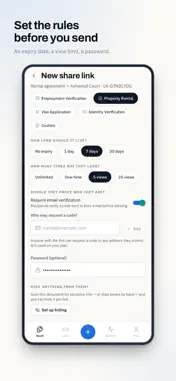
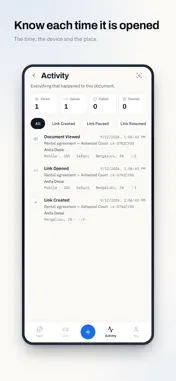
Lockey keeps your control of a sensitive document after you send it. Upload one time. Share many times. Track for all time. WHY LOCKEY IS DIFFERENT When you send a document by email or by chat, you lose control of the file. The other person can keep it, copy it and send it to more persons. Lockey does not send your file. Lockey sends a link to a protected view. HOW YOU USE IT 1. Add a document. Use the camera, the photo library or a file on your device. Then you set the four corners, you turn the page and you make the image straight. 2. Look at the scan. Lockey finds the sensitive fields, for example an ID number or a date of birth. You approve each field that you want to hide. 3. Make a link. Give the purpose, an expiry date, a maximum quantity of views and a password. 4. Send the link. The other person opens it in a browser or in the app. 5. Read the history. You see each view with the time, the device and the approximate location. WHAT THE OTHER PERSON RECEIVES - A view of the pages only. The person does not receive your file. - No download button. - A watermark in each page. It shows the name of the viewer, the purpose, the time and the identifier of the session. Our server puts the watermark into the image. The viewer cannot remove it. - No hidden fields. Lockey removes each field that you masked from the image. HOW YOU KEEP CONTROL - Stop a link immediately. - Stop a link for a short time, then start it again. - Set an expiry date and a maximum quantity of views. - Add a password. - Ask the viewer for a code that Lockey sends by email. - Make a different link for each person, with different conditions. WHAT YOU SEE - A record of each view, each download attempt and each refused entry. - The time, the device, the type of browser and the approximate city. - A message in the app when a person opens one of your documents. Push messages are optional. PRIVACY - Lockey encrypts your documents on the disk and on the network. - Lockey shows no advertisements and does not track you. - You can export your data. - You can delete your account in the app. Lockey then deletes your documents, your links and your records. HOW YOU SIGN IN Use Google, Apple or your telephone number. Lockey sends a code by SMS. There is no password for the account. WHERE LOCKEY IS USEFUL - A landlord, an agent or an employer asks for your ID. - A bank or an office asks for a certificate. - You send a contract to a client for examination. - You give a document to a person for one time only. Privacy policy: https://trylockey.com/privacy Terms: https://trylockey.com/terms
What's New
Version 1.0.1 2026-10-08
- You can now stamp a scanned document on your device and share it without uploading it. - Phone sign-in has a country picker that fills in your country f...- You can now stamp a scanned document on your device and share it without uploading it. - Phone sign-in has a country picker that fills in your country for you. - Bug fixes and improvements. Technical Analysis
Package Overview Basic metadata
Bundle ID
com.trylockey.app Current Version 1.0.1
Minimum iOS 16.4
Package Size App Store Size
Package Metadata 0 / 0 version records
Detailed binary, privacy manifest, framework, and Info.plist results have not been indexed for this package yet. The verified App Store and archive metadata above remains available.
Developer Information
Known Version Records
0 version records with stored package metadata
Stored metadata does not guarantee a package is currently available to download.
| Details | Version / IDs | Version date | Action |
|---|