
Preview










Description
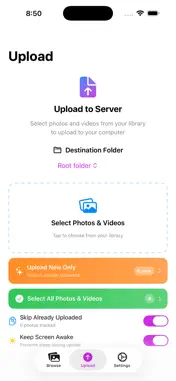
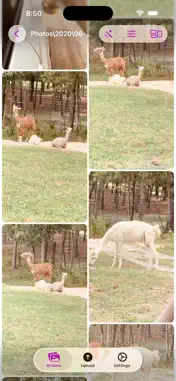
FREE SERVER — DOWNLOAD IT ON YOUR COMPUTER FIRST: • Windows: szakari.com/lumina/windows • Mac: szakari.com/lumina/mac • Linux: szakari.com/lumina/linux Setup steps for every system: szakari.com/lumina Lumina Gallery lets you browse, view, and upload photos & videos from your computer — right on your iPhone. Connect to your Mac, Windows PC, or Linux machine over your home Wi-Fi and enjoy your entire media collection with a beautiful, customizable gallery experience. BROWSE YOUR WAY • Waterfall, Grid, List, and Carousel view modes • Adjustable columns, sorting by name/date/size • Filter by photos only, videos only, or all • Search files instantly • Navigate folders and subfolders AI SMART ALBUMS • Powered by Apple Vision AI — 100% on-device, completely private • Automatically organizes photos into categories: Nature, People, Animals, Food, Architecture, and more • Face detection for Portraits, Friends, and Group Photos • Screenshot detection • Analyze any folder with one tap UPLOAD FROM PHONE • Upload photos and videos from your camera roll to your computer • Select all or upload new only — skips duplicates automatically • Pause, resume, or stop uploads anytime • Keeps screen awake during long uploads • Handles large videos with streaming upload FAMILY SHARING • Multiple family members can connect at the same time • Share connection via QR code — no typing needed • Built-in setup guide for every platform EASY SETUP • Step-by-step onboarding guide for Windows, Mac, and Linux • Free server for your computer: szakari.com/lumina • Works over your home Wi-Fi — your photos never leave your network SECURE & PRIVATE • All data stays on your local network • Access code protection • No cloud, no accounts, no subscriptions • AI runs entirely on your iPhone — nothing uploaded anywhere
What's New
Version 2.3 2026-10-11
• New app icon • The setup guide now starts with the server downloads for Windows, Mac and Linux — szakari.com/lumina — with steps for the new one-click install...• New app icon • The setup guide now starts with the server downloads for Windows, Mac and Linux — szakari.com/lumina — with steps for the new one-click installers • If you haven't opened the app for a month, the setup guide is shown again • Stronger security: once your computer is trusted, Lumina only ever talks to it over encrypted HTTPS, and the QR code now carries your server's certificate fingerprint for a secure first connection • Honest upload results: uploaded, skipped and failed are counted separately • Uploads retry automatically and pause after repeated problems instead of failing everything • RAW, TIFF and HEIC photos upload as originals; Live Photos include their video; edited videos upload with your edits • Folders with videos load much faster, and Save/Share keep your photos' original date and location • Smooth pinch-to-zoom in the viewer, waterfall layout no longer cuts off, files with & or + in their names now open • App Lock no longer interrupts a running upload Technical Analysis
Package Overview Basic metadata
Bundle ID
com.pictureviewer.app Current Version 2.3
Minimum iOS 17.0
Package Size App Store Size
Package Metadata 0 / 4 version records
Detailed binary, privacy manifest, framework, and Info.plist results have not been indexed for this package yet. The verified App Store and archive metadata above remains available.
Developer Information
Known Version Records
0 version records with stored package metadata • 4 known version records
Stored metadata does not guarantee a package is currently available to download.
| Details | Version / IDs | Version date | Action |
|---|---|---|---|
| Not archived | App Store ID: 887615149 | Unknown | Paid / Arcade |
| Not archived | App Store ID: 887558442 | Unknown | Paid / Arcade |
| Not archived | App Store ID: 885928704 | Unknown | Paid / Arcade |
| Not archived | App Store ID: 883729448 | Unknown | Paid / Arcade |