
Preview




Description
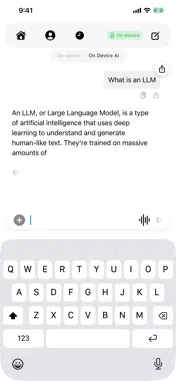
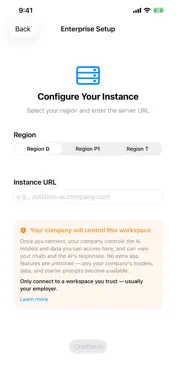
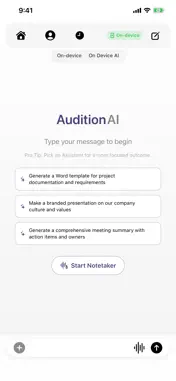
AuditionAI brings private, on-device AI to iPhone and iPad — plus your company's own AI workspace, when you need it. CHAT INSTANTLY FOR FREE, NO ACCOUNT NEEDED Open the app and start talking to AI right away. Local Mode downloads a compact, open model (Gemma 3) and runs it entirely on your device — no sign-in, no cloud, nothing ever leaves your phone. TALK BY VOICE Switch to voice chat and speak naturally. On-device speech recognition transcribes what you say, sends it to the assistant, and reads replies back aloud — with pause detection and barge-in so the conversation feels live. REALTIME NOTETAKER Record a meeting or voice memo and get an on-device transcript instantly. Save it as a note, then ask the assistant to summarize it, pull out action items, or write an executive recap. CONNECT YOUR COMPANY'S WORKSPACE If your organization runs AuditionAI, sign in with your Microsoft work account to reach the assistants, agents, and models your admin has configured — with your conversation history and enterprise data available wherever you are. PHOTO ATTACHMENTS (ENTERPRISE) In your company's cloud workspace, attach up to ten photos to a message. The assistant can look at what you share and respond with text, generated files, or generated images you can view full screen and save. YOUR DATA, YOUR RULES • Local Mode: chats, notes, and history never leave your device. • Enterprise Mode: messages go to your company's AuditionAI backend over HTTPS under your Microsoft sign-in — and your employer can review anything sent through that workspace. • No ads, no tracking, no third-party analytics, anywhere. ON-DEVICE MODELS Browse and download additional open models, manage storage, and pick the one that fits your device. Larger models need more RAM and storage — expect a Wi-Fi download of roughly 1 GB. Built for iOS 17+, with light and dark themes and a full iPad layout. Local Mode is free for everyone, no sign-in required. An Enterprise workspace is available if your employer runs AuditionAI, giving you access to the models, assistants, and data they've approved — while your Local Mode chats stay private to your device either way. AuditionAI is a product of Saberin Data Platform.
What's New
Version 1.2.2 2026-10-19
- Siri and Shortcuts. - Choose and download any on-device model right from the On Device AI sheet in chat. Switching to a downloaded model asks for confirmation...- Siri and Shortcuts. - Choose and download any on-device model right from the On Device AI sheet in chat. Switching to a downloaded model asks for confirmation first, and models you haven't downloaded yet can be downloaded in place. - The On Device AI card is friendlier and easier to understand, and "Tool Calls" is now called "Capabilities". - The "About Intelligence" explanation opens in a sheet so the full text is readable. - Settings cleanup: a System/Light/Dark theme picker, a correct app version, clearer rows and icons, and a more logical section order. The non-working Text Size row is gone. - Polished first-run landing, Enterprise Setup, and Home screens. - History search sits cleanly under the floating nav bar, hides the bar while searching, and has a Back button and left-edge swipe to leave search. - The floating nav bar no longer covers content on Settings, History, Home, and pushed screens. - Scan a QR code to set up the app: on the Enterprise Setup screen, tap "Scan QR code" and scan the code shown in the web app under Settings → Mobile → iOS Configuration. Your region and instance are filled in, and you can go straight to sign-in. - Automations: view your automations, pause or resume them, run one now, and browse run history (including each run's details and an option to open the resulting chat). Look for the new Automations button in the chat toolbar when automations are available for your account. - Personal Token Usage: a new "Usage" row in Profile shows your token usage and estimated cost with daily charts, preset date ranges, and breakdowns by model, persona, label, and source. - Session security: a new screen shows how you signed in and how each Conditional Access policy applied to your session. - Mermaid diagrams now render as images in chat messages. Tap one to open a full-screen viewer with pinch-to-zoom, copy the code, or save the image. - Branch a new chat from any message: use "Branch from here" in a message's context menu. - Sub-agent threads can be expanded to follow their work, both live and when you reopen a chat. - Reopened chats show a collapsed "Used N tools" row on assistant messages. Expand it to see tool calls, and open Supporting data from a tool row or the message menu. - When clipboard blocking is on and your organization allows the server clipboard, copy and paste inside the app work again through the server instead of being refused. - Labels and Thread Files moved from the chat Share menu to the + menu. Technical Analysis
Package Overview Basic metadata
Bundle ID
com.saberindataplatform.AuditionAI Current Version 1.2.2
Minimum iOS 17.0
Package Size App Store Size
Package Metadata 0 / 4 version records
Detailed binary, privacy manifest, framework, and Info.plist results have not been indexed for this package yet. The verified App Store and archive metadata above remains available.
Developer Information
Known Version Records
0 version records with stored package metadata • 4 known version records
Stored metadata does not guarantee a package is currently available to download.
| Details | Version / IDs | Version date | Action |
|---|---|---|---|
| Not archived | App Store ID: 888717993 | Unknown | Request Version |
| Not archived | App Store ID: 888661057 | Unknown | Request Version |
| Not archived | App Store ID: 888497088 | Unknown | Request Version |
| Not archived | App Store ID: 887652675 | Unknown | Request Version |