Preview



Description
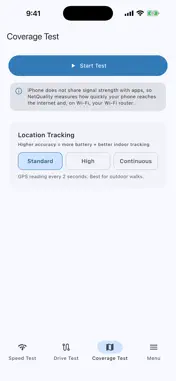
NetQuality measures how well your connection works and shows you where it is strong or weak. SPEED TEST Run a download, upload and latency test against a server you choose. NetQuality uses iperf3, a standard open-source network testing tool, and has public servers built in. Advanced settings let you change the test mode and length. On Wi-Fi it also checks how quickly your phone reaches your router. COVERAGE TEST Walk around and watch your connection quality update live. NetQuality measures how quickly your phone gets a response from the internet, so you can see where a place is good, fair or poor. Your route is drawn on a map, and you can view it in 3D. DRIVE TEST Survey a whole journey with your phone on the dashboard or in a holder. Record connection quality along your route, take a short speed test every 30 seconds, or stream video-rate data and log every stall. Each result is placed on the route. ROOM SURVEY Name a spot, walk around it, and see its best, current and worst moments as connection-quality grades. HISTORY Every test is saved on your phone with its route. Signing in with a NetQuality account is optional and syncs your results across your devices. GOOD TO KNOW • iPhone does not let apps read signal strength. NetQuality shows connection quality, speed and latency instead, and never shows dBm or signal bars. • A result is a measurement at one moment. It changes with the server you pick, the time of day, your network and your phone. Use it to compare places and times, not as a promise of what you will get. • Coverage Test and Drive Test need your location and work only while the app is open on screen. The screen stays awake, and the survey pauses if you leave the app or lock your phone. • Tests send real data over your connection. Streaming in Drive Test uses about 1.3 GB an hour. Check your mobile data allowance before you start. • Speed tests work without an account.
Technical Analysis
Package Overview Basic metadata
Bundle ID
ca.netquality Current Version 1.0
Minimum iOS 15.0
Package Size App Store Size
Package Metadata 0 / 0 version records
Detailed binary, privacy manifest, framework, and Info.plist results have not been indexed for this package yet. The verified App Store and archive metadata above remains available.
Developer Information
Known Version Records
0 version records with stored package metadata
Stored metadata does not guarantee a package is currently available to download.
| Details | Version / IDs | Version date | Action |
|---|