
Preview


Description
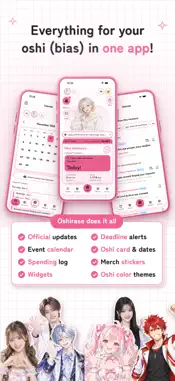
Oshirase is a fan app that gathers the “today” of your oshi (bias) in one place. ■ Oshirase Oshirase regularly collects new posts from your oshi's official YouTube, X, and website, and puts them all in one place. No more hopping between social apps: this one app is all you need to know your oshi's today. Ticket and merch deadlines go right at the top as “To-do today,” and you'll get a notification the day before and 3 hours before each deadline. Plans you add to the calendar also show up in To-do today and in your notifications. ■ Pick your oshi and add their official accounts in one go Choose your oshi from about 50,000 suggestions, including idols, VTubers, K-POP artists, voice actors, actors, and anime characters, and their verified official accounts are added all at once. If your oshi isn't listed, you can add them by pasting a URL. ■ Your oshi is the star of Home Choose a photo of your oshi, and the app cuts them out automatically so they pop out of the window on Home. You can adjust the size and position with your finger. Your oshi's membership card, the “oshi card,” shows how many days you've been a fan and how many days are left until their birthday or anniversaries. ■ Widgets Put your oshi's photo, day counts, countdowns, and To-do today on your Home Screen or Lock Screen. ■ Spending and collection Record what you spend on your oshi and see it by month or by oshi. Snap photos of your merch to turn them into stickers, and decorate boards with them. ■ Peace of mind Photos of your oshi are processed only on your device. We don't save your date of birth. ■ Plans (auto-renewing subscriptions) On the free plan, you can add up to 2 oshi, and updates arrive in a roundup twice a day, in the morning and evening. Watch an ad to the end to add a 3rd oshi for 7 days. The free plan shows ads in places such as the Oshirase list. Oshirase Plus (¥300/month or ¥2,400/year) lets you add up to 5 oshi. It has no ads, and you can remove the logo from images you export. Oshirase Premium (¥600/month or ¥4,800/year) lets you add as many oshi as you like. It checks for updates every 15 minutes and notifies you each time there's a new post. It has no ads, and you can remove the logo too. Payment is charged to your Apple ID. Your subscription renews automatically unless you cancel at least 24 hours before the end of the current period. You can cancel anytime in iPhone Settings → your name → Subscriptions. Terms of Use: https://appful-oshirase.web.app/terms.html (Japanese) Privacy Policy: https://appful-oshirase.web.app/privacy.html (Japanese)
What's New
Version 1.4.0 2026-11-15
Introducing Pairs! Pair up with a friend to show both of your oshi side by side on one home screen, and send each other stamps. With the new Oshi Fan Sheet, yo...Introducing Pairs! Pair up with a friend to show both of your oshi side by side on one home screen, and send each other stamps. With the new Oshi Fan Sheet, you can sum up your oshi's charms on one sheet and share it on social media. Make one from My Page. There's now a "My Page" tab at the bottom. Settings open from the gear at the top right of My Page. You can also now: ・Oshi Savings: keep track of money you've saved for your oshi ・Recurring Spending: automatically record monthly costs like fan club fees ・Choose light or dark mode for each oshi ・Lock the app ・Reorder boards in your Collection ・Choose up to 24 photos for widgets We fixed a bug where widget images and clocks turned black after updating, and made it easier to find your oshi in search. Technical Analysis
Package Overview Basic metadata
Bundle ID
appful.oshikatsu Current Version 1.4.0
Minimum iOS 18.0
Package Size App Store Size
Package Metadata 0 / 0 version records
Detailed binary, privacy manifest, framework, and Info.plist results have not been indexed for this package yet. The verified App Store and archive metadata above remains available.
Developer Information
Known Version Records
0 version records with stored package metadata
Stored metadata does not guarantee a package is currently available to download.
| Details | Version / IDs | Version date | Action |
|---|