
Preview



Description
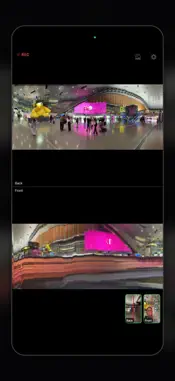
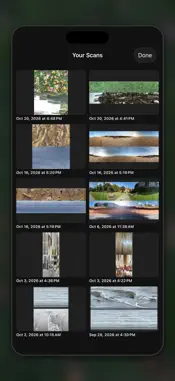
Surface Surfer scans with the iPhone's front and rear cameras at the same time. Glide the phone over a surface, as if surfing it, to collect the interesting surfaces and textures of the world. As you move your iPhone, it records as if carving an invisible mirror into the world along your path. Each side of the mirror shows the world it was facing. Just as the gradients on ocean waves mirror the sky on the other side, putting a surface next to what lies opposite it may reveal connections you don't usually see. It uses slit scanning: from the center of the camera image it takes a single thin line, frame after frame, and lines them up in time. Move your iPhone and the places you pass become one long image. Hold it still and the changes that happen in front of you become the image. Go explore the surfaces of the world. CAPTURE • Scan while you hold a volume button or Camera Control. Scans are saved to Photos automatically (or choose to be asked each time) • Real scale: each strip is as wide as the image actually moved (optical flow), so what you scan keeps close to its real proportions • Horizon lock keeps the slit upright to the world even when the phone tilts • Exposure and white balance lock at the start of a scan (or stay automatic) • Choose the back lens: Ultra Wide, Wide or Telephoto (the lenses available depend on your iPhone) • Back light while scanning, and a "front flash" that lights your face by turning the screen white • Records where you scanned (file name and photo location; can be turned off) VIEW • Solid: the strips are placed back into space using the phone's orientation and how far it actually moved. Walk around a tree to get a cylinder; turn on the spot or circle the phone around your face to get a curved panorama • Lenticular: tilt the phone and the back and front images switch through fine stripes, like a lenticular print. Keep tilting and they keep alternating. Pinch to zoom • Export as USDZ to open in Files, AR Quick Look or Preview on a Mac COLLECT • Saved to your photo library as PNG. Browse only the scans made with this app FREE No ads and no in-app purchases. Every feature is ready to use. Requires an iPhone that can use the back and front cameras at the same time.
What's New
Version 1.3 2026-10-28
• Surface Surfer is now completely free: no ads and no in-app purchases. USDZ export is available to everyone. Thank you to everyone who made an in-app purchase...• Surface Surfer is now completely free: no ads and no in-app purchases. USDZ export is available to everyone. Thank you to everyone who made an in-app purchase. • You can now choose the back camera lens: Ultra Wide, Wide or Telephoto (the lenses available depend on your iPhone). Tap the back camera view at the bottom right of the main screen to switch, or choose it under Camera in Settings. • The status display at the top left now shows the lens in use and its field of view. • The light button is now split in two: the back LED button is at the top right of the back camera side, and the front flash (which lights the screen white) is at the top right of the front camera side. Technical Analysis
Package Overview Basic metadata
Bundle ID
com.ryufurusawa.WorldSurface Current Version 1.3
Minimum iOS 26.0
Package Size App Store Size
Package Metadata 0 / 0 version records
Detailed binary, privacy manifest, framework, and Info.plist results have not been indexed for this package yet. The verified App Store and archive metadata above remains available.
Developer Information
Known Version Records
0 version records with stored package metadata
Stored metadata does not guarantee a package is currently available to download.
| Details | Version / IDs | Version date | Action |
|---|