Preview


Description
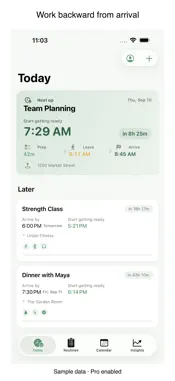
Leave on time without guessing. Prep Clock starts with your arrival time, works backward through travel and preparation, and tells you exactly when to begin. PLAN THE WHOLE DEPARTURE - Build reusable routines from real prep steps. - Add destination, travel mode, buffer, and arrival time. - See start-prep, leave, and arrive times together. - Run tasks step by step with per-task timing. - Recalculate when traffic or the plan changes. - Use Running Late mode to see an honest updated arrival estimate. LEARN YOUR REAL TIMING - Record how long tasks actually take. - Compare planned and observed duration ranges. - Apply adaptive estimates to future plans. - Generate upcoming events from recurring prep plans. FREE - Up to three upcoming events and three custom routines. - Core backward planning and commute calculation. PREP CLOCK PRO - Unlimited events and routines. - Recurring plans and adaptive timing. - Manually import selected Calendar events and attach a prep routine. No background calendar sync. - Running Late mode and additional travel modes. - Home Screen widgets and Lock Screen Live Activities. Calendar, location, and notification permissions are requested only when the related feature needs them. Schedule, task, and location details are not sent to an AI service. Subscriptions renew automatically unless canceled in your Apple ID settings. Restore an existing purchase from Settings > Restore Purchases. TERMS OF USE Product Terms of Use: https://www.uncommonweather.com/legal/apps/prepclock-terms.html Apple Standard Terms of Use (EULA): https://www.apple.com/legal/internet-services/itunes/dev/stdeula/
What's New
Version 1.0.12 2026-10-03
This update improves legal-consent reliability: - Keeps withdrawal choices durable if a saved receipt cannot be read or the app is interrupted. - Improves safe... Technical Analysis
Package Overview Basic metadata
Bundle ID
app.rork.prep-clock-backward-timer Current Version 1.0.12
Minimum iOS 18.0
Package Size App Store Size
Package Metadata 0 / 3 version records
Detailed binary, privacy manifest, framework, and Info.plist results have not been indexed for this package yet. The verified App Store and archive metadata above remains available.
Developer Information
Known Version Records
0 version records with stored package metadata • 3 known version records
Stored metadata does not guarantee a package is currently available to download.
| Details | Version / IDs | Version date | Action |
|---|---|---|---|
| Not archived | App Store ID: 886797123 | Unknown | Request Version |
| Not archived | App Store ID: 886621498 | Unknown | Request Version |
| Not archived | App Store ID: 883164122 | Unknown | Request Version |