Preview




Description
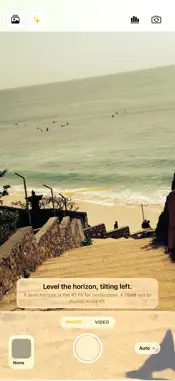
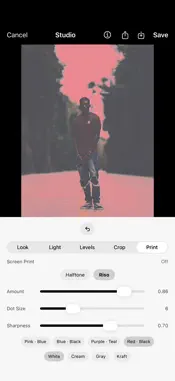
Your photos, honest. Microprism captures pure, unfiltered RAW: the scene as your lens actually saw it, with the heavy computational processing turned all the way down. No smoothing, no watercolor skies, no invisible "fixes." Just your shot. THE LOOK OF EARLY PHONE PHOTOS, DONE RIGHT Remember when phone pictures had character, with warm tones, real grain, a little glow and a soft vignette? Microprism brings back that early-smartphone, filtered-feed feeling with retro looks you apply on your terms: • Warm, faded color and moody high-contrast fades • True black & white, from crunchy and neutral to soft and cool • Cinematic and classic emulsion grades with real grain, bloom and halation Every look is drawn by hand, not borrowed. The retro looks soften detail on purpose, the way early phone photos did. The cinematic looks keep every pixel. A COACH THAT CATCHES IT BEFORE YOU SHOOT Turn on the coach and it watches the frame with you: closed eyes, a backlit face, a tilted horizon, a cut-off hand, a cluttered background, a shaky grip, even a smudged lens. It tells you what you can do right now (move, reframe, wipe the lens, wait for the light), and after the shot it can offer a quick note on what worked. It never edits your photo for you, and it only speaks up when you ask. SHOOT MORE, OVERTHINK LESS Not sure what to point at? Microprism sends you gentle creative prompts, little photo challenges like "shoot in black & white" or "find something green," to get you out and shooting. Tap one and the camera opens ready in a matching look. A REAL CAMERA UNDER THE HOOD • Full manual control over focus, exposure, ISO, shutter and zoom, plus aperture on iPhone 18 Pro • RAW capture, with optional Apple ProRAW • Full manual control over focus, exposure, ISO, shutter and zoom • Tap a face to lock focus and exposure on it • Live histogram, focus peaking and zebra stripes • Software long exposure for light trails and silky water • Video that records with your chosen look applied, live • Works with Camera Control, Shortcuts, widgets and Control Center STUDIO: YOUR SHOT, REDEVELOPED Come back to any RAW shot, or import one from Photos, and give it a new look anytime. Crop freely or to a classic ratio, straighten and fine-tune, or turn it into a screen-print halftone or a two-ink riso duotone on textured paper. Your original is never touched. Save to Photos or export to iCloud Drive when you're done. FREE TO START, YOURS TO UNLOCK Download free and start shooting: honest RAW capture, a set of sample looks, and the exposure coach are on the house. One simple, one-time unlock, never a subscription, opens the full look catalog, Studio, video, long exposure, and the full coach. YOURS, AND ONLY YOURS Microprism runs entirely on your device, coach included. No account, no sign-up, no tracking, nothing is collected. Your photos never leave your phone unless you choose to share them. Shoot honest. Finish with feeling.
What's New
Version 1.3 2026-10-30
• Crop freely in Studio: drag the corners and edges like in Photos, or lock the shape to 1:1, 4:5, 5:4, 16:9, 9:16 or the original. • iPhone 18 Pro: pick your ... Technical Analysis
Package Overview Basic metadata
Bundle ID
com.microprism.app Current Version 1.3
Minimum iOS 26.0
Package Size App Store Size
Package Metadata 0 / 0 version records
Detailed binary, privacy manifest, framework, and Info.plist results have not been indexed for this package yet. The verified App Store and archive metadata above remains available.
Developer Information
Known Version Records
0 version records with stored package metadata
Stored metadata does not guarantee a package is currently available to download.
| Details | Version / IDs | Version date | Action |
|---|