
Preview


Description
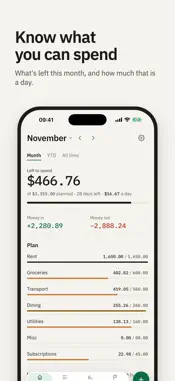
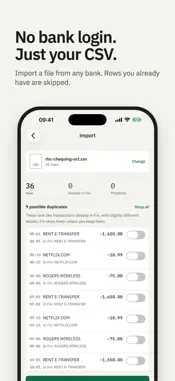
Fin tracks your income and expenses from your bank's CSV files. You never give Fin your bank login. Sign in with Apple, Google or your email. No password to remember. Built for self-employed and gig workers in Canada, Fin answers the question that matters most: how much can you still spend this month? LEFT TO SPEND Your Home screen opens on one number: what's left of your plan, with how much that is per day for the days left. Money in and money out sit underneath, and a bar for each category shows where you are. Swipe between months, or switch to the year so far or all time. SEE WHAT REPEATS Fin finds the recurring charges in your history, like subscriptions, phone and rent, and shows what they cost each month and each year. Fin Pro adds price changes, payments that may have stopped, how each category compares with your usual, and where the month is heading. IMPORT YOUR BANK'S CSV Download a CSV from your bank and choose it in Fin, or share it to Fin from Files or Mail. Fin finds the date, description and amount columns on its own, recognises credit card statements, and shows you what it will add before anything is saved. Exact repeats are skipped, and rows that look like ones you already have wait for you to decide, so importing the same file twice is safe. The categories you choose are remembered for each store and filled in next time. A LEDGER YOU CAN READ Every transaction, grouped by day, with each day's total. Search, filter money in or out, add a transaction with Fin's keypad, and swipe to delete. Switch to a whole year, and export a month or a year to CSV. Amounts show in the currency you choose. PLANS AND GOALS Plan each month by category and start next month from this one. Set goals for things you're saving toward and see whether this month's plan can cover them. FREE, OR BUY PRO ONCE Tracking, monthly summaries, the recurring charges Fin finds, CSV import and export, a budget plan for each month and one active goal are free, with no limit on how many transactions you keep. Fin Pro is a one-time purchase, not a subscription: deeper insights, unlimited plans and goals and recurring transactions, free category suggestions for up to 5,000 descriptions a month, plus 30 Fin Credits every month. PRIVATE BY DEFAULT Hide amounts shows •••• until you tap a number. App lock asks for Face ID, Touch ID or your passcode. Your data isn't sold. ASK FIN Ask questions like "How much did I spend on fuel last month?" and get answers from your own transactions. Fin can also suggest categories for the rows in an import. Both are optional, and Fin asks before sending anything to OpenAI. They use Fin Credits: every account starts with 20, a question costs 1, and category suggestions cost 1 credit per 100 different descriptions, or nothing with Fin Pro up to 5,000 a month. Packs of 100 are available in the app, with or without Pro, and credits don't expire. Pro is a one-time purchase; Ask Fin and category suggestions use credits, sold separately. Fin is free. Everything except Ask Fin and category suggestions works without paying. Fin is for information only and isn't financial, tax or legal advice.
What's New
Version 1.0.2 2026-11-08
- You can now buy Fin Pro and Fin Credits in the app. - Better imports for US and Canadian banks, including Chase, Bank of America, Wells Fargo, Capital One, Ci...- You can now buy Fin Pro and Fin Credits in the app. - Better imports for US and Canadian banks, including Chase, Bank of America, Wells Fargo, Capital One, Citi, BMO, Scotiabank and Rogers. Technical Analysis
Package Overview Basic metadata
Bundle ID
com.usefinapp.fin Current Version 1.0.2
Minimum iOS 16.4
Package Size App Store Size
Package Metadata 0 / 0 version records
Detailed binary, privacy manifest, framework, and Info.plist results have not been indexed for this package yet. The verified App Store and archive metadata above remains available.
Developer Information
Known Version Records
0 version records with stored package metadata
Stored metadata does not guarantee a package is currently available to download.
| Details | Version / IDs | Version date | Action |
|---|