
Preview










Description
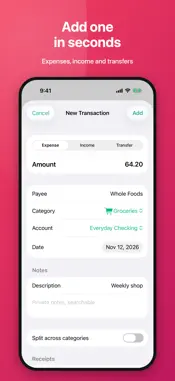
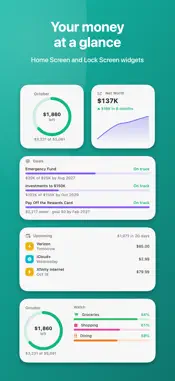
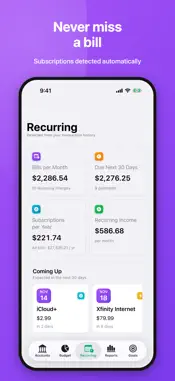
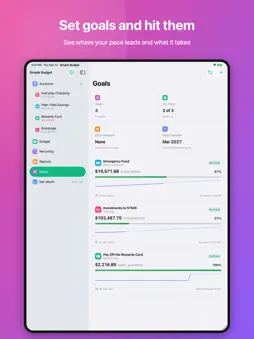
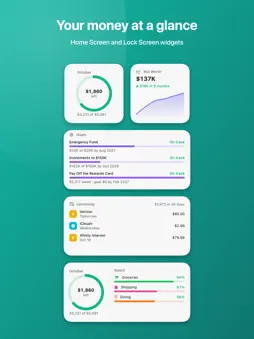
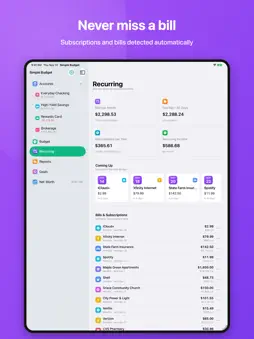
Simple Budget is the calm, private way to see where your money goes and plan where it should go next. Add your accounts, set a monthly budget, and Simple Budget does the rest: it sorts every transaction, tracks each category against its budget, spots your bills and subscriptions, and shows how your net worth grows over time. Everything stays on your devices and syncs through your own iCloud. There's no sign-up, no ads and no tracking. BUDGETS THAT KEEP UP WITH YOU • Budget month by month. Changing a budget never rewrites the past • Organize with sub-categories, like Coffee and Restaurants under Dining • Start from suggested budgets based on your recent spending • Roll unspent money into next month for irregular costs like travel, gifts or repairs • Split a single purchase across several categories • Get an alert when a category nears or passes its budget, even when the app is closed EVERY ACCOUNT IN ONE PLACE • Checking, savings, credit cards, loans, mortgages, cash, investments and property • On iPad, a sortable transaction table with running balances • Bring in Apple Card, Apple Cash and Savings straight from Apple Wallet, going back as far as you choose • Add transactions by hand, import CSV, QFX or QIF files, or import automatically from your own SimpleFIN Bridge account • Moving from another app? Bring your history and categories with you • Duplicates are skipped on import, and Find Duplicates merges the rest • Bank descriptions become clean payee names, and each payee's category is remembered • Create rules to rename and categorize payees automatically • Add transfers between accounts in one step; they never count as spending • Undo a delete, category change or bulk edit • Amounts in your own currency • Reconcile accounts with your statements, down to the penny SEE EXACTLY WHERE IT WENT • Monthly and yearly reports by category or payee, with interactive charts • Tap any category to see the transactions behind it • Cash flow: income vs. spending and your savings rate, month by month • Export any report as a PDF with its charts, or as a CSV NEVER MISS A BILL • Recurring bills, subscriptions and paychecks are detected automatically • See what's due in the next 30 days, with a reminder before each bill SET GOALS AND HIT THEM • Give any account a target and a date, like $25,000 saved by next summer • See where your pace leads and how much more each month gets you there WATCH YOUR NET WORTH GROW • Net Worth: your total, how it's changed, what you own and owe, and where you're heading • Track holdings, allocation and gains, with optional live prices from your own free Twelve Data key • Track your home's value and your equity against the mortgage • See your mortgage payoff date and what extra payments would save RECEIPTS, SCANNED • Scan a paper receipt with your camera or attach a photo or PDF to any transaction ASK YOUR BUDGET • Ask questions in plain English, like "How much did I spend on dining this month?", answered on device by Apple Intelligence • Ask Siri what's left in your budget or what you spent at a store, or add a transaction hands-free WIDGETS • Left to spend, upcoming bills, net worth and goals on your Home Screen and Lock Screen PRIVATE BY DESIGN • Your data lives on your devices and in your own private iCloud database • No account to create, and the developer never sees your information • Lock the app with Face ID • Automatic sync between iPhone, iPad and Mac, plus backups you control FREE TO TRY Simple Budget is free to download and use with up to 10 transactions per account. A one-time purchase of Simple Budget Unlimited removes the limit on all your devices, with no subscription. Notes: Asking questions requires Apple Intelligence. Apple Wallet import works on iPhone where Apple Card, Apple Cash or Savings are available. Importing from SimpleFIN Bridge requires your own SimpleFIN Bridge account, a separate service. Live stock prices require your own Twelve Data API key.
What's New
Version 1.5 2026-11-13
• Undo: deleted a transaction or changed a category by mistake? Tap Undo. It works for bulk edits too. • Transfers in one step: choose Transfer when you add a ...• Undo: deleted a transaction or changed a category by mistake? Tap Undo. It works for bulk edits too. • Transfers in one step: choose Transfer when you add a transaction and pick the two accounts. • Your own currency: amounts now appear in your device's currency, or choose one in Settings. • A new transaction form on iPhone: the amount comes first, every field is labeled, and Cancel and Add stay above the keyboard. • A number pad for every amount. • More transactions fit on the screen, with the account's name at the top. • Recurring: tap ••• on anything that isn't really a bill to hide it. • Steadier bank imports with SimpleFIN Bridge: a charge that posts for a different amount than it was pending for (a tip, a gas hold) is updated; a transaction you delete stays deleted; an account you renamed keeps its name after you reconnect your bank; and an account shows a warning when your bank needs you to sign in again. • Files from outside the US import correctly: dates written day first and amounts with a decimal comma are recognized, and you can correct either before importing. • Goals whose account was removed can be moved to another account or deleted. • Fixes: default categories no longer come back on a new device. Changing a transfer's amount or date updates both sides. Two subscriptions from the same company are both found. Text that isn't a number in a budget field no longer clears the budget. Technical Analysis
Package Overview Basic metadata
Bundle ID
com.ryanegli.SimpleBudget Current Version 1.5
Minimum iOS 18.0
Package Size App Store Size
Package Metadata 0 / 0 version records
Detailed binary, privacy manifest, framework, and Info.plist results have not been indexed for this package yet. The verified App Store and archive metadata above remains available.
Developer Information
Known Version Records
0 version records with stored package metadata
Stored metadata does not guarantee a package is currently available to download.
| Details | Version / IDs | Version date | Action |
|---|