
Preview






Description
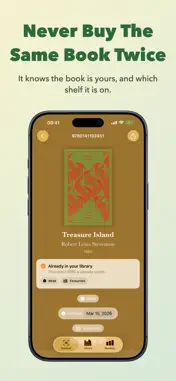
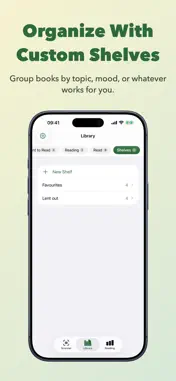
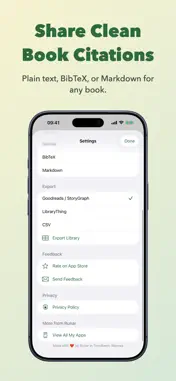
Scan the books you own, build your personal library in seconds, and never accidentally buy the same book twice. A friend of mine keeps a shelf of books behind her sofa, most of them titles I had never come across. Last summer I went through the whole shelf with my phone, scanning one spine after another until every book was saved to my library. That is the app in one sentence: the fastest way I have found to get books into a list I actually keep. Point the camera at the barcode on the back of a book and the app reads the ISBN, then looks it up in Open Library, Google Books, Apple Books and more at the same time. The title, author and cover usually appear within a second or two, even for older or obscure titles. SHELF CHECK In a bookshop, holding a book you think you might already own, turn on Shelf Check and scan it without adding anything to your library. The app tells you whether that exact ISBN is saved, and whether the same title and author sit on a shelf in another edition. It also shows your history with the author: books you own, books read, and the average rating you gave them. Save it with one tap if you want it, or leave the screen and the library is untouched. The edition warning shows up on ordinary scans too, so a duplicate does not slip in unnoticed. YOUR LIBRARY Every book you scan lands in your library. Mark each one as Read, Currently Reading, or Want to Read, and sort them onto shelves you make yourself. I keep one shelf for the books I lend out and would like to see again. BATCH SCANNING When you have a whole shelf to get through, turn on batch mode and scan without stopping between books. The app keeps a running count and lets you look over everything once you are done. This is the mode I reach for when cataloguing a bookcase or a stack from the library. RATE & REMEMBER When you finish a book, give it a rating from one to five stars and write down what you thought while it is still fresh. I use the notes for the small things I would otherwise forget: who recommended it, who I want to lend it to, the line I underlined. Ratings and notes stay private, and they come along when you export. YOUR READING YEAR Set a goal for the year and watch the ring fill as you finish each book. A dedicated tab turns your library into a picture of the year: books read, your average rating, the author you come back to most, whether you are keeping pace, and a chart of every month. I set mine in January and check it more often than I should admit. Setting a goal is free. The full set of insights comes with Premium. EXPORT Your library does not have to stay in the app. Export the whole collection to Goodreads, The StoryGraph, LibraryThing, or a plain CSV file, or share a single book's citation as plain text, BibTeX or Markdown. The citation formats are there for students, researchers, and anyone who keeps a reference list. BUY WHERE YOU LIKE Open any scanned book in Apple Books, Amazon or Bookshop.org and buy it there. That link, from a book in your hand to the edition you want, is the reason I first built the app, back when I mostly wanted the ebook of whatever I found in a shop. Amazon links cover stores in 20 countries, and Premium lets you set the one you shop with. GO PREMIUM The first 10 books and your first shelf are free, with every book source available. So are reading goals and Shelf Check. Premium removes the limits, unlocks batch scanning, ratings and notes, the full reading insights, removes ads, and lets you set the Amazon store you prefer. • Shelf Check spots duplicates and other editions without saving • Batch scan whole shelves, then add reading status, ratings, and private notes • Set a reading goal and follow your year month by month • Export your library or open a book in the store you prefer • Go Premium for unlimited books and shelves, full insights, and no ads
What's New
Version 2026.9 2026-10-23
- The library opens again for anyone who updated straight from version 2026.3 or older. Your books, shelves and notes were never touched, and this update brings... Technical Analysis
Package Overview Package analysis available
Bundle ID
com.hjerpbakk.bookscanner Current Version 2026.9
Minimum iOS 26.2
Package Size App Store Size
Package Metadata 3 / 18 version records
FBLPromises
org.cocoapods.FBLPromises v1.2.10iOS 8.0+201.3 KB
GoogleAPIClientForREST
org.cocoapods.GoogleAPIClientForREST v1.4.3iOS 8.0+1.16 MB
GoogleToolboxForMac
org.cocoapods.GoogleToolboxForMac v2.2.2iOS 8.0+171.73 KB
GoogleUtilities
org.cocoapods.GoogleUtilities v6.7.2iOS 8.0+295.65 KB
GTMSessionFetcher
org.cocoapods.GTMSessionFetcher v1.4.0iOS 8.0+368.4 KB
leveldb
org.cocoapods.leveldb v1.22.0iOS 8.0+416.37 KB
Mono
xamarin.ios.mono-framework v1.0iOS 8.0+2.98 MB
nanopb
org.cocoapods.nanopb v1.30906.0iOS 8.0+134.32 KB
Protobuf
org.cocoapods.Protobuf v3.13.0iOS 8.0+1.01 MB
Xamarin
xamarin.ios.xamarin-framework v1.0iOS 8.0+428.16 KB
Xamarin.Sdk
com.hjerpbakk.bookscannerXamarin v1.0iOS 12.0+18.94 MB
1.0 / 5.0 (1 ratings)
Developer Information
Known Version Records
3 version records with stored package metadata • 18 known version records
Stored metadata does not guarantee a package is currently available to download.
| Details | Version / IDs | Version date | Action |
|---|---|---|---|
 12.11 MB | v2026.5 App Store ID: 887672834Build: 2026.5 | 2026-08-18 01:16:49 | Get Version |
| 6.08 MB | v2026.2 App Store ID: 883655782Build: 1 | 2026-04-04 11:18:42 | Get Version |
 30.39 MB | v2021.1 App Store ID: 841761040Build: 4 | 2021-04-28 00:17:24 | Get Version |
| Not archived | App Store ID: 834500434 | Unknown | Request Version |
| Not archived | App Store ID: 829962084 | Unknown | Request Version |
| Not archived | App Store ID: 811744775 | Unknown | Request Version |
| Not archived | App Store ID: 811655069 | Unknown | Request Version |
| Not archived | App Store ID: 811534304 | Unknown | Request Version |
| Not archived | App Store ID: 811013235 | Unknown | Request Version |
| Not archived | App Store ID: 810813514 | Unknown | Request Version |
| Not archived | App Store ID: 614273341 | Unknown | Request Version |
| Not archived | App Store ID: 606702684 | Unknown | Request Version |
| Not archived | App Store ID: 578159038 | Unknown | Request Version |
| Not archived | App Store ID: 556442673 | Unknown | Request Version |
| Not archived | App Store ID: 485902640 | Unknown | Request Version |
| Not archived | App Store ID: 467152636 | Unknown | Request Version |
| Not archived | App Store ID: 415812662 | Unknown | Request Version |
| Not archived | App Store ID: 358302646 | Unknown | Request Version |