
Preview






Description
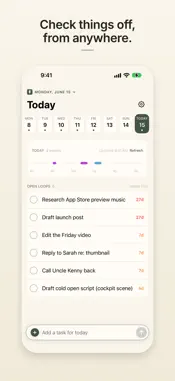
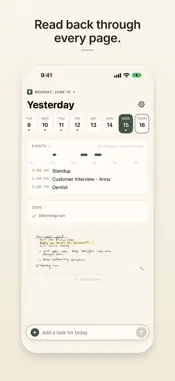
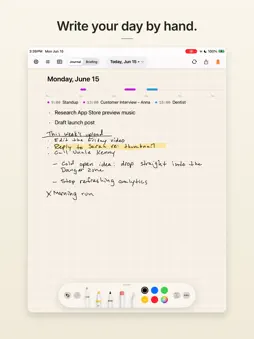
Write a task by hand. Watch it show up in Notion. Penlog is a handwritten daily journal. You write with Apple Pencil on iPad. On iPhone you see today, add and check off tasks, and read every page. Every day gets its own page, so there is nothing to name, nothing to file, and no folder to choose. You write. Your other apps update themselves. Rick Thomas, a solo founder in Indianapolis, builds Penlog for people who think in ink. TWO-WAY TASK SYNC WITH NOTION A task you write by hand becomes a real task in your Notion tasks database. Cross it off with Apple Pencil, or tap it on iPhone, and it completes in Notion. Complete it in Notion and it shows as done on your page. Task status moves in both directions automatically. There is no export step and no copying and pasting. NOTATION READING Penlog reads your notation, not only your words. A bullet is a task. A dash is a note. An X means done. An underline makes a heading. Your page arrives sorted into tasks and notes instead of a wall of transcribed text. Penlog reads a page after you stop writing, not while you write. It waits for a finished thought rather than reacting to a half-formed stroke. CARRY-FORWARD An open task stays with you. If you do not finish it today, Penlog carries it forward to tomorrow's page, and to the day after, until you cross it off. Nothing gets lost because you turned the page. THE MORNING BRIEFING Connect Notion, your calendar, Claude, or ChatGPT. Penlog places today's events and open tasks on your page before you open it. That is the Morning Briefing. You can edit or hide anything in it before you start writing. SEEDING FROM AN AI ASSISTANT Ask Claude or ChatGPT to put something on tomorrow's page and it is waiting when you sit down. Penlog calls this seeding. It works in the other direction too, because an assistant can read the page you wrote by hand. FOR AGENTS, SCRIPTS, AND DEVELOPERS Every page is available through a REST API. Penlog also runs a Model Context Protocol server, usually written MCP, so any assistant that supports MCP can read your page and write to it the same way it reads your calendar. Penlog is listed in the Notion Integration Gallery and in the official MCP Registry. WHAT IS FREE AND WHAT NEEDS PRO The journal is free. You can write every day, have your notation read into tasks and notes, carry unfinished tasks forward, and export your pages without a subscription. Penlog Pro adds the destinations, and you can try it free for 14 days. Two-way Notion sync, calendar import, the REST API, and the MCP server require Pro. Pro also removes the daily limit on handwriting reads that applies to free accounts. WHAT PENLOG IS NOT Penlog does not replace Notion and it does not ask you to move your tasks somewhere new. If you keep tasks in Notion and write by hand on iPad, you are doing both today and reconciling them yourself. Penlog is the part in between. FROM A FIVE-STAR REVIEW sleepypeach wrote: "I loved notion but really struggle to refer to it on a daily basis... Written systems worked better but didn't allow me to plan long term. Penlog has been the perfect solution to my workflow issues." PRIVACY AND SECURITY Penlog encrypts all network traffic in transit with TLS. You can delete your account in Settings, which permanently removes your data from Penlog's servers. Writing needs an iPad and Apple Pencil. SUBSCRIPTION AND PURCHASE TERMS Penlog Pro is an auto-renewable subscription, offered monthly or annually. Eligible new subscribers get a 14-day free trial. Payment is charged to your Apple Account when the trial ends, or when you confirm the purchase if there is no trial. The subscription renews automatically unless you turn off auto-renew at least 24 hours before the current period ends, and renewal is charged within 24 hours of the end of that period. You can manage or cancel your subscription in your Apple Account settings. Terms of Use (EULA): https://penlog.app/terms/ Privacy Policy: https://penlog.app/privacy/
What's New
Version 1.3.5 2026-11-02
Fixed a red "Notion sync failed" message that showed up for people who have not connected Notion. It now appears only when a sync to Notion really fails. Technical Analysis
Package Overview Basic metadata
Bundle ID
com.richardthomas.inkFlow Current Version 1.3.5
Minimum iOS 18.0
Package Size App Store Size
Package Metadata 2 / 21 version records
Detailed binary, privacy manifest, framework, and Info.plist results have not been indexed for this package yet. The verified App Store and archive metadata above remains available.
Developer Information
Known Version Records
2 version records with stored package metadata • 21 known version records
Stored metadata does not guarantee a package is currently available to download.
| Details | Version / IDs | Version date | Action |
|---|---|---|---|
| Not archived | App Store ID: 891438986 | Unknown | Request Version |
| 7.59 MB | v1.2.18 App Store ID: 891169776Build: 1.2.18 | 2026-09-16 17:38:48 | Get Version |
| Not archived | App Store ID: 891104510 | Unknown | Request Version |
| Not archived | App Store ID: 891042272 | Unknown | Request Version |
| Not archived | App Store ID: 890840370 | Unknown | Request Version |
| Not archived | App Store ID: 890654450 | Unknown | Request Version |
| Not archived | App Store ID: 890286064 | Unknown | Request Version |
| Not archived | App Store ID: 890193079 | Unknown | Request Version |
| Not archived | App Store ID: 889667746 | Unknown | Request Version |
| Not archived | App Store ID: 889578177 | Unknown | Request Version |
| Not archived | App Store ID: 889137715 | Unknown | Request Version |
| Not archived | App Store ID: 889037253 | Unknown | Request Version |
| Not archived | App Store ID: 888604862 | Unknown | Request Version |
| 7.63 MB | v1.2.17 App Store ID: 888162715Build: 1.2.17 | 2026-09-11 18:27:55 | Get Version |
| Not archived | App Store ID: 887924076 | Unknown | Request Version |
| Not archived | App Store ID: 887415000 | Unknown | Request Version |
| Not archived | App Store ID: 887291007 | Unknown | Request Version |
| Not archived | App Store ID: 887204356 | Unknown | Request Version |
| Not archived | App Store ID: 887010445 | Unknown | Request Version |
| Not archived | App Store ID: 886852705 | Unknown | Request Version |
| Not archived | App Store ID: 885158848 | Unknown | Request Version |