
Preview





Description
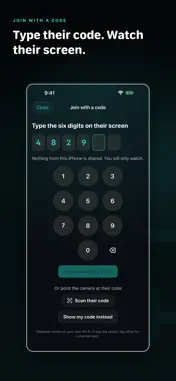
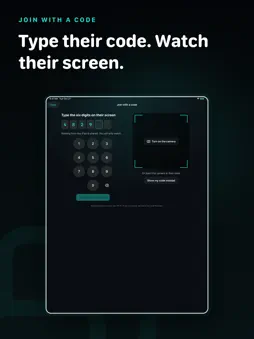
Peekside puts one screen on another screen, over your own Wi-Fi. An iPhone, iPad, or Mac can send. An iPhone, iPad, or Mac can watch. Every pairing works, so a phone can mirror to another phone just as easily as to a Mac. Nothing is uploaded. There is no server in the middle, no account to create, and no sign-in. The picture goes straight from one device to the other and stops there. Pair once, then tap a device and pick what you want: send your screen, watch theirs, or read their captions. Nothing starts until the other person allows it on their device. FREE CORE * No watermark * No session time limit imposed by Peekside * One watcher at a time * App audio with the live picture * Adaptive quality for changing Wi-Fi conditions * A connection HUD with latency and bitrate * Automatic reconnection after brief network changes PEEKSIDE PRO, ONE-TIME PURCHASE * Live Text, copy text straight out of the moving picture * Instant Replay, rewind the last 60 seconds without recording * Follow-zoom, keep the busy part of the screen framed * Annotation, draw on the feed with pen, highlighter, and arrows * Recording, save the feed and your annotations as a movie * Higher resolution when the link can carry it * Guidance, point and draw on the other screen to walk someone through something * Companion Cue, type a line that appears along the bottom of their screen * Audio Mute, silence the mirrored sound on your device while the picture keeps playing * Presentation mode, a clean full-screen feed with the controls hidden * Kids Mode, hand your child a device that shows only what you share, until you end it with a PIN HONEST LIMITS Peekside is view-only. The watching device cannot tap, type, or drive the device it is watching. An iPhone or iPad sends its screen or its captions, one or the other, not both in the same session. A Mac can send both at once. Protected video appears black. That is the operating system blocking capture, and Peekside does not work around it. Sharing stops when the sharer's iPhone or iPad locks, and there it always starts through Apple's own picker. Kids Mode keeps a child in Peekside only when a grown-up turns on Apple's Guided Access on that device. Peekside cannot lock a device by itself. Kids Mode never shows you the child's screen, and it works with one device at a time. Peekside needs two devices on the same Wi-Fi network. It does not work over the internet, by design. Some features need Peekside Pro.
What's New
Version 1.1 2026-11-01
Peekside Pro adds Kids Mode. Start it from your Mac or iPhone, hand your child their iPad, and it shows only what you share. A PIN you choose on their iPad ends... Technical Analysis
Package Overview Basic metadata
Bundle ID
com.roxykovu.peekside Current Version 1.1
Minimum iOS 17.0
Package Size App Store Size
Package Metadata 0 / 0 version records
Detailed binary, privacy manifest, framework, and Info.plist results have not been indexed for this package yet. The verified App Store and archive metadata above remains available.
Developer Information
Known Version Records
0 version records with stored package metadata
Stored metadata does not guarantee a package is currently available to download.
| Details | Version / IDs | Version date | Action |
|---|