
Preview





Description
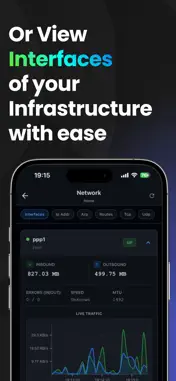
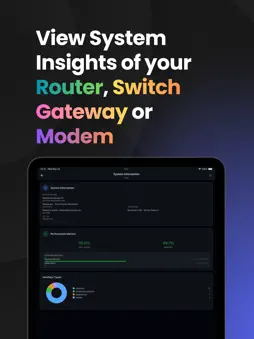
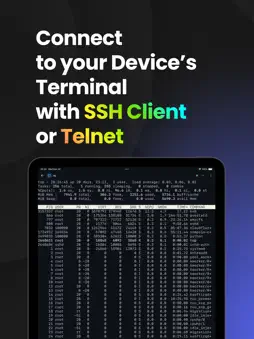
xInfra is the ultimate SNMP Network Monitor and SSH/Telnet Client for iOS. Designed for Network Engineers, System Administrators, and DevOps professionals who need to visualize their infrastructure health and troubleshoot issues instantly from their pocket. Whether you are monitoring switch ports, checking router uptime, or managing Linux servers, xInfra puts professional network tools at your fingertips. Key Features: • Advanced SNMP Monitoring xInfra provides a comprehensive SNMP manager with dedicated views for critical device data. System: Instantly view vital device information including System Description, Uptime, Contact, and Location. Verify device identity and running software versions at a glance. Interfaces Tab: Monitor the status of all network interfaces. View Admin/Oper status, In/Out traffic counters, errors, and physical addresses (MAC). Identify bandwidth bottlenecks or disconnected ports immediately. Walk: Explore the full SNMP MIB tree of your device. Perform an SNMP Walk to discover available OIDs and inspect configuration values that aren't exposed in standard views. GET/SET: A powerful OID testing tool. specific OIDs to retrieve custom data points or use SNMP SET to modify device configurations (Write access required). Includes a built-in MIB Dictionary to resolve OIDs to human-readable names. • Professional SSH & Telnet Client Desktop-Class Terminal: A robust emulator supporting ANSI colors, UTF-8, and special keys. Perfect for vim, htop, screen, and tmux. Secure Shell (SSH v2): Secure remote access with support for modern encryption algorithms. Legacy Support: Full Telnet client for managing legacy network equipment. Customization: Choose professional fonts (JetBrains Mono, Fira Code, Menlo) and switch between Dark and Light themes. Virtual Keypad: Quick access to ESC, CTRL, ALT, TAB, Arrow keys, and Function keys. Inventory Management Device Organizer: Group devices by type (Router, Switch, Firewall, Server, Modem). Seamless Sync: (Premium) Sync your device inventory across all your iOS devices using encrypted iCloud storage. Local Encryption: Credentials are stored exclusively on your device using iOS Keychain encryption. Privacy First: No tracking, no analytics, no external servers. Direct connection to your infrastructure. Biometric Security: Lock the app with FaceID or TouchID. • Supported Protocols SNMP: v1, v2c, v3 SSH Telnet • Why xInfra? xInfra is optimized for mobile troubleshooting, check an interface status via SNMP, then jump into an SSH session to fix it. It is the perfect mobile companion for tools like SolarWinds, PRTG, or Nagios users who need mobile access. • xInfra Pro (In-App Purchase) Full SNMP Set support to configure devices remotely. Securely backup and sync your devices across all your Apple devices. Run multiple concurrent SSH/Telnet sessions. Support for Jump Hosts and SOCKS5 Proxies. Import your own MIB files for specialized device support. Download xInfra today and take control of your network infrastructure! Terms of Use: https://www.apple.com/legal/internet-services/itunes/dev/stdeula/ Privacy Policy: https://xinfra.routecore.io/privacy Note: This app is a professional network management client. To use this application, you must have administration access to your own existing network infrastructure (such as Servers, Routers, Switches, or IoT devices) that support SNMP, SSH, or Telnet protocols. This app acts as a secure client to connect to your devices; it does not provide any cloud servers, VPNs, or managed infrastructure services.
Technical Analysis
Package Overview Basic metadata
Bundle ID
io.routecore.xinfra Current Version 1.0.0
Minimum iOS 15.1
Package Size App Store Size
Package Metadata 1 / 1 version records
Detailed binary, privacy manifest, framework, and Info.plist results have not been indexed for this package yet. The verified App Store and archive metadata above remains available.
Known Version Records
1 version record with stored package metadata
Stored metadata does not guarantee a package is currently available to download.
| Details | Version / IDs | Version date | Action |
|---|---|---|---|
| 40.56 MB | v1.0.0 App Store ID: 880660380Build: 1.0.0 | 2025-12-30 01:41:53 | Get Version |