
Preview









Description
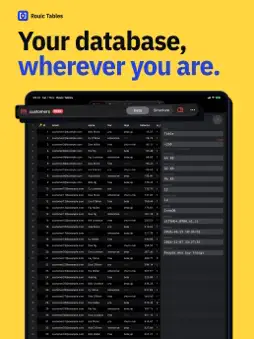
Rouic Tables is a database client for the moment something needs fixing and your laptop is not there, built so that fixing it cannot make things worse. It connects straight from your device to MySQL, MariaDB, PostgreSQL, CockroachDB, SQLite and Redis, over verified TLS or through an SSH tunnel. There is no account, no server in the middle and no analytics. HARD TO BREAK BY ACCIDENT • Production connections open read-only, in the app and on the server session itself. Unlocking takes Face ID or Touch ID, lasts ten minutes, and locks itself again. • Edits are staged, never sent. Changing a cell changes nothing until you choose to review. • You read the SQL first: every change is shown as the exact statements that will run, with a warning for anything that touches a whole table. • Confirmation scales with the risk: a tap, a slide, or typing the table's name. • Row edits commit in one transaction and roll back if a row changed underneath you. • Undo a committed change from History, put back only where nothing has changed since. SECURE BY CONSTRUCTION • TLS can be required and verified against your own CA, with client certificates. "Required" never falls back to plain text. • SSH tunnels pin the server's host key the first time and refuse a different one after. • Generate an SSH key inside the Secure Enclave, where it cannot be copied off the device. • Passwords, certificates and keys live in the Keychain. Turn on iCloud sync and they reach your iPad and Mac through iCloud Keychain, encrypted end to end. THE TOOLS YOU REACH FOR • A fast grid with pinned headers, sorting, and filter rules you can switch on and off. • Tabs: every table you open keeps its own filters, sort, page and place, and one table can be open in several tabs. • A query editor with completion, history and saved queries. • Find a table, or a column in any table, across hundreds of tables. • Follow a key to the row it points at, or see every row that points here. • Search inside tables: look for a value across every table at once, with regular expressions and ready-made patterns for emails, UUIDs and more, on a read-only connection of its own. • With Apple Intelligence: SQL suggested as you write, written from a description, and explained, all on your device. It sees your tables' names, never your rows, and nothing runs until you run it. • See what the server is doing, and cancel or kill a runaway query. • Create and rename tables; add, change and drop columns, indexes and keys. • A diagram of how tables join, and a board of cards that each run a query, as widgets on your Home Screen and in Shortcuts. • Compare two databases and write the change that makes one match the other. • Copy and paste between the grid and your spreadsheet, both ways. A paste is reviewed like any edit. • Import CSV; export a page or every row as CSV, JSON, SQL and more. • Back up tables to a SQL file and restore from one. • Manage accounts and privileges. • Table lists, structures and the pages you had open are kept, encrypted, for when there is no signal. BRING YOUR CONNECTIONS • Bring them from DBeaver, DataGrip, Sequel Ace, MySQL Workbench, pgAdmin, Navicat, Beekeeper Studio or TablePlus. • Paste a connection string from Neon, Supabase, PlanetScale, RDS, Azure and others. • Move everything between devices in one encrypted file. ON THE MAC TOO One purchase covers iPhone, iPad and Mac. On the Mac it is laid out like a desktop database client, with several databases open at once. AT HOME ON IPHONE DUO Closed, navigation sits in a rail and the rest is your data. Open, the inner display becomes two pages: the table list beside the table, then the table beside the row you are editing. Rouic Tables is made by Rouic Ltd in the UK.
What's New
Version 1.4 2026-11-10
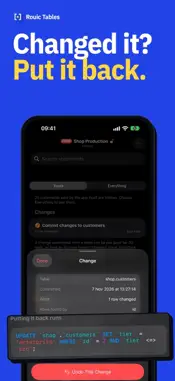
Follow a key to its row, undo a change you've made, and bring your connections from other apps. • Follow keys: tap a key's value to open the row it points at, ...Follow a key to its row, undo a change you've made, and bring your connections from other apps. • Follow keys: tap a key's value to open the row it points at, or ask for the rows that point here, with how many in each table. Keys over several columns and across schemas too. • Undo a change: History keeps the changes you commit from the grid. Undo This Change shows the SQL that puts the rows back, and stops if a row has changed since. • Bring your connections across from DBeaver, DataGrip, Sequel Ace, MySQL Workbench, pgAdmin, Navicat, Beekeeper Studio and TablePlus. Choose their file, tick what you want, and type any password they didn't hand over. • Compare two databases, staging and production say, and write the change that makes one match the other. It is reviewed, and runs on the one you chose only. • Board cards on your Home Screen, and Shortcuts and Siri actions that read a card or run a saved query. Read-only, and they ask first on production. • Structure, rethought: find a column; make a column the primary key, unique, indexed or a foreign key from its own menu; choose several columns at once; and edit an index or a foreign key instead of dropping and adding it again. Indexes get their order, kind and partial conditions; MySQL columns can be moved and given a character set and collation; SQLite tables are rebuilt for the changes its ALTER can't make. • Query results can be chosen and copied like a table's rows: as CSV, JSON, SQL or Markdown. • SQLite views can be renamed. Technical Analysis
Package Overview Basic metadata
Bundle ID
com.rouic.tables Current Version 1.4
Minimum iOS 26.0
Package Size App Store Size
Package Metadata 0 / 0 version records
Detailed binary, privacy manifest, framework, and Info.plist results have not been indexed for this package yet. The verified App Store and archive metadata above remains available.
Developer Information
Known Version Records
0 version records with stored package metadata
Stored metadata does not guarantee a package is currently available to download.
| Details | Version / IDs | Version date | Action |
|---|