
Preview






Description
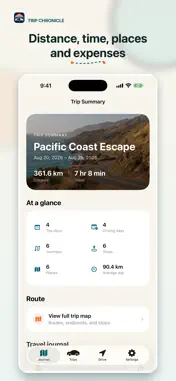
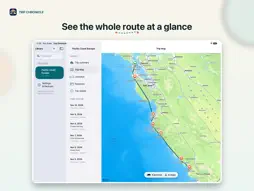
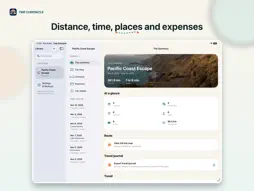
Trip Chronicle turns your road-trip drives, stops and memories into a private journal you can keep - with optional hands-free detection or manual recording. Choose the recording style that suits you: • Optional automatic detection - with your permission, Trip Chronicle can recognize vehicle travel and build journeys while your phone is locked or another app is open. • Manual recording - tap Start Recording before driving and end the journey when you arrive. It works with ״While Using״ location access and does not require Motion access. When a trip is active, you can also start or stop manual recording with Siri or Shortcuts. BUILD A DAY-BY-DAY ROAD JOURNAL See each day’s drives, meaningful stops, distance and driving time in one clear timeline. Explore maps for individual journeys, full days, or the entire trip. Add notes and photos so the practical record and the memories stay together. CAPTURE THE REST OF THE JOURNEY Add journal moments with a title, notes, photos and a flexible location. Record flights and other travel separately from driving, or review a possible flight suggested after landing. REVIEW AND CORRECT EVERYTHING Edit journey times and places, choose locations on a map, add missing journeys or stops, and merge or split journeys whenever automatic detection needs a correction. KEEP TRAVEL EXPENSES ORGANIZED Track spending by category and currency, link expenses to the relevant journey or stop, and scan receipts using Apple’s on-device text recognition. MAP THE WHOLE STORY Review an individual journey, a complete day or the full road trip on a map. Choose a favorite photo as the trip cover and see whole-trip summaries for distance, driving time, places, stops and expenses. CREATE A TRAVEL JOURNAL TO SHARE Export a polished PDF travel journal with Apple Maps, daily routes, stops, moments and photos. Expenses are optional, and you can choose a colored screen style or clean white pages for printing. PRIVATE BY DESIGN Trip Chronicle has no accounts, advertising, analytics or third-party tracking SDKs. Your routes, locations, photos, receipts, notes and expenses stay on your iPhone unless you explicitly export or share them. The developer cannot access your journal. Create complete local backups, export expenses and trip data, and remove individual trips, stored receipt images or all app data whenever you choose. Automatic recording is optional and requires Always location access and Motion access. Manual journey recording works with While Using location access and does not require Motion access.
What's New
Version 1.4 2026-11-11
• Faster app launch, especially if you have a large trip library. Trip Chronicle loads less data up front. • A new journal library for iPad and Apple silicon Ma...• Faster app launch, especially if you have a large trip library. Trip Chronicle loads less data up front. • A new journal library for iPad and Apple silicon Mac brings together a searchable trip sidebar, daily journals, maps, summaries, and expenses. The layout adapts to your window size and includes keyboard shortcuts. Record drives on iPhone, then bring over your trips by restoring an iPhone backup in Settings & Backups. Each device keeps its own copy. • iCloud backups open more reliably. See download progress and estimated speed when available, and follow the status while your data is restored. • When choosing a journey’s start or destination on the map, keep the place name or use its street address when available. The pin stays in the same spot. • Large trips load faster, trip summaries and daily journals open more reliably, and maps make better use of larger screens. • Automatic drive recording starts more reliably when a scheduled trip begins, including when the app is in the background. • iPhone Duo support. Trip Chronicle adapts to the compact outer display when folded and gives your journal and maps more room on the larger inner display when unfolded. Technical Analysis
Package Overview Basic metadata
Bundle ID
com.ronsigall.roadtripjournal Current Version 1.4
Minimum iOS 26.0
Package Size App Store Size
Package Metadata 0 / 0 version records
Detailed binary, privacy manifest, framework, and Info.plist results have not been indexed for this package yet. The verified App Store and archive metadata above remains available.
Developer Information
Known Version Records
0 version records with stored package metadata
Stored metadata does not guarantee a package is currently available to download.
| Details | Version / IDs | Version date | Action |
|---|