
Preview




Description
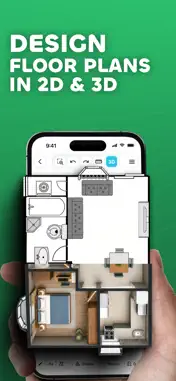
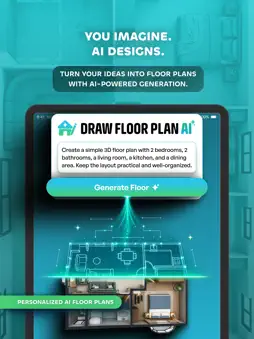
Draw Floor Plan: Generate floor plans with AI, design your dream house, and bring your ideas to life from 2D to 3D. Design your space, create floor plans, and visualize your ideas in 2D and 3D. Or simply describe your space in a prompt and let Draw Floor Plan AI generate your floor plan. Draw Floor Plan by VebBuilders is an easy-to-use floor plan creator, AI floor plan generator, and home design app for house plans, room layouts, interior designs, and property layouts. Generate plans with our own AI, draw walls, add furniture, measure dimensions, and explore designs with an interactive 3D walkthrough. • Draw Floor Plan AI: AI Floor Plan Generator Generate AI house plans and room layouts using our own AI technology. Describe your space in a prompt or select your preferences. - Generate floor plans from AI prompts - Regenerate layouts to explore alternatives - Edit prompts to refine your floor plan - Create house plans and room layouts faster - Purchase credits for AI generation • Create Floor Plans Create house plans, home floor plans, room layouts, and interior designs with flexible drawing tools. - Draw walls, lines, rectangles, and circles - Add doors, windows, stairs, furniture, and objects - Add text and labels - Move, resize, rotate, and edit objects - Use grid and snapping for precise placement - Measure distances while designing - Customize your canvas and workspace • Customize Walls - Adjust wall height, thickness, color, and style, even after drawing. • 2D & 3D Floor Plan Design - Turn 2D floor plans into 3D views. Explore rooms, walls, and furniture from different angles with an interactive 3D walkthrough. • Design Rooms & Interiors - Add beds, sofas, tables, chairs, cabinets, doors, windows, stairs, and more. Resize, rotate, and arrange objects for your ideal room layout. • Create Custom Objects - Create and reuse custom furniture, fixtures, and other objects for personalized floor plans. • Measure & Plan With Precision Plan with built-in tools: - Measurement tools - Grid and snapping - Compass and Level - Object positioning - Canvas customization • Powerful Drawing Tools - Free Draw - Line, Rectangle and Circle - Text and labels - Eraser - Select and Move - Object editing • Save, Sync & Manage Projects Keep your floor plans organized. - Create and manage projects - Work offline and save locally - Sync projects to the cloud - Continue across sessions - Access projects on supported devices • Mobile & Web Floor Plan App - Create and manage designs on mobile and web. Continue working on your phone or desktop. • Export, Print & Share - Export house plans and floor plans as high-quality PNG images or PDF files. Print or share with clients, builders, and friends. HD and watermark-free exports are available with eligible plans. • Interactive Tutorials - Follow step-by-step tutorials to learn drawing tools, create rooms, add objects, and edit layouts. • Made for Every Project - For homeowners, architects, interior designers, builders, contractors, students, and DIY planners. Ideal for home design, renovations, room planning, and architectural layouts. • Flexible Plans Choose the option that fits your needs. - Single Plan Pass - Premium access for one floor plan with a one-time purchase. - Creator & Pro - More floor plans, premium objects, custom objects, advanced features, and export options. - AI Credits - Purchase credits to generate, regenerate, and refine floor plans with AI. From a room sketch to an AI-generated house plan and 3D walkthrough, design and visualize your space in one app. Start creating your floor plan today. Draw Floor Plan by VebBuilders Need help? Contact [email protected] or send feedback through the app. - Privacy Policy: https://drawfloorplan.app/privacy - Terms of Use: https://drawfloorplan.app/terms
What's New
Version 2.0.30 2026-11-06
• Introducing Draw Floor Plan AI - Turn your ideas into floor plans with our new AI-powered generator. Create layouts using simple prompts or your preferred se...• Introducing Draw Floor Plan AI - Turn your ideas into floor plans with our new AI-powered generator. Create layouts using simple prompts or your preferred selections, regenerate designs to explore different possibilities, and make changes using AI Prompt Edit. You can also explore free, ready-made sample plans and customize them to create a floor plan that fits your needs. • Introducing 3D Render - Give your floor plans a more realistic look with high-quality renders. Customize your view, lighting, and visual details to create the perfect presentation of your space. • Introducing 3D Preview & Walkthrough - Bring your 2D floor plans to life in 3D and experience your space from a whole new perspective. Explore your layout from different angles, view your created rooms and objects in three dimensions, and move through your space with the interactive walkthrough experience to get a better understanding of how everything comes together. • Introducing Single Plan Pass - Get premium access for one floor plan with a one-time purchase, including ad-free use, full access to objects, HD image & PDF exports, and watermark-free exports for 7 days. • Cross-Platform Access - Draw Floor Plan is now available on the web, allowing you to access and manage your projects across mobile and desktop devices. • Introducing Floor & Wall Textures in 3D Mode - Enhance your floor plans with realistic floor and wall textures. Choose from a variety of textures, customize individual walls or your entire space, and see the results in 3D. • Introducing Creator & Pro Plans - Choose from new subscription plans with more floor plans, custom objects, premium features, ad-free use, and advanced export options. • Performance Enhancements - We’ve optimised the app for better speed and stability. Drawing, editing, and navigation are now faster and more fluid across all devices. • Bug Fixes & Stability Improvements - Multiple issues have been resolved to ensure a more reliable experience with fewer interruptions during your workflow. Technical Analysis
Package Overview Basic metadata
Bundle ID
com.vebbuilders.drawingplan Current Version 2.0.30
Minimum iOS 15.0
Package Size App Store Size
Package Metadata 0 / 17 version records
Detailed binary, privacy manifest, framework, and Info.plist results have not been indexed for this package yet. The verified App Store and archive metadata above remains available.
Developer Information
Known Version Records
0 version records with stored package metadata • 17 known version records
Stored metadata does not guarantee a package is currently available to download.
| Details | Version / IDs | Version date | Action |
|---|---|---|---|
| Not archived | App Store ID: 888443760 | Unknown | Request Version |
| Not archived | App Store ID: 888283487 | Unknown | Request Version |
| Not archived | App Store ID: 886527164 | Unknown | Request Version |
| Not archived | App Store ID: 885908644 | Unknown | Request Version |
| Not archived | App Store ID: 885662785 | Unknown | Request Version |
| Not archived | App Store ID: 885325556 | Unknown | Request Version |
| Not archived | App Store ID: 885241142 | Unknown | Request Version |
| Not archived | App Store ID: 885147636 | Unknown | Request Version |
| Not archived | App Store ID: 884631552 | Unknown | Request Version |
| Not archived | App Store ID: 884325892 | Unknown | Request Version |
| Not archived | App Store ID: 884235417 | Unknown | Request Version |
| Not archived | App Store ID: 884096411 | Unknown | Request Version |
| Not archived | App Store ID: 884018986 | Unknown | Request Version |
| Not archived | App Store ID: 883822586 | Unknown | Request Version |
| Not archived | App Store ID: 883583656 | Unknown | Request Version |
| Not archived | App Store ID: 883533513 | Unknown | Request Version |
| Not archived | App Store ID: 852523294 | Unknown | Request Version |