
Preview
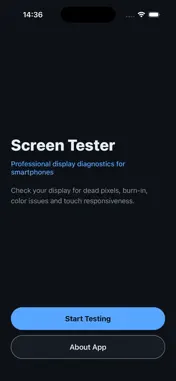


Description
BlueMonitor is a professional display diagnostic tool for smartphones. Run a full suite of fullscreen tests to inspect your screen for dead pixels, burn-in, color issues, uneven backlight, and touch problems — right on your device. Whether you are buying a used phone, checking a repair, or simply want peace of mind, BlueMonitor gives you clear, fullscreen patterns designed to reveal display defects that are easy to miss in everyday use. HOW IT WORKS Tap Start Testing and move through 18 guided fullscreen tests. Swipe or tap the sides of the screen to go to the next or previous test. Each pattern fills the entire display so you can spot stuck pixels, tinting, banding, and touch dead zones quickly. 18 BUILT-IN TESTS Solid Colors • Red, Green, Blue, White, Black, and Gray fullscreen fills — ideal for finding dead, stuck, or hot pixels. Stripe Patterns • Vertical and horizontal black-and-white stripes • RGB stripe pattern for color channel checks Gradients • Black-to-white gradient for banding and uniformity • Red, green, and blue gradients for tint and color transition issues Advanced Patterns • Pixel grid — inspect individual pixels and subpixel alignment • Color checker — compare color blocks across the screen • Dead pixel test — cycling colors to highlight defective pixels • Burn-in test — detect ghosting and image retention • Touch screen test — verify touch response across the entire display KEY FEATURES • 18 professional display tests in one app • Fullscreen immersive test mode • Simple tap navigation — no complicated setup • Works offline — no account or internet required • Lightweight and fast • Designed for iPhone and iPad PERFECT FOR • Testing a new or used smartphone before purchase • Verifying screen quality after a repair or replacement • Checking for burn-in on OLED displays • Finding dead or stuck pixels • Diagnosing touch screen issues • Comparing display quality between devices BlueMonitor is a practical utility for anyone who cares about display quality. No ads, no subscriptions — just straightforward screen diagnostics when you need them. Note: BlueMonitor is a diagnostic helper tool. Results depend on viewing conditions, brightness settings, and display type. It does not replace professional hardware calibration equipment.
Technical Analysis
Package Overview Basic metadata
Bundle ID
com.bluemonitor.test.app Current Version 1.0.0
Minimum iOS 16.6
Package Size App Store Size
Package Metadata 0 / 1 version records
Detailed binary, privacy manifest, framework, and Info.plist results have not been indexed for this package yet. The verified App Store and archive metadata above remains available.
Known Version Records
0 version records with stored package metadata • 1 known version records
Stored metadata does not guarantee a package is currently available to download.
| Details | Version / IDs | Version date | Action |
|---|---|---|---|
| Not archived | App Store ID: 886939906 | Unknown | Request Version |