
Preview




Description
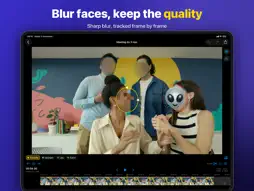
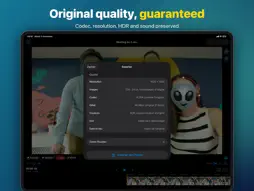
VideoBlur blurs whatever must stay private in your videos: faces, body parts, tattoos, logos, branded clothing, license plates… with automatic tracking and a result that keeps the quality of the original. PLACE IT, TRACKING DOES THE REST Put a blur at a few keyframes: VideoBlur automatically follows faces and body parts (arm, leg, torso, tattoo…) throughout the video, facing the camera, in profile or from behind. For a logo, a piece of clothing or any other object, simply place keyframes and VideoBlur smooths the motion between them. Your manual keyframes always take priority. PRECISE, FRAME BY FRAME • Scrubbable timeline with thumbnails, zoom and ±1 frame buttons • Adjustable blur ellipse: size, width, height, rotation, intensity and soft edges • Several targets in the same video, one track per person or object • Undo / redo and automatic saving SAFETY FIRST When tracking is unsure, VideoBlur enlarges the blur rather than risk showing what should be hidden, and flags the uncertain area in colour on the timeline so you can check it. NO QUALITY LOSS • Same codec, resolution and timestamps as the source video • HDR and 10-bit preserved • Audio copied without re-encoding • Capture date and location kept in Photos YOUR VIDEOS STAY WITH YOU Everything is processed right on your device. No video is ever sent to a server, and no account is needed. Works on iPhone and iPad.
What's New
Version 1.3 2026-11-12
Simpler, more intuitive editing: • Zoom is always available: pinch the video to zoom, drag to move around. • New "Add a blur" button: choose face, eyes or body ...Simpler, more intuitive editing: • Zoom is always available: pinch the video to zoom, drag to move around. • New "Add a blur" button: choose face, eyes or body part, then tap it on the video. • A blur now starts at the frame where you place it: no more trimming the beginning. • Dedicated handles to move and rotate an area. • Blur settings zoom in on the area so you see the effect live, without dimming the screen. • Blur intensity is easier to fine-tune, and settings can be applied to all blurs at once. • A short guide helps you get started. Technical Analysis
Package Overview Basic metadata
Bundle ID
lapi.FaceBlur Current Version 1.3
Minimum iOS 17.0
Package Size App Store Size
Package Metadata 0 / 0 version records
Detailed binary, privacy manifest, framework, and Info.plist results have not been indexed for this package yet. The verified App Store and archive metadata above remains available.
Developer Information
Known Version Records
0 version records with stored package metadata
Stored metadata does not guarantee a package is currently available to download.
| Details | Version / IDs | Version date | Action |
|---|