
Preview


Description
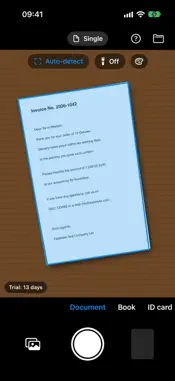
Flipsheet turns your camera into a scanner: hold up a sheet, the edges are detected automatically, and the page is straightened and cropped. Your PDF is ready. SCAN THE WAY IT FITS • Five modes: document, book, ID card, business card and QR code • Enhanced color mode: evens out uneven light and turns the background white, ideal for photos of screens • Read QR codes: the content appears as text you can copy and share, also as a PDF • Automatic edge detection with an outline in the viewfinder, can be switched off • Flashlight for poor lighting • Single: you press the shutter and see the page right away • Scan immediately: the app captures by itself as soon as the sheet is steady in view (adjustable); with “Multiple” it then captures every further page automatically • Import existing photos from your library ID CARDS AND CARDS Front and back of an ID card appear in the PDF at actual size, one below the other, on a single A4 page. Business cards appear at actual size on a page. Books are captured as a double page. SEARCHABLE PDF AND TEXT RECOGNITION • Text recognition right on your device in seven languages: German, English, French, Spanish, Italian, Portuguese and Dutch • Search, select and copy text in the PDF – the PDF looks exactly like the scan • “Recognize” view: switch between the image and the recognized text, copy the text, share it or save it as a text file in “My Files” • In the settings (gear at the top left) you decide once whether the PDF should be searchable EDIT PAGES • Adjust the crop by hand: drag the corners with your finger • Rotate, rearrange by dragging and delete pages • Retake a page or keep scanning • Reopen finished documents later and keep editing them • Save in color, grayscale or black and white for smaller PDFs • A document in progress is kept even after you close the app • Rename the PDF SIGN Sign with your finger or Apple Pencil, place the signature where it belongs and set its size. The signature is saved on your device so you don’t have to sign again every time. MORE TOOLS • Fill in and sign forms, including PDFs from emails • Redact spots, add a watermark if you want • Password-protect PDFs when exporting • Read receipts into a list, turn business cards into contacts, translate text • Automatic names like “Invoice Telekom 2026-10-14” MY FILES IN ICLOUD • Organize like in a file manager: create, rename, move and delete folders • Folder view with previews or list, search and sorting • With iCloud your documents also appear on your iPad and in the Files app • Export: share finished PDFs, or export the current page from the page view as a PDF, JPG or text file – by mail, Messages, AirDrop and any other app. Choosing several pages at once is part of the full version PRIVACY Flipsheet does not send anything to a server of the publisher. There are no ads and no analytics. Photos, recognized text and signature stay on your device and in your own iCloud account. TRY AND UNLOCK For 14 days after you first open it, all features are free. After that Flipsheet stays free to use: scan documents, books and business cards, crop, text recognition, copy and export text, and storage in iCloud – with one page per PDF and up to 4 scans per day. The full version (one-time purchase, no subscription) adds ID cards, QR codes, signing, filling in forms, watermarks, redaction, password protection, receipts, translating, multiple scanning, multi-page PDFs, exporting several pages, rearranging pages and unlimited scans. The app is available in English, German, French, Spanish, Italian, Portuguese (Brazil) and Dutch.
What's New
Version 1.4 2026-11-06
Version 1.4: Fill in forms: new “Fill in” tool in the page view. Type text, place check marks, crosses and today’s date, drag them to the right spot and adjust ... Technical Analysis
Package Overview Basic metadata
Bundle ID
de.vmm.Flipsheet Current Version 1.4
Minimum iOS 18.0
Package Size App Store Size
Package Metadata 0 / 0 version records
Detailed binary, privacy manifest, framework, and Info.plist results have not been indexed for this package yet. The verified App Store and archive metadata above remains available.
Known Version Records
0 version records with stored package metadata
Stored metadata does not guarantee a package is currently available to download.
| Details | Version / IDs | Version date | Action |
|---|