Preview




Description
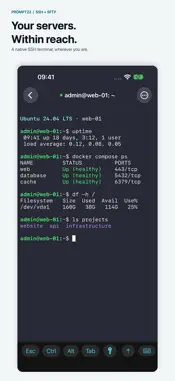
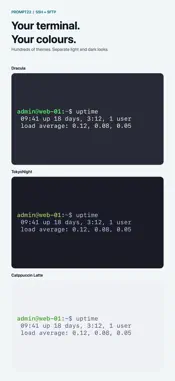
Prompt22 brings SSH terminals and SFTP file transfers to iPhone and iPad. Its terminal is powered by libghostty-vt, Ghostty’s open-source terminal engine. Connect to your servers, run commands and manage remote files in a focused, native interface. SSH TERMINALS • Open multiple sessions and switch between them. • See open SSH and SFTP session counts in a Live Activity on your Lock Screen or in the Dynamic Island on supported iPhones. • Customize fonts, text size and scrollback limits, and choose separate terminal themes for light and dark mode. • Choose from hundreds of themes or import your own Ghostty themes. • Restore locally saved terminal scrollback when you reopen the app. • Use external keyboard shortcuts and multiple windows on iPad. • Enable hold-and-drag arrow controls to move the cursor with your thumb. HOSTS AND IDENTITIES • Organize hosts into folders, move several at once, mark favorites and find them with search. • Personalize hosts with symbols, emoji or custom images, synced with iCloud. • Open favorite or recent hosts from the Home Screen quick actions. • Generate, import or paste SSH identities stored in Apple Keychain. • Optionally save host passwords in Keychain and sync them through iCloud Keychain. • Sync hosts, trusted host keys and snippets through your private iCloud database. COMMANDS AND SNIPPETS • Run reusable snippets in a terminal or assign one to run after login. • Opt in to local command history and suggestions on supported Bash shells. • Set up the optional Bash script on supported Linux servers to keep suggestions available after sudo. • Keep successful commands with their arguments, organized by server and login account. • Pause recording or clear saved command history whenever you choose. SHORTCUTS AND SIRI • Connect to a host or open its file browser with Shortcuts and Siri. • Find hosts by name, folder or tags to build workflows across your servers. • Run saved snippets or commands supplied by a previous Shortcuts action. • Use command output and exit codes in later steps, and choose whether to keep the session history. • Download, upload and list remote files over SFTP from Shortcuts, passing files between actions. • Review commands before running, or automate in the background using saved credentials and trusted hosts when app lock is off. SFTP FILE TRANSFERS • Browse remote directories with file types, permissions, sizes and modification dates. • Select multiple items to copy, move or delete, including folder contents when requested. • Upload multiple files from Files to the current remote folder without overwriting existing files. • Track uploads and downloads together with progress, transfer rate and estimated remaining time. • Choose a default download folder and open completed downloads in Files. • Continue user-started transfers in the background when iOS grants execution time. PRIVACY AND CONTROL Connections go directly to the servers you choose. Prompt22 has no ads or third-party analytics SDK. Command history stays on your device. Enable device authentication and choose whether to hide the app preview in the app switcher. All features are included in your purchase. Optional coffee tips support ongoing development and do not unlock features or renew automatically. An accessible SSH/SFTP server is required for remote connections. iOS may suspend connections in the background, and reopening a saved session requires reconnecting. Use a server-side tool such as tmux or screen for work that must continue while disconnected.
What's New
Version 1.3.2 2026-11-20
Choose from 586 terminal themes, with 121 new additions, including Heritage Themes, Stranger Theme, Zacess Warm and mistpine. Existing theme selections are pres...Choose from 586 terminal themes, with 121 new additions, including Heritage Themes, Stranger Theme, Zacess Warm and mistpine. Existing theme selections are preserved. • Reopened terminals display their theme immediately, and reconnecting keeps the keyboard and command suggestions steady. • Cancel an SSH or SFTP connection from the session toolbar. In Remote Files, the same toolbar position opens Transfers once connected. • Keep typing while large command histories load or save. Scrollback settings respond faster when you have saved terminal tabs you haven’t opened. • Tap anywhere on the Identity row in Edit Host to choose or add an SSH key. • The Hosts sidebar button stays available after closing a session, and the next session restores your full-screen or pinned-sidebar layout. Hosts also returns when you unfold iPhone Duo with no session selected. • On iPhone Duo, Back and Sidebar controls take priority when toolbar space is limited, and the keyboard button stays clear of the camera in landscape. • The keyboard surround matches the terminal key row, and the hinge area matches your theme in iPhone Duo laptop mode. • The cursor goes hollow when the terminal loses keyboard focus, including when switching between windows side by side. Technical Analysis
Package Overview Basic metadata
Bundle ID
com.robinscherrer.Prompt22 Current Version 1.3.2
Minimum iOS 26.0
Package Size App Store Size
Package Metadata 0 / 0 version records
Detailed binary, privacy manifest, framework, and Info.plist results have not been indexed for this package yet. The verified App Store and archive metadata above remains available.
Developer Information
Known Version Records
0 version records with stored package metadata
Stored metadata does not guarantee a package is currently available to download.
| Details | Version / IDs | Version date | Action |
|---|