
Preview






Description
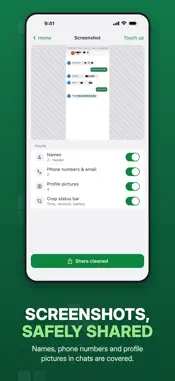
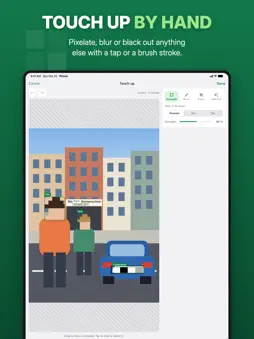
Pixnul cleans your photos before you share them. It finds what gives you away — faces, license plates, ID numbers, addresses, phone numbers, QR codes and the hidden location in the file — and covers or removes it. Everything happens on your iPhone: no account, no upload, no tracking. SHARE STRAIGHT FROM ANY APP Tap "Share with Pixnul" in the share sheet and the cleaned copy goes on to your chat, social network or email. Your original stays untouched in your library. WHAT PIXNUL FINDS • Faces — also small ones in the background and people turned away • License plates • Location, camera model, date and other hidden metadata (EXIF, XMP) • ID and passport numbers, MRZ, IBANs, card numbers and tax IDs (Pro) • Addresses, phone numbers, email addresses, usernames and links (Pro) • QR codes and barcodes — and what they hold, like a Wi-Fi password or a boarding pass (Pro) YOU STAY IN CONTROL • Review every finding and tap it in or out • Pixelate, blur or cover with a solid bar • Touch up by hand: draw areas, paint with a brush, erase, undo • Compare before and after • Keep the capture date or color profile if you like — everything else goes A PROFILE FOR EVERY SITUATION Social media, classifieds, documents or metadata only: a profile decides what gets covered. Set your default once and switch with one tap. SCREENSHOTS AND BATCHES (Pro) • Screenshot mode hides names, phone numbers and profile pictures in chats and crops the status bar • Clean up to 50 photos at once PRIVATE BY DESIGN • All detection runs on your device, with Apple's on-device Vision framework • No account, no ads, no analytics • The only network access is for purchases • Shared copies are deleted from the app after an hour • Copied photos stay on this device and leave the clipboard after 10 minutes • The app hides its content in the app switcher • Your history keeps counts only, never images MADE FOR iPHONE AND iPAD Shortcuts and Siri, the share sheet extension, Save to Files, pasting without a permission prompt, HEIC kept as HEIC, HDR photos kept intact, Live Photos shared as stills, and dark mode. FREE AND PRO Free, without limits: metadata, faces and license plates. Pro unlocks IDs, text, codes, screenshots, batches and your own profiles — as a yearly subscription or a one-time purchase. Terms of Service: https://pixnul.app/policies/terms.html End User License Agreement (EULA): https://www.apple.com/legal/internet-services/itunes/dev/stdeula/
What's New
Version 1.2 2026-11-08
File names that give nothing away The name a copy goes out under no longer tells when the photo was taken or which app made it. • "Anonymize file name" now pic... Technical Analysis
Package Overview Basic metadata
Bundle ID
com.reneph.pixnul Current Version 1.2
Minimum iOS 18.2
Package Size App Store Size
Package Metadata 0 / 0 version records
Detailed binary, privacy manifest, framework, and Info.plist results have not been indexed for this package yet. The verified App Store and archive metadata above remains available.
Known Version Records
0 version records with stored package metadata
Stored metadata does not guarantee a package is currently available to download.
| Details | Version / IDs | Version date | Action |
|---|