
Preview





Description
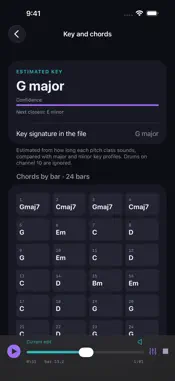
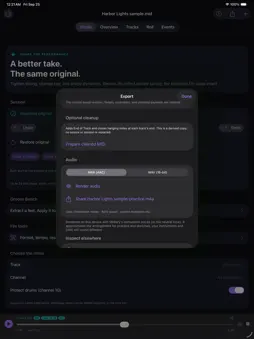
NEW IN 5.0 — PLAY, PRACTISE AND CONVERT - Instrument voices: every part plays with a voice chosen by its General MIDI program family (piano, organ, guitar, bass, strings, brass, winds, synths) and channel 10 plays a drum kit. The voices are Midiary's own sounds; they sketch the arrangement rather than reproduce a General MIDI sound set. - Practice & mix: mute or solo any part, change speed from 25% to 200% without changing pitch, shift the key up or down 12 semitones for singers, and loop any range of bars. - Play to MIDI gear: send the file to a USB or Bluetooth MIDI keyboard, module or interface, with its own program changes. SysEx is sent only if you turn it on. - Key and chords: an estimated key and a chord for every bar, with a shareable chord chart. Tap a bar to play from it. - Lyrics and karaoke: lyric events and .kar files follow playback line by line. - File tools: convert format 1 to format 0 for keyboards, arrangers and player pianos, or split a file into one track per channel for your DAW. Set or scale the tempo, change resolution, set a channel's General MIDI instrument, rename, move or delete tracks. Every change is verified and undoable. - Extract: copy a range of bars and the parts you choose into a new MIDI file, with tempo and sounds set up at its start. - Audio export: render M4A or WAV with the current mix, key and speed — a practice backing track in seconds. - Bars and beats throughout: event list, note list, piano roll grid and a playhead. - Open MIDI files from Files, Mail or other apps, use Shortcuts actions (file info, format conversion, transpose, tempo), and iPad keyboard shortcuts. Midiary is an offline studio for Standard MIDI Files on iPhone and iPad. Your imported original always stays intact. MAKE MUSICAL CORRECTIONS Select tracks and channels, transpose, adjust velocity, or move note starts toward straight and triplet grids with variable strength. Drum protection keeps channel 10 out of batch edits. EDIT THE EXACT NOTE Search by pitch, filter and page through long files. Change a note's pitch, velocity, start and duration. Review the actual changes before saving; ambiguous overlaps and unsafe edits are blocked with an explanation. GROOVE BENCH Extract the timing and velocity feel of a passage and apply it to another part with separate timing and dynamics strengths. Up to 64 templates are kept on the device. KEEP THE ORIGINAL Imported MIDI bytes stay unchanged. Edits save locally with undo and redo that survive closing the app, up to 20 steps within 48 MB. Restore the original as an undoable step. Damaged sessions are preserved for recovery. INSPECT THE FILE Tracks with their instruments, channels and note ranges; tempo map; time and key signatures; markers; structural findings; a channel-coloured piano roll; and an event desk with bar, time and tick. Metrical and SMPTE timing and format 2 sequences are supported. EXPORT YOUR WORK Share the untouched original, the edited MIDI, a cleaned copy with missing End-of-Track events added and hanging notes closed, an event CSV, or rendered audio. Start with your own .mid, .midi or .kar file, or open the bundled piano sample or the band sample with lyrics. Imports support up to 8 MB, 1,024 tracks and 100,000 events. Playback runs in the foreground. No account, subscription, in-app purchase, advertising or tracking. Files and editing sessions stay on your device unless you export or share them. Midiary does not record from the microphone. Bluetooth is used only if you open Bluetooth MIDI pairing.
What's New
Version 5.1 2026-10-06
Midiary is now on Mac, included with your purchase. The same studio runs in a resizable window with a menu bar: open .mid and .kar files with Command-O or from ... Technical Analysis
Package Overview Basic metadata
Bundle ID
com.realbobcorbin.Midiary Current Version 5.1
Minimum iOS 17.0
Package Size App Store Size
Package Metadata 0 / 0 version records
Detailed binary, privacy manifest, framework, and Info.plist results have not been indexed for this package yet. The verified App Store and archive metadata above remains available.
Developer Information
Known Version Records
0 version records with stored package metadata
Stored metadata does not guarantee a package is currently available to download.
| Details | Version / IDs | Version date | Action |
|---|