Preview




Description
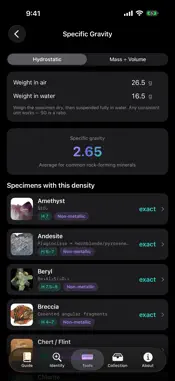
Lithify is a serious, offline field guide for rockhounds, geology students, prospectors and hikers. It pairs a genuine identification engine with an illustrated reference library of 101 rocks and minerals — all on your device, with no account, no subscription, and no photos leaving your phone. Most rock-ID apps upload your pictures to a cloud service and hide the answer behind a subscription. Lithify does not pretend an AI can name a rock from one picture: it teaches you to identify a specimen the way a geologist does — by its diagnostic properties — and shows its work every step of the way. NEW IN 3.0 • A fairer key — specimens that vary in the field fit every answer they can honestly give: earthy or metallic hematite, weakly magnetic chromite, foliated slate, pale streaks. Corrected cleavage for microcline, barite and celestine. • Acid strength — calcite fizzes readily in cold acid; dolomite barely reacts unless powdered. The key, detail pages and Compare now show it. • Near misses — specimens ruled out by only one answer, so one uncertain observation does not hide the right one. • Field Safety & Collecting — gear, acid handling, toxic and fibrous minerals, collecting rules, and hazard notes on entries such as cinnabar. • Private exports — leave coordinates out of CSV and PDF logs. • Safer log — swipe-delete asks first, measurements accept 2.65 or 2,65, and an unreadable log file is always kept. • Still included: look-alikes and Compare, Collection Insights, a Specimen of the Day widget, a Control Center control and Siri shortcuts. IDENTIFY, HONESTLY • Dichotomous Key — an adaptive key that asks mineral or rock, then luster, hardness, magnetism, streak, cleavage and acid, showing the live candidate count. • Property Matcher — enter whatever you observed (hardness band, streak color, cleavage, magnetism, acid reaction, color) and get a ranked shortlist scored by how well each specimen agrees. Partial information still helps. • Photo Color Assist — sample a photo's dominant colors on-device to suggest color-consistent candidates. An aid, never an automatic verdict. A REAL REFERENCE LIBRARY • 69 minerals and 32 rocks (igneous, sedimentary, metamorphic); 97 entries have specimen photos. • Factual structured properties: Mohs hardness, streak, luster, cleavage, fracture, specific gravity, crystal system, chemical formula, diaphaneity, tenacity, magnetism and acid reaction. • Classification by mineral group plus Dana and Strunz numbers. • Formation environments, notable localities, common uses, and field-identification tips for every entry. • Search and filter by type, rock class, hardness band, color and collection status. FIELD TOOLS • Mohs Scale — the ten index minerals, common field-test tools (fingernail, copper coin, steel, glass), and how to run a proper scratch test. • Specific Gravity Calculator — compute SG by the hydrostatic (Archimedes) method or mass ÷ volume, then match your result against minerals of that density. • Test Reference — how to read streak, luster, cleavage versus fracture, and the acid test. • Field Safety & Collecting — what to check before you hammer, test or collect. YOUR COLLECTION • Log the specimens you find with a photo, a linked field-guide entry, the locality, the date, and optional coordinates. • Record your own hardness and specific-gravity measurements and see how they compare with the guide. • Search your log, export it, and keep file backups. Everything is stored locally on your device. PRIVATE AND OFFLINE BY DESIGN • Works everywhere — the quarry, the trail, the plane — with no signal. • No account, no sign-in, no subscription, no in-app purchases. • No analytics, no tracking. Your photos and collection never leave your device unless you export them. Specimen photographs are sourced from Wikimedia Commons under public-domain, CC0, CC-BY and CC-BY-SA licenses, with full per-image attribution inside the app. Buy it once. Own it forever. Take it anywhere.
What's New
Version 3.0 2026-11-20
Lithify 3.0 is a free update for everyone who owns the app. • Fairer key: specimens that vary in the field (earthy hematite, weakly magnetic chromite, slate, p...Lithify 3.0 is a free update for everyone who owns the app. • Fairer key: specimens that vary in the field (earthy hematite, weakly magnetic chromite, slate, pale streaks) are no longer ruled out by an honest answer. • Fixed: dolomite, dolostone, rhodochrosite and cerussite were marked as fizzing in cold acid; they barely react unless powdered or warmed. Compare now shows calcite vs dolomite as an acid-test difference. • Fixed: cleavage for microcline (two directions), barite and celestine (three). • Near misses: the key lists specimens ruled out by only one answer. • New Field Safety & Collecting guide and hazard notes for toxic and fibrous minerals. The guide no longer suggests tasting specimens. • Option to leave coordinates out of CSV and PDF exports. • Swipe-to-delete in your collection now asks first. • Measurements accept 2.65 or 2,65 and are range-checked (2.0 could store 265). • An unreadable collection file is always copied aside before saving, and your Lithify folder is visible in the Files app. • Photos that did not show the specimen (charts, jewelry, micrographs, a car) were removed; coal, graphite, sulfur and turquoise have no photo for now. • Specific gravity is shown without units; VoiceOver announces selected options. Technical Analysis
Package Overview Basic metadata
Bundle ID
com.realbobcorbin.Lithify Current Version 3.0
Minimum iOS 17.0
Package Size App Store Size
Package Metadata 0 / 0 version records
Detailed binary, privacy manifest, framework, and Info.plist results have not been indexed for this package yet. The verified App Store and archive metadata above remains available.
Developer Information
Known Version Records
0 version records with stored package metadata
Stored metadata does not guarantee a package is currently available to download.
| Details | Version / IDs | Version date | Action |
|---|