
Preview






Description
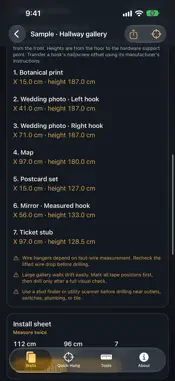
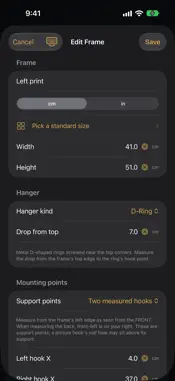
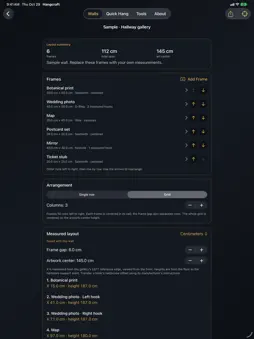
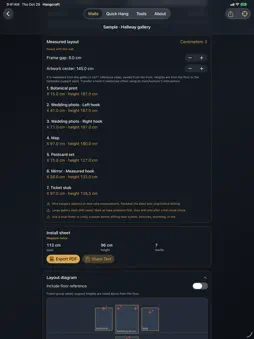
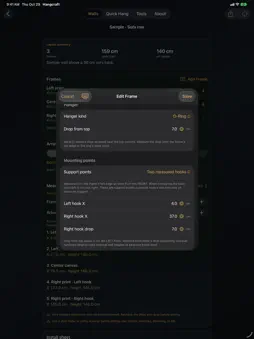
Plan a gallery wall from the measurements of your frames and hardware. Hangcraft combines saved walls, measured support points, row and grid arrangements, a scaled diagram, and a printable PDF install sheet. Everything is included in one purchase: no subscription, no account, no ads. NEW IN 3.0 • Grid arrangements of up to 6 columns, or a single row with centers, tops, or bottoms aligned • A printable PDF install sheet with a scaled diagram, numbered marks, steps, checks, and supplies • Tape-measure inches rounded to 1/16 in, decimal inches, or centimeters • Back up every wall to a file and restore it later without overwriting existing walls • Reorder frames, duplicate walls, rename walls, add notes, and explore two sample walls MEASURE THE HARDWARE In a saved wall, choose one centered support, one measured support, or two measured supports. Enter each hook's position from the frame's left edge as viewed from the front, plus its drop from the top. Separate left and right drops handle hardware mounted at different heights. The diagram, mark list, shared text, and PDF sheet use the same measurements. KEEP YOUR LAYOUT Save mixed-size frames as a row or a grid, adjust the gap and artwork-center height, and reopen the same plan later. The whole group stays centered on the height you choose. Choose standard frame sizes or enter your own dimensions in centimeters or inches. Invalid mounting measurements withhold the plan until corrected. TAKE A CLEAR INSTALL SHEET TO THE WALL Read support positions from the gallery's left reference edge and the floor. Export a PDF to print or save, or share the plan as text through the system share sheet. A picture hook's nail or screw can sit above its support point: apply the actual hardware offset using the manufacturer's instructions. AR VISUAL REFERENCES On supported devices, tap the camera view to place targets on detected vertical surfaces. Plumb snapping helps align nearby targets, and saved local AR maps can help restore a room. AR dots are manually placed visual aids; they are not automatically projected, calibrated drilling marks. Confirm distances and level with physical tools. TOOLS FOR THE JOB Quick Hang for a single centered support; eye-line and above-furniture calculations; anchor and stud-spacing references; and an installation handoff. Stud spacing projects expected locations from your verified reference and selected spacing. It does not detect studs or utilities, and hardware guidance does not certify a load rating. LOCAL AND PRIVATE No accounts, ads, analytics, or cloud sync. Walls, frame measurements, and AR mapping data stay in the app's local container unless you choose to share or back them up. Backup files go only where you save them. If a library cannot open, original files are preserved and new work can be saved in a separate recovery library. Always confirm actual wall construction, utilities, hardware ratings, mounting instructions, and final level before drilling.
What's New
Version 3.0 2026-10-29
Hangcraft 3.0 is a major update, and everything is included in one purchase. • Grid layouts of up to 6 columns, plus rows with centers, tops, or bottoms aligned... Technical Analysis
Package Overview Basic metadata
Bundle ID
com.realbobcorbin.Hangcraft Current Version 3.0
Minimum iOS 17.0
Package Size App Store Size
Package Metadata 0 / 6 version records
Detailed binary, privacy manifest, framework, and Info.plist results have not been indexed for this package yet. The verified App Store and archive metadata above remains available.
Price History (USA store)
6 recorded price change points. These are historical observations, not a guarantee of the current price.
| Recorded at | Price | Currency |
|---|---|---|
| 1.99 | USD | |
| 0.0 | USD | |
| 0.99 | USD | |
| 2.99 | USD | |
| 0.0 | USD | |
| 2.99 | USD |
Developer Information
Known Version Records
0 version records with stored package metadata • 6 known version records
Stored metadata does not guarantee a package is currently available to download.
| Details | Version / IDs | Version date | Action |
|---|---|---|---|
| Not archived | App Store ID: 887538637 | Unknown | Paid / Arcade |
| Not archived | App Store ID: 887364563 | Unknown | Paid / Arcade |
| Not archived | App Store ID: 887150256 | Unknown | Paid / Arcade |
| Not archived | App Store ID: 887067225 | Unknown | Paid / Arcade |
| Not archived | App Store ID: 886935458 | Unknown | Paid / Arcade |
| Not archived | App Store ID: 886572106 | Unknown | Paid / Arcade |