
Preview


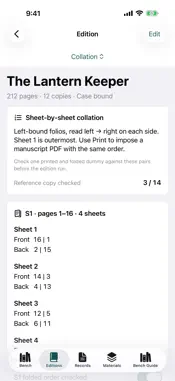


Description
NEW IN 3.0: PRINT YOUR BOOK IN SIGNATURES Import your finished interior as a PDF and Foliowright places every page into your edition's signatures, ready to print double-sided, fold and sew. Choose folio (two pages per side) or quarto (four pages per side) on Letter, A4, Legal, Tabloid, A3 or an exact-trim sheet. Add fold marks, sewing-station marks on each centre fold and optional creep compensation. A sheet map shows the page order before you print anything. ALSO NEW IN 3.0 • Flat case layout: a drawn, dimensioned case showing boards, spine strip, joints and turn-ins, plus a cut list. Pick your spine-strip rule: block only, block + 1 board, or block + 2 boards. • Sewing stations: evenly spaced stations between your kettle stitches, and a printable, actual-size punching guide with a scale check. • Grain & fold check: see whether a folio, quarto or octavo fold keeps the grain parallel to the spine on your paper. • Cutting plan: grain-correct folded sheets per parent sheet, board sheets for the edition and the length of covering roll to buy. • Edition costing: paper, board, covering, thread, other materials and your time, giving a cost per copy and a suggested price. • Millimeters or inches throughout, with the nearest sixteenth of an inch in cut lists. • Paper caliper from a measured stack or a gsm estimate. • Shortcuts actions: Plan Signatures and Estimate Spine Width. • Duplicate an edition to start the next run. SAVE THE EDITION Keep page count, copies, binding method, signature layout, measurements, stock, sewing, costs and notes together in one saved plan. Your existing editions, books, material records and checkpoints carry over unchanged. PLAN EVERY SIGNATURE Compare balanced and equal signature layouts. See sheets and blank pages per copy, sheet savings, and the front/back page pairs for each folded sheet. Check off the folded order of a reference copy, and those checks are kept between sessions. PREPARE YOUR MATERIALS Work out folded-sheet stock with spares and setup sheets, board and covering sizes, covering area and press bundles. Use a measured finished spine or a caliper-and-swell estimate. TAKE THE PLAN WITH YOU Export a production PDF with the case diagram, sewing stations, cutting plan and costing, and a complete collation CSV. Browse 60 offline reference plates. WHAT IT DOES NOT DO Foliowright arranges your PDF's pages. It does not edit page content or margins, and it does not control your printer. Printers flip double-sided pages differently, so print and fold one test sheet first. Stock counts leave out endpapers and linings. Thread, adhesive and cost figures are estimates. Check the grain and make a folded, sewn dummy before committing to the full run. No account is required. Workshop data stays on your device unless you export it. Manuscript PDFs are read on the device and are not stored in the edition. Device backups may include local data, depending on your system settings.
What's New
Version 3.0.2 2026-10-07
Small improvements and fixes. Technical Analysis
Package Overview Basic metadata
Bundle ID
com.realbobcorbin.Foliowright Current Version 3.0.2
Minimum iOS 17.0
Package Size App Store Size
Package Metadata 0 / 0 version records
Detailed binary, privacy manifest, framework, and Info.plist results have not been indexed for this package yet. The verified App Store and archive metadata above remains available.
Developer Information
Known Version Records
0 version records with stored package metadata
Stored metadata does not guarantee a package is currently available to download.
| Details | Version / IDs | Version date | Action |
|---|