
Preview



Description
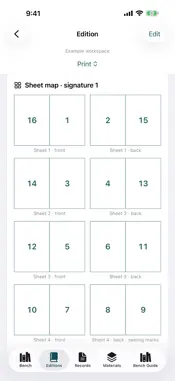
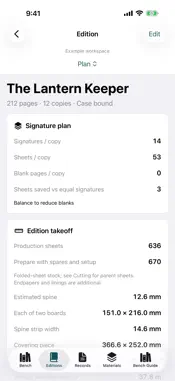
NEW IN 5.0 • Print at true size: imposed pages are never enlarged. The app shows the print scale and printed page size, and warns when pages are reduced or differ from your trim, so the text block still matches the boards and the punching guide. • Blank pages where you want them: at the end, before page 1, or split front and back. • Tape and cord sewing: a station either side of each tape or cord, carried into the punching guide and the PDF sewing marks. • Type inches as fractions such as 5 1/2. Cut lists give boards, spine strip and covering to the nearest sixteenth. • Add and edit checkpoints and materials, and see dashboard figures from your saved editions. • A longer PDF than the edition now says which pages are left out. Back up and restore your workspace as before. PRINT YOUR BOOK IN SIGNATURES Import your finished interior as a PDF and Foliowright places every page into your edition's signatures, ready to print double-sided, fold and sew. Choose folio (two pages per side) or quarto (four pages per side) on Letter, A4, Legal, Tabloid, A3 or an exact-trim sheet. Add fold marks, sewing-station marks on each centre fold and optional creep compensation. A sheet map shows the page order before you print anything. BOOKBINDING TOOLS • Flat case layout: a drawn, dimensioned case showing boards, spine strip, joints and turn-ins, plus a cut list. Pick your spine-strip rule: block only, block + 1 board, or block + 2 boards. • Sewing stations: evenly spaced, or paired around tapes or cords, between your kettle stitches, and a printable, actual-size punching guide with a scale check. • Grain & fold check: see whether a folio, quarto or octavo fold keeps the grain parallel to the spine on your paper. • Cutting plan: grain-correct folded sheets per parent sheet, board sheets for the edition and the length of covering roll to buy. • Edition costing: paper, board, covering, thread, other materials and your time, giving a cost per copy and a suggested price. • Millimeters or inches throughout. Type fractions such as 5 1/2; cut lists give the nearest sixteenth of an inch. • Paper caliper from a measured stack or a gsm estimate. • Shortcuts actions: Plan Signatures and Estimate Spine Width. • Duplicate an edition to start the next run. SAVE THE EDITION Keep page count, copies, binding method, signature layout, measurements, stock, sewing, costs and notes together in one saved plan. Your existing editions, books, material records and checkpoints carry over unchanged. PLAN EVERY SIGNATURE Compare balanced and equal signature layouts. See sheets and blank pages per copy, sheet savings, and the front/back page pairs for each folded sheet. Check off the folded order of a reference copy, and those checks are kept between sessions. PREPARE YOUR MATERIALS Work out folded-sheet stock with spares and setup sheets, board and covering sizes, covering area and press bundles. Use a measured finished spine or a caliper-and-swell estimate. TAKE THE PLAN WITH YOU Export a production PDF with the case diagram, sewing stations, cutting plan and costing, and a complete collation CSV. Browse 12 concise offline bench references. WHAT IT DOES NOT DO Foliowright arranges your PDF's pages. It does not edit page content or margins, and it does not control your printer. Printers flip double-sided pages differently, so print and fold one test sheet first. Stock counts leave out endpapers and linings. Thread, adhesive and cost figures are estimates. Check the grain and make a folded, sewn dummy before committing to the full run. No account is required. Workshop data stays on your device unless you export it. Manuscript PDFs are read on the device and are not stored in the edition. Device backups may include local data, depending on your system settings.
What's New
Version 5.0 2026-11-19
Foliowright 5.0 keeps the printed book matched to your plan and adds tools binders asked for. Everything is included in one purchase. • Fixed: "Scale pages to f...Foliowright 5.0 keeps the printed book matched to your plan and adds tools binders asked for. Everything is included in one purchase. • Fixed: "Scale pages to fit" could enlarge or shrink imposed pages without saying so; pages are never enlarged now, and the print scale is shown • Fixed: a PDF longer than the edition dropped its last pages without a clear warning • Fixed: checkpoints and materials could not be added on a new workspace • New: blank pages at the end, the front, or split • New: tape and cord sewing stations in the punching guide and PDF marks • New: inch fractions such as 5 1/2, and sixteenths for boards, strip and covering • The sheet map shows every sheet of the first signature, and the imported PDF stays loaded between views Technical Analysis
Package Overview Basic metadata
Bundle ID
com.realbobcorbin.Foliowright Current Version 5.0
Minimum iOS 17.0
Package Size App Store Size
Package Metadata 0 / 0 version records
Detailed binary, privacy manifest, framework, and Info.plist results have not been indexed for this package yet. The verified App Store and archive metadata above remains available.
Developer Information
Known Version Records
0 version records with stored package metadata
Stored metadata does not guarantee a package is currently available to download.
| Details | Version / IDs | Version date | Action |
|---|