Preview






Description
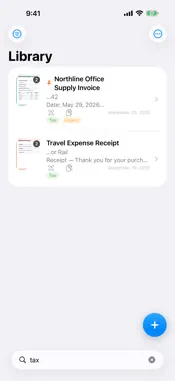
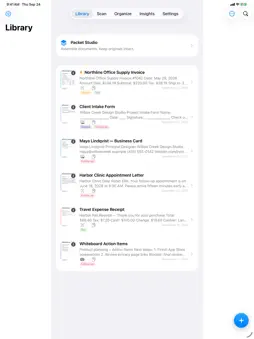
DocUpick turns paper into smart notes you can find, read, summarize and reuse — all on your iPhone or iPad, with no account and nothing uploaded. NEW IN 4.0 • Import from Files: bring in PDFs and images, or share them to DocUpick from any app. PDFs that already contain text keep it exactly; scanned PDFs and photos are read on-device. • Tables to spreadsheet: DocUpick finds tables on your pages and shows them as a grid. Copy the cells straight into your spreadsheet app, or share a CSV file. • Read Aloud: listen to any document sentence by sentence, with the current sentence highlighted. Tap a sentence to jump there and set the speed you like. • Smart summary: on iPhones and iPads with Apple Intelligence, DocUpick writes a short summary, key points and a suggested title on-device. On other devices it picks the key lines from your document and pulls out merchant, total and date from receipts and invoices. Every summary says how it was made. • Search from the Home Screen: scanned text, titles, tags and folders show up in Spotlight, and a tap opens the note. • Siri and Shortcuts: "Scan a document with DocUpick", find documents by their text, or pass a document's text to other actions. Quick actions on the app icon start a scan, an import or a search. • App Lock: require Face ID, Touch ID or your passcode to open DocUpick, and hide its contents in the app switcher. • Add to Calendar: dates found in a document open a pre-filled event you can review and save. • Backup & Restore: save your whole library — notes, page images, folders and tags — as one file in Files, iCloud Drive or on a computer. Restoring adds what's missing and never overwrites anything. SCAN ANYTHING WITH TEXT Receipts, invoices, letters, forms, business cards, whiteboards and handwritten notes. Multi-page scanning with edge detection and perspective correction, or import from Photos and Files. Text recognition runs on-device in the languages you choose. SMART NOTES Every scan gets its recognized text, a detected document type, and tap-to-act phone numbers, emails, links, addresses and dates. Receipts and invoices show merchant, total and date. Business cards become a shareable contact card. QR codes and barcodes are detected too. FIND IT FAST Ranked full-text search across titles, recognized text, tags and folders, with the matching words highlighted. Folders with color and icon, tags, pins, filters and sort options. SHARE IT YOUR WAY Image PDFs, searchable PDFs with a hidden text layer, text-only PDFs, adjustable size and watermark, automatic file names from the document's content, CSV export of your library, and Packet Studio for ordered multi-document PDF packets with a cover and contents page. KEEP IT TIDY Page filters, rotation and reordering, merging notes, expiry dates with reminders, an Insights view of your library and a review queue for scans that need attention. PRIVATE BY DESIGN No account, no ads, no tracking, no analytics and no servers. Your documents stay in DocUpick on your device until you choose to share or back them up. iPhone and iPad. Works offline. Apple Intelligence summaries require a supported device with Apple Intelligence turned on; everything else works on every supported device.
What's New
Version 4.0.2 2026-10-06
Small improvements and fixes. Technical Analysis
Package Overview Basic metadata
Bundle ID
com.realbobcorbin.DocUpick Current Version 4.0.2
Minimum iOS 17.0
Package Size App Store Size
Package Metadata 0 / 7 version records
Detailed binary, privacy manifest, framework, and Info.plist results have not been indexed for this package yet. The verified App Store and archive metadata above remains available.
Price History (USA store)
6 recorded price change points. These are historical observations, not a guarantee of the current price.
| Recorded at | Price | Currency |
|---|---|---|
| 2.99 | USD | |
| 0.99 | USD | |
| 1.99 | USD | |
| 3.99 | USD | |
| 0.99 | USD | |
| 3.99 | USD |
Developer Information
Known Version Records
0 version records with stored package metadata • 7 known version records
Stored metadata does not guarantee a package is currently available to download.
| Details | Version / IDs | Version date | Action |
|---|---|---|---|
| Not archived | App Store ID: 887540923 | Unknown | Paid / Arcade |
| Not archived | App Store ID: 887357589 | Unknown | Paid / Arcade |
| Not archived | App Store ID: 887240045 | Unknown | Paid / Arcade |
| Not archived | App Store ID: 887215018 | Unknown | Paid / Arcade |
| Not archived | App Store ID: 886969797 | Unknown | Paid / Arcade |
| Not archived | App Store ID: 886930119 | Unknown | Paid / Arcade |
| Not archived | App Store ID: 886218785 | Unknown | Paid / Arcade |