
Preview




Description
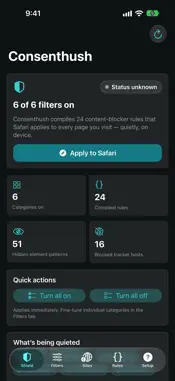
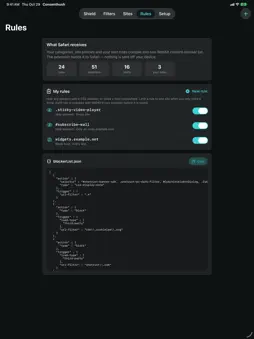
Consenthush is a focused Safari content blocker for cookie banners, consent-management scripts, newsletter overlays, open-in-app prompts, floating chat widgets and notification nags. Version 2.0 adds your own rules, Siri and Shortcuts actions, and backup and restore. EVERYTHING INCLUDED, ONE PURCHASE No subscription, no in-app purchases, no account. Every feature below is part of the app. YOUR OWN RULES Hide any element the built-in categories miss with a CSS selector, or block a host and its subdomains. Limit a rule to one site when you only need it there, and switch rules on and off at any time. Every new rule is checked with WebKit's own content-blocker compiler before it is saved, so one mistyped selector cannot make Safari reject your whole rule list. SELECTIVE SITE POLICIES When a site needs special treatment, you do not have to turn every filter off. Create a policy that bypasses only the troublesome categories on that site while your other protections stay on. A full-site bypass is available when it is genuinely needed, and policies cover the domain and its subdomains. INSPECT BEFORE YOU APPLY Paste a domain or URL into the on-device Policy Inspector to see which protections stay active there, which categories a site policy bypasses, and how many of your own rules apply. No page is opened and no browsing activity is collected. SIRI AND SHORTCUTS Turn a category on or off, allow a site, protect a site again, or re-apply your rules from Siri, the Shortcuts app or an automation, without opening Consenthush. BACKUP AND RESTORE Save your filters, site policies and custom rules to a JSON file in Files and restore them on a new iPhone or iPad. Restoring shows what the backup contains before anything is replaced. TRANSPARENT RULES - Six individually controlled categories - Hides page overlays and prompts with Safari's cosmetic rules - Blocks scripts from 16 widely used third-party consent-management hosts at the network level (the list is shown in the app) - Live counts for rules, selectors, hosts and your own rules - Exact preview of the JSON rule list Safari receives - Clear extension status and setup guidance GOOD TO KNOW - After installing, turn on Consenthush under Settings > Apps > Safari > Extensions, then tap Apply to Safari in the app. - Consenthush hides banners built with the consent frameworks and common banner markup it lists. A site with its own custom banner may still show it; a custom rule can often hide it. Hiding a banner does not accept or reject anything on your behalf. - Blocking a consent script can stop a few sites from working properly; a site policy for that site fixes it. PRIVACY Consenthush uses Safari's declarative content-blocker engine. The extension cannot read your browsing history or page contents. Your settings stay on your device in the app's shared container. No account, advertising, analytics, tracking, subscription or developer server.
What's New
Version 2.0 2026-10-30
Consenthush 2.0 is a major update. - My rules: hide any element with a CSS selector or block a host, everywhere or on one site. Each rule is checked with WebKi... Technical Analysis
Package Overview Basic metadata
Bundle ID
com.realbobcorbin.Consenthush Current Version 2.0
Minimum iOS 17.0
Package Size App Store Size
Package Metadata 0 / 0 version records
Detailed binary, privacy manifest, framework, and Info.plist results have not been indexed for this package yet. The verified App Store and archive metadata above remains available.
Price History (USA store)
3 recorded price change points. These are historical observations, not a guarantee of the current price.
| Recorded at | Price | Currency |
|---|---|---|
| 2.99 | USD | |
| 0.0 | USD | |
| 2.99 | USD |
Developer Information
Known Version Records
0 version records with stored package metadata
Stored metadata does not guarantee a package is currently available to download.
| Details | Version / IDs | Version date | Action |
|---|