
Preview







Description
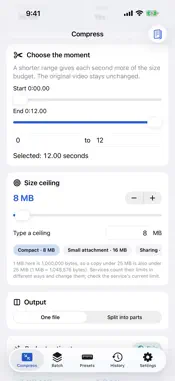
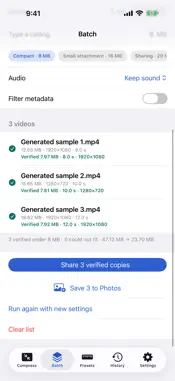
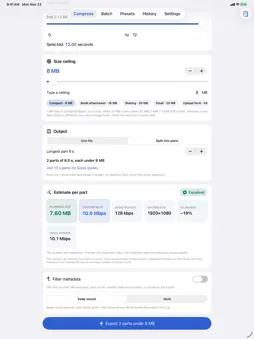
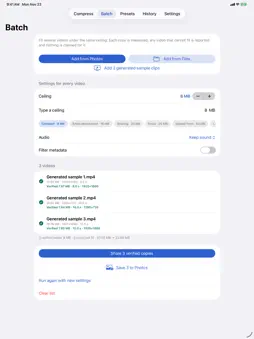
Clipquota fits a video under the size you need, then measures the finished file before you share it: actual bytes, duration and, if you chose Mute, that no audio track remains. Everything happens on your device. NEW IN 4.0 - Encodes at the planned bitrate and size. Earlier versions handed the encoder a fixed preset, so busy clips often came out much smaller than the estimate. Now the video is encoded at the bitrate the plan shows, the finished file is measured, and a file over the ceiling is encoded again at a lower bitrate. Apple's export presets remain as a last resort. - After export you see the measured average bitrate and a quality estimate from the measured file. History records what was made, not the plan. - Save to Photos, for one file, all parts or a whole batch. Clipquota asks only to add videos; it never reads your library. - Type a ceiling to a tenth of a megabyte, such as 9.5 MB. Labels and file names no longer round up. - Metadata filter off now keeps the source's creation date and location; on, the copy carries no file metadata. - Variable-frame-rate clips keep their original frame timing (earlier versions could drop frames). - Safer data: a damaged History or preset record no longer empties the list; the original is kept and a notice explains it. Deleting a History record, a preset, or batch videos with verified copies asks first. - History CSV adds local date and time columns, and the formula guard covers tab and return characters. - Free-space check before exporting, leftover temporary copies are cleared, and an export interrupted by leaving the app says so. HOW IT WORKS 1. Choose a video from Photos or Files, or generate a sample clip, and set the start and end of the moment you need. 2. Pick a size ceiling (type it, slide it or tap one of your presets), choose one file or equal parts, Keep sound or Mute, and optional metadata filtering. 3. Read the plan: video and audio bitrate, encode size and an estimated quality rating. 4. Export. Review the measured result, preview it, save it to Photos or share it with an export receipt. ALSO INCLUDED - Split into parts: equal, consecutive parts that each fit the same ceiling, with a suggested part length for Good quality. Every part is verified. - Batch: up to 20 videos from Photos or Files under one ceiling; any video that cannot fit is reported instead of counted. - Shortcuts action “Fit Video to Size”: give it a video and a size in MB, get back a verified copy. - History dashboard with totals and CSV export, your own size presets, readable file names such as “Trip (25 MB).mp4”. EVERYTHING INCLUDED One purchase, no subscription. No account, no ads, no analytics. WHAT TO KNOW 1 MB here is 1,000,000 bytes, so a copy under 25 MB is also under 25 MiB. Services set and change their own limits; check the one you are sending to. The quality rating is a rule of thumb from bits per pixel, not a measurement of the picture. If a verified result cannot be produced, no success is claimed. Output is H.264 video with AAC audio in an MP4 file; HDR footage is converted to standard range. The original is never edited. iPhone and iPad.
What's New
Version 4.0 2026-11-23
Clipquota 4.0 - Encodes at the planned bitrate and size, measures the file and re-encodes smaller only if needed (busy clips no longer drop to a much smaller pr...Clipquota 4.0 - Encodes at the planned bitrate and size, measures the file and re-encodes smaller only if needed (busy clips no longer drop to a much smaller preset) - Measured bitrate and quality estimate after export; History logs the measured file - Save to Photos for one file, parts or a batch (add-only access) - Type a ceiling to 0.1 MB; labels no longer round up - Metadata filter off keeps creation date and location - Variable-frame-rate clips keep their original frame timing - A damaged History or preset record no longer empties the list - Deleting History records, presets or verified batch copies asks first - CSV adds local date and time; stronger formula guard - Free-space check, leftover temporary files cleared, clear message if an export is interrupted Technical Analysis
Package Overview Basic metadata
Bundle ID
com.realbobcorbin.Clipquota Current Version 4.0
Minimum iOS 17.0
Package Size App Store Size
Package Metadata 0 / 0 version records
Detailed binary, privacy manifest, framework, and Info.plist results have not been indexed for this package yet. The verified App Store and archive metadata above remains available.
Price History (USA store)
3 recorded price change points. These are historical observations, not a guarantee of the current price.
| Recorded at | Price | Currency |
|---|---|---|
| 2.99 | USD | |
| 0.0 | USD | |
| 2.99 | USD |
Developer Information
Known Version Records
0 version records with stored package metadata
Stored metadata does not guarantee a package is currently available to download.
| Details | Version / IDs | Version date | Action |
|---|