Preview




Description
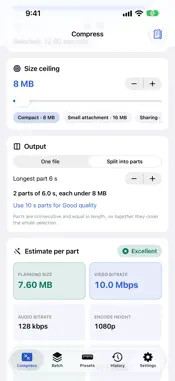
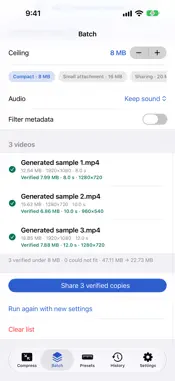
Clipquota fits a video under the exact size you need, then measures the finished file before you share it: actual bytes, duration and, if you chose Mute, that no audio track remains. Everything happens on your device. NEW IN 3.0 - Split into parts: turn a long video into equal, consecutive parts that each fit the same ceiling. Clipquota suggests the longest part length that keeps Good quality for your clip, and every part is verified. - Batch: add up to 20 videos from Photos or Files and fit them all under one ceiling. Each copy is measured; any video that cannot fit is reported instead of counted. - Smarter fitting: when a busy clip overshoots the plan, Clipquota automatically steps down to a smaller encoder size and tries again, so tight ceilings succeed more often. - Shortcuts action "Fit Video to Size": give it a video and a size in MB, get back a verified copy. Keep sound and metadata filtering are options. - History dashboard: every verified export is logged with totals, how many landed under the ceiling and how full the allowance was. Export the history as a CSV file. - Try it without your own footage: generate a sample clip on the device (moving colour bars and a tone). - Exported files keep a readable name, such as "Trip (25 MB).mp4" or "Trip part 2 of 3.mp4". - Redesigned for iOS 26 with better contrast, larger-text support and iPad layouts. HOW IT WORKS 1. Choose a video from Photos or Files and set the start and end of the moment you need. 2. Pick a size ceiling (type it, slide it or tap one of your presets), choose one file or parts, Keep sound or Mute, and optional metadata filtering. 3. Read the budget estimate: planned bitrate, encode height and an expected-quality rating. 4. Export. Review the measured result, preview it and share the copy with an export receipt. EVERYTHING INCLUDED One purchase, no subscription. No account, no ads, no analytics. WHAT TO KNOW Budget values are estimates; the completed file is checked against the chosen ceiling. If a verified result cannot be produced, no success is claimed. Encoding can reduce quality and supported source formats depend on the device. The original is never edited. Metadata filtering uses Apple's sharing filter and is not a guarantee that all identifying information is removed. iPhone and iPad.
What's New
Version 3.0 2026-10-30
Clipquota 3.0 - Split into parts: equal parts that each fit your ceiling, with a suggested part length for Good quality - Batch: fit up to 20 videos under one c... Technical Analysis
Package Overview Basic metadata
Bundle ID
com.realbobcorbin.Clipquota Current Version 3.0
Minimum iOS 17.0
Package Size App Store Size
Package Metadata 0 / 0 version records
Detailed binary, privacy manifest, framework, and Info.plist results have not been indexed for this package yet. The verified App Store and archive metadata above remains available.
Price History (USA store)
3 recorded price change points. These are historical observations, not a guarantee of the current price.
| Recorded at | Price | Currency |
|---|---|---|
| 2.99 | USD | |
| 0.0 | USD | |
| 2.99 | USD |
Developer Information
Known Version Records
0 version records with stored package metadata
Stored metadata does not guarantee a package is currently available to download.
| Details | Version / IDs | Version date | Action |
|---|