Preview



Description
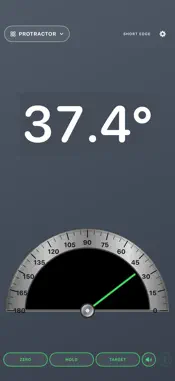
A protractor, bubble level, tape measure, ruler and room-planning toolkit in your pocket. Digital Protractor & Level brings 15 tools together with large readings, familiar instruments and a quick tool selector. Choose any tool as your default at launch. Now in English, Spanish, French and German. ANGLES & LEVELS • Protractor: read angles with a realistic dial and clear numerical display. • Level: a traditional bubble vial with degrees, percent slope and rise per 12. • 4 Corners: a bullseye surface level for tabletops and other flat surfaces. • Photo Angle: choose a photo and drag the corner and endpoints to measure an angle. • Camera Level: use on-screen alignment guides over the live camera. • Compass & Tilt: check direction and inclination. MEASURE & PLAN • Tape Measure: place a start and end point in augmented reality, with a bold measurement line and visible point markers. Chain segments, capture dimensions and save measurements with Expanded Toolkit. • Ruler: a full-height, calibrated on-screen ruler in metric or imperial units, with a drag handle that stays clear of the controls. • Feet & Inches: calculate fractions, convert metric lengths, add or subtract dimensions, multiply, divide and find equal spacing. • Height: mark a base and top to estimate vertical height. • Area: outline a flat surface to estimate its area. • Floor Plan: enter wall lengths or mark floor corners, then save and share a plan. • Room Layout: scan a room with LiDAR on a supported iPhone. Export USDZ, OBJ, SVG and JSON files to a computer for compatible 3D, drawing and rendering software. Exports contain simplified geometry, not a photographic scan. • TV Sizer: preview a selected screen size on a wall. • Magnetic Field: view nearby magnetic field strength. PROJECTS & QUICK ACCESS Group saved measurements, notes and selected photos into projects and share PDF reports with Expanded Toolkit. Pin favorite tools for quick access. Level opens by default on a new installation; choose your own startup tool in Settings or Tools. Owners and subscribers open their entitled default ready to use. Portrait and landscape layouts keep controls within reach. The app follows your iPhone's language in English, Spanish, French and German, including readings, spoken angles and purchase details. FREE & PAID ACCESS Use the basic Protractor, Level, Ruler and single-line Tape Measure free. Opening a tool preview is free; paid tools and actions show the available purchase options when you use them. Expanded Toolkit unlocks all paid features. Choose $1.99 per month, $4.99 every three months, or a $14.99 one-time lifetime purchase in the U.S. Prices vary by country and are shown before purchase. Monthly and three-month subscriptions renew automatically unless canceled at least 24 hours before the current period ends. Manage or cancel subscriptions in your App Store account settings. Lifetime does not renew. Restore Purchases is available in the app. Existing Original Tools buyers keep the tools and features included in their original purchase. Expanded Toolkit is an optional upgrade for the additional tools. DEVICE & MEASUREMENT NOTES AR measurements are estimates and depend on lighting, surfaces and tracking. Room scanning requires a LiDAR-equipped iPhone. Camera Level displays virtual guides; it does not project a laser. Magnetic Field is not a dependable wire or stud detector. Photo angles can be affected by perspective. Check critical measurements with appropriate physical tools. No account and no in-app ads. Photos, scans and saved measurements stay on your device unless you choose to share them. Camera access supports camera and AR tools; optional location access supports true north. Purchases and restores require internet access. Terms of Use: https://www.apple.com/legal/internet-services/itunes/dev/stdeula/
What's New
Version 2.2 2026-10-21
New in 2.2: • Feet & Inches calculator: fractions, metric conversions, arithmetic and equal spacing. • Projects: organize saved measurements with notes and phot... Technical Analysis
Package Overview Basic metadata
Bundle ID
com.djbobcarpenter.simple-digital-protractor Current Version 2.2
Minimum iOS 17.0
Package Size App Store Size
Package Metadata 0 / 0 version records
Detailed binary, privacy manifest, framework, and Info.plist results have not been indexed for this package yet. The verified App Store and archive metadata above remains available.
Developer Information
Known Version Records
0 version records with stored package metadata
Stored metadata does not guarantee a package is currently available to download.
| Details | Version / IDs | Version date | Action |
|---|