Preview


Description
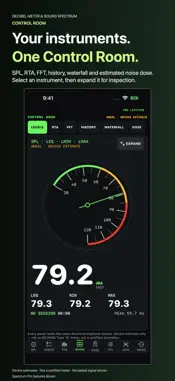
SPL. Spectrum. Exposure. One Control Room. Analyze sound level, frequency and change over time. For audio engineers, AV technicians, installers, musicians and environmental-sound investigations. SIX-INSTRUMENT CONTROL ROOM On iPad and Mac, view SPL/Leq, RTA, FFT, level history, waterfall and estimated noise dose together from one microphone. Expand an instrument, then close it to restore the overview. iPhone shows one instrument at a time. Live previews are available; Pro unlocks professional interactions and saved work. HIGHER-RESOLUTION SPECTRAL ANALYSIS FFT: 1,024–16,384 points; Hann, Hamming or flat-top windows; bin spacing and frame duration displayed. Hum preset: 20–500 Hz, 16,384 points. Longer frames improve bin spacing at the cost of temporal resolution, not microphone calibration. FREE LIVE SOUND LEVEL METER Explore live instrument previews before upgrading. Spectrum Pro unlocks professional controls, captures, sessions, saving and export. GUIDED SOUND CHECK Hum & Buzz, Feedback Tone and Venue Sound Check capture ten seconds before and after adjustment. Compare log-frequency overlays, signed 1/3-octave deltas and largest band change. Export graphical PDF with settings and frequency table, or original JSON. Match microphone, calibration and settings for comparisons. Relative tone strength tracks a frequency, not its source. MEASURE AND ANALYZE • Live estimated SPL, Leq, Lmin, Lmax, Hold and peak frequency • A, B, C, Z and ITU-R 468 weighting; Fast, Slow and Impulse response • 1/3-octave RTA, FFT, bars, line and scrolling waterfall views • System RTA, Feedback, Hum and Waterfall analyzer presets • Named calibration profiles and guided comparison with a trusted physical meter • Saved sessions, field reports and estimated noise dose MORE TOOLS Pro includes AAC/WAV and video recording, camera overlays, waveform inspection, loud-noise alerts, Live Activities, Siri/Shortcuts, optional iCloud session backup and Default Tool selection at launch. App and Watch support twelve languages; reports remain English. Sound Checks remain local unless exported. On Mac, use the macOS Sound input. Calibrate each microphone/gain setting against a trusted reference. No HealthKit integration. APPLE WATCH CONTROL ROOM Choose Watch Microphone or iPhone Remote. An active Spectrum Pro subscription or Lifetime unlocks full Watch tools. Watch Microphone measures raw dBFS or user-adjusted estimates with a reference offset, only while the Watch app is in the foreground. Spectrum, Dose, Hum & Buzz and Feedback use iPhone analysis, not the Watch microphone. Pause, resume or stop the iPhone session from your wrist. Adjustable text, Hold Display and favorite tool ordering. SPECTRUM PRO PRICING Monthly, Annual or one-time Lifetime. Apple shows local prices and offer eligibility before purchase. Existing purchases honored. Subscriptions renew automatically unless canceled at least 24 hours before the current period ends. Payment is charged to your Apple Account at confirmation or after an eligible trial. Manage or cancel in Apple Account subscription settings. Lifetime is a one-time purchase. ACCURACY AND PRIVACY Device microphone readings are estimates. This is not an IEC/ANSI Type 1 or Type 2 meter, a certified dosimeter, or a replacement for required safety equipment. Use a trusted reference and consistent positioning for meaningful comparisons. Audio is processed on device. Optional audio/video recording starts only when you choose Record. Recordings stay local unless exported and are excluded from iCloud session sync. Optional iCloud backup is off by default. No tracking. Measurement is foreground-only; Live Activities may show paused or stale readings when measurement stops. Privacy Policy: https://gqbunny.com/decibel-meter-sound-spectrum-privacy.php Terms of Use (Apple Standard EULA): https://www.apple.com/legal/internet-services/itunes/dev/stdeula/
What's New
Version 3.3.1 2026-10-21
Mac Version now Ready Decibel Meter & Sound Spectrum is now available on the Mac App Store for Mac computers. New Apple Watch Control Room: choose the Watch's...Mac Version now Ready Decibel Meter & Sound Spectrum is now available on the Mac App Store for Mac computers. New Apple Watch Control Room: choose the Watch's own microphone or iPhone Remote. Full Watch tools require an active Spectrum Pro subscription or Lifetime purchase. Explore live instrument previews before upgrading. Spectrum Pro unlocks professional controls, captures, sessions, saving and export. Clearer subscription offers and renewal prices, improved preview layouts and a more readable waterfall display. Apple TV Control Room is coming soon. Availability is subject to App Review. Technical Analysis
Package Overview Basic metadata
Bundle ID
com.gqbunny.decibelsoundlevelmeter Current Version 3.3.1
Minimum iOS 17.0
Package Size App Store Size
Package Metadata 0 / 0 version records
Detailed binary, privacy manifest, framework, and Info.plist results have not been indexed for this package yet. The verified App Store and archive metadata above remains available.
Developer Information
Known Version Records
0 version records with stored package metadata
Stored metadata does not guarantee a package is currently available to download.
| Details | Version / IDs | Version date | Action |
|---|