
Preview

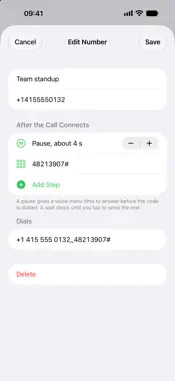

Description
Watch Keypad puts a full keypad on your wrist and dials what the built-in one can't: numbers with pauses and codes, saved numbers you don't want in your contacts, and one-tap calls from your watch face. DIAL SEQUENCES • A number, a pause, then a PIN and #: join a conference call, check your voicemail or reach an extension in one tap • A pause gives a voice menu time to answer; a wait stops until you tap to send the rest • Build sequences on your phone and see exactly what gets dialled SAVED NUMBERS • Keep the numbers you call or text now and then, without cluttering your contacts • Edit them on your phone, use them on your watch: they sync directly between the two ON YOUR WRIST • Large keys with haptics; turn the crown for *, #, +, pause and wait • Call or text straight from the keypad • Recent numbers, one tap to call again • Install it on your watch on its own: calls go through your phone or the watch's own cellular connection ONE TAP AWAY • Put a saved number on your watch face or in the widget stack • Open the keypad from Control Center • Say "Call Team standup with Watch Keypad" PRIVATE No account, no tracking, no ads. Your numbers stay on your phone and watch. Used the earlier version? Your recent numbers are carried over.
What's New
Version 3.0 2026-11-01
Watch Keypad is rebuilt from scratch. • Dial sequences: numbers with pauses, PINs and codes • Saved numbers, synced between your phone and watch • Watch face co... Technical Analysis
Package Overview Basic metadata
Bundle ID
com.Rydee.Phatch Current Version 3.0
Minimum iOS 18.0
Package Size App Store Size
Package Metadata 0 / 0 version records
Detailed binary, privacy manifest, framework, and Info.plist results have not been indexed for this package yet. The verified App Store and archive metadata above remains available.
Developer Information
Known Version Records
0 version records with stored package metadata
Stored metadata does not guarantee a package is currently available to download.
| Details | Version / IDs | Version date | Action |
|---|