SetsRepsWheels App Icon

SetsRepsWheels

Health & Fitness • Rob Boer
4+ v1.7 Recorded price: Free App Store →
★★★★★
★★★★★
(1 App Store ratings)
IPA Analysis
Technical Specs
Bundle ID robotex.workout-aicode
Version 1.7
App Store Size 16.58 MB
Minimum iOS 18.6
Devices iPhone, iPad, iPod touch
Catalog release date 2026-04-14
Latest recorded version date 2026-11-07
Features & Support
Apple Watch
Advisory 4+
Languages (1)
EN
Top In App Purchases
No In App Purchases Listed

Preview

SetsRepsWheels screenshot 1 SetsRepsWheels screenshot 2 SetsRepsWheels screenshot 3 SetsRepsWheels screenshot 4 SetsRepsWheels screenshot 5 SetsRepsWheels screenshot 6 SetsRepsWheels screenshot 7 SetsRepsWheels screenshot 8 SetsRepsWheels screenshot 9 SetsRepsWheels screenshot 10 SetsRepsWheels screenshot 11 SetsRepsWheels screenshot 12 SetsRepsWheels screenshot 13 SetsRepsWheels screenshot 14 SetsRepsWheels screenshot 15 SetsRepsWheels screenshot 16 SetsRepsWheels screenshot 17 SetsRepsWheels screenshot 18

Description

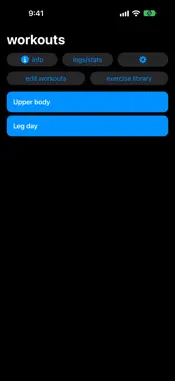
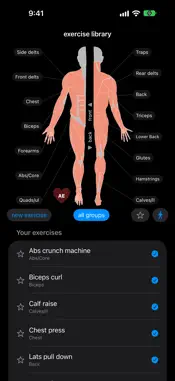
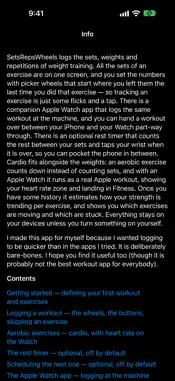
SetsRepsWheels logs the sets, weights and repetitions of weight training. All the sets of an exercise are on one screen, and you set the numbers with picker wheels that start where you left them the last time you did that exercise — so tracking an exercise is just some flicks and a tap. There is a companion Apple Watch app that logs the same workout at the machine, and you can hand a workout over between your iPhone and your Watch part-way through. Everything stays on your devices unless you turn something on yourself. I made this app for myself because I wanted logging to be quicker than in the apps I tried. It is deliberately bare-bones. I hope you find it useful too (though it is probably not the best workout app for everybody).

What's New

Version 1.7 2026-11-07
Kilograms or pounds. Weights have a unit now. Pick yours in Settings — the app starts from wherever you are — and everything already logged comes with you, conv...Kilograms or pounds. Weights have a unit now. Pick yours in Settings — the app starts from wherever you are — and everything already logged comes with you, converted once and shown the way you chose. Wheels step in fractions too, so 2.5 kg and 1.25 kg increments work properly. Machines that take weight off you. An exercise can be marked as assisted: the wheel is what you set on the machine, and the app works out what you actually lifted from your body weight, which it can take from Apple Health. Your workout on Apple Watch as a real Apple workout. New under Settings › Workouts on the Watch: let the Watch record the whole session as an Apple workout, so it lands in Fitness with your heart rate and counts towards your rings. While it runs, the five heart rate zones sit as a colored band behind the exercise name, with a marker showing where in the zone you are. How strongly it is drawn is yours to set. Zones that are actually yours. On watchOS 27 the app reads the very boundaries the Workout app is using, straight out of Health. On an older Watch you can type your four numbers in under Settings › Heart rate zones rather than let the app estimate them — and the Watch always says which of the three it is using. More room on the Watch. Weights and repetitions can show as two rows of wheels at once instead of one row with a toggle. Logging slides on to the next exercise, and you can swipe between exercises without logging. The rest timer shows as a red bar down the left side of the screen that drains as it runs, so the wheels stay usable the whole way through. You can now set the number taps at the end of a rest from one to five, because one tap is easy to miss in a gym. Scheduling the your next workouts. Optional, and off until you switch it on: finishing a workout can offer to put some next ones in your calendar, at the time you trained today. It only ever touches events it put there itself. Duplicate and merge workouts. Swipe a workout to the right to copy it, or to make a third one out of two — for splitting a routine without throwing the old one away. Also: opening the iPhone no longer takes a workout off the Watch; the logs filter filters what you can see; blank rows no longer appear in the log list; a set with no repetitions is not counted as a set; and the wheels settle where you let go of them. There is a Mac app now as well, in the Mac App Store under the same name.

Technical Analysis

Package Overview Basic metadata
Bundle ID robotex.workout-aicode
Current Version 1.7
Minimum iOS 18.6
Package Size App Store Size
Package Metadata 0 / 3 version records
Detailed binary, privacy manifest, framework, and Info.plist results have not been indexed for this package yet. The verified App Store and archive metadata above remains available.

Developer Information

Known Version Records

0 version records with stored package metadata • 3 known version records

Stored metadata does not guarantee a package is currently available to download.

Details Version / IDs Version date Action
SetsRepsWheels icon
Not archived
App Store ID: 884955077 Unknown Request Version
SetsRepsWheels icon
Not archived
App Store ID: 884564469 Unknown Request Version
SetsRepsWheels icon
Not archived
App Store ID: 884179290 Unknown Request Version