
Preview




Description
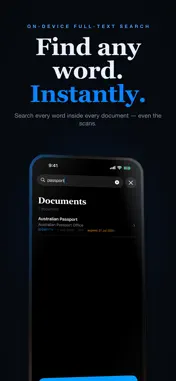
Every document saves as a file you actually control. 2026-04-25-Australian-Passport-Office-Passport-Ben-Lewis.pdf. Or your own pattern: date first, issuer first, title first, custom tokens — your call. That's the standout feature. Most document scanners trap your scans behind a proprietary search box. FileSnap Docs saves them as named PDFs (or JPGs) on your device, in a folder you can open, share, sort, and find without the app. You own the files. Pay once. Keep forever. No account. No cloud. No subscription. THE NAMING CONVENTION (THE BIT THAT DIFFERENTIATES) Pick a preset: • Date + Issuer + Title: 2026-04-25-Australian-Passport-Office-Passport-Ben-Lewis.pdf • ISO-dash, ISO-dots, US/UK/EU date orders — all built in • Vendor-first, Date+Title, Date+Type+Title — pick what suits the way you sort Or write your own pattern with {date} {issuer} {title} {type} {tags} tokens — your separators, your order. Apply it to the whole archive in one tap if you change your mind. The documents you scan are the ones you'll need to find later — sometimes years later, often under stress. Filenames you can read at a glance beat any in-app search. WHAT ELSE IT DOES • Multi-page capture — scan a passport, a contract, an insurance schedule, all into one document. • On-device OCR — every page is indexed so you can full-text search the whole archive later. "Where is that warranty for the dishwasher?" — just search "dishwasher". • Smart suggestions — FileSnap reads the issuer, document type, date, and expiry from the captured pages and pre-fills the Confirm screen. Edit anything you don't like. • Expiry reminders — add a calendar reminder before a passport, insurance policy, or registration expires. The reminder lives in your iOS Calendar; you control how far in advance. • Encrypted ZIP export — bundle documents into a standard, password-protected AES-256 .zip your accountant, lawyer or family can open in any zip tool (Keka, 7-Zip, the Files app) with the password — no special app needed. • PDF or JPG output — your choice per document. WHY ON-DEVICE MATTERS The documents you scan are sensitive. Passports, drivers' licences, insurance numbers, contracts, medical records — these are exactly the things you don't want sitting on someone else's server. FileSnap Docs keeps them on your iPhone, in the app's private storage. Apple's Vision framework runs the OCR. Apple's Calendar holds the reminders. We don't have a server. There is no FileSnap Docs cloud account. If you have iCloud Backup enabled in iOS, your documents are included in your backup, governed by Apple's privacy policy. We don't see them. No analytics. No tracking. No ad SDKs. No data leaves your device. WHO IT'S FOR • Anyone who's ever rummaged through a folder for "the right form" and given up. • Self-employed people who keep contracts, ABN paperwork, and insurance certificates close at hand. • Parents tracking immunisation records, school forms, and Medicare cards. • Anyone who's missed a passport renewal by three weeks. • People who want their important paperwork searchable without uploading it to a third party. PERMISSIONS WE ASK FOR AND WHY • Camera — to scan a document. We don't use the camera for anything else. • Photos — only when you import an existing photo of a document. We don't read your photo library. • Calendar (optional) — only when you opt in to an expiry reminder for a specific document. The event is created in your default calendar. You can revoke any of these in iOS Settings. The app continues to work with reduced auto-fill convenience. PRIVACY PROMISE • We do not collect data about you. • Apple's privacy nutrition label for this app is "Data Not Collected". • No accounts. No login. No newsletter signup nag. ONE-TIME PURCHASE You pay once. You own the app. There is no subscription, no premium tier, no upsell. Future updates are included. SUPPORT A short page lives at the support URL. We're a small team — emails get answered.
What's New
Version 1.3.0 2026-08-11
Sort documents as you scan. Tag each document Personal or Business, and flag anything tax deductible. Tags are now a searchable picker: choose one you have us...Sort documents as you scan. Tag each document Personal or Business, and flag anything tax deductible. Tags are now a searchable picker: choose one you have used before or create a new one, so you do not end up with near duplicates of the same tag. Filter your library by classification or tag. Both are included in Spotlight search too. Technical Analysis
Package Overview Basic metadata
Bundle ID
com.roamhpu.FileSnapDocs Current Version 1.3.0
Minimum iOS 17.0
Package Size App Store Size
Package Metadata 0 / 3 version records
Detailed binary, privacy manifest, framework, and Info.plist results have not been indexed for this package yet. The verified App Store and archive metadata above remains available.
Developer Information
Known Version Records
0 version records with stored package metadata • 3 known version records
Stored metadata does not guarantee a package is currently available to download.
| Details | Version / IDs | Version date | Action |
|---|---|---|---|
| Not archived | App Store ID: 887951053 | Unknown | Paid / Arcade |
| Not archived | App Store ID: 887853404 | Unknown | Paid / Arcade |
| Not archived | App Store ID: 885200610 | Unknown | Paid / Arcade |