
Preview


Description
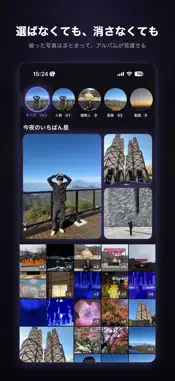
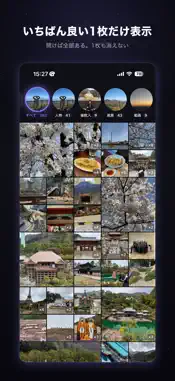
After a trip, an iCloud Shared Album fills up with bursts and retakes of the same scene. Picking the best one, or deleting the rest, is a chore nobody does. So the album just sits there, unopened. mekkemon is a viewer that shows that album tidied up. Near-identical photos are grouped, and only the best-looking one of each group is shown. No picking, no deleting: you can finally flick through the whole album to the end. It's not an app you'll open every day. But one day you open it and run into a photo you'd forgotten you ever took. That chance find is what the name means. ■ Repeats, folded into one ・Similar photos are grouped automatically; only one representative is shown ・Open a group to compare the other shots of the same scene ・Nothing is deleted. The originals are untouched; only the view is tidied ■ Wander a canvas ・Representative photos stretch endlessly in every direction ・The best shots are shown larger ・Pinch to change the photo size ・Switch to a plain list any time ■ Shared albums, and your own ・You choose which albums to read: shared albums, or albums you made yourself ・Combine a few albums into a group and browse them together, without the rest mixed in ・Or look at a single album on its own ・Albums you didn't pick, and the rest of your library, are never read ■ See only what you want ・Switch between People, Scenery and Video ・Jump back to any day from the calendar ・Screenshots and the like are hidden by default ■ Tonight's brightest star ・A few photos you haven't looked at in a while, refreshed daily ・"On this day" photos from past years are favoured ■ One photo a day, on your home screen ・The "Today's find" widget shows one photo a day from the albums you've read ・Small, medium and large. Tap to open the photo ■ Video and Live Photos too ・Video plays in place. Press and hold a Live Photo in the detail view to play it ■ Your photos are never touched ・mekkemon never deletes, edits or reorders anything in your albums ・All analysis happens on your iPhone ・No data is collected or sent anywhere (the one exception: if you tap Send in "Send a note" in the menu, what you wrote plus your device model and app version reach the developer) ■ Before you start ・You need an iCloud Shared Album you created or joined, or an album of your own ・Shared albums can't be read with Limited Access, so Full Access to Photos is required ・The first pass over an album takes a little while. Close the app any time; it picks up where it left off
What's New
Version 1.3 2026-09-26
Browse your photos on a canvas. Representative shots stretch endlessly in every direction, with the best ones shown larger. Pinch to resize, or jump to any day ...Browse your photos on a canvas. Representative shots stretch endlessly in every direction, with the best ones shown larger. Pinch to resize, or jump to any day from the calendar. Besides shared albums, you can now pick your own albums to read. Combine a few albums into a group and browse them together without the rest mixed in, or look at a single album on its own. Technical Analysis
Package Overview Basic metadata
Bundle ID
wtf.maji.mekkemon Current Version 1.3
Minimum iOS 18.0
Package Size App Store Size
Package Metadata 0 / 0 version records
Detailed binary, privacy manifest, framework, and Info.plist results have not been indexed for this package yet. The verified App Store and archive metadata above remains available.
Developer Information
Known Version Records
0 version records with stored package metadata
Stored metadata does not guarantee a package is currently available to download.
| Details | Version / IDs | Version date | Action |
|---|