Preview




Description
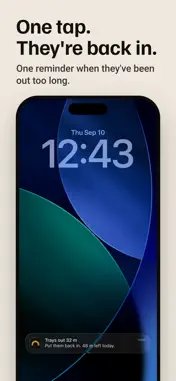
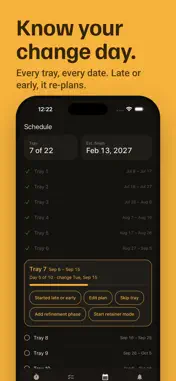
Wearclock is a clear aligner tracker and wear timer that counts the time your trays spend out of your mouth, against a daily out-time budget you set. Tap when they come out, tap when they go back in, and see exactly how much out-time is left today. It works offline, with no account and no ads. Most aligner trackers ask you to log the hours you managed to keep your trays in. Wearclock turns that around, because the number you can actually do something about is how long they are out. THE OUT-TIME BUDGET Set a daily budget and the ring counts it down as you eat, drink and brush. When it runs low you find out while the day can still be saved, instead of the morning after. Your day rolls over at 4:00 am rather than midnight, so a late dinner counts against the day you ate it. TRAY SCHEDULE AND CHANGE DAY Every tray in your plan, its dates, and the day you swap to the next one. A tray countdown tells you which tray you are on and how many days are left on it. Started late, skipped a tray, or moved into refinements? Say so once and the tray schedule redoes itself. REMINDERS AND ALARMS One reminder after your trays have been out too long, and one tap ends it. Wearclock never repeats a reminder unless you turn repeat on. The change-day reminder arrives the evening before you swap, so a tray change does not slip past you, and a nightly summary gives you the day's wear time in one line. AN EDITABLE WEAR LOG Forgot to tap? Add the session afterwards. Every entry in the wear log can be edited or deleted, and every number recalculates when you do. A weekly chart puts your wear time against your target, so a bad day is visible while you can still fix it. FREE, FOREVER • The in/out timer and the daily out-time budget • Tray schedule with a change-day reminder • Reminders that respect your Focus settings • A full wear log you can edit, and a backup file you own • Dark and light, and nothing to sign up for WHAT PRO ADDS • Home and lock-screen widgets with the timer and the button • Progress photos with a guide overlay and a compare slider • A wear report as a PDF for your orthodontist • Refinement phases and retainer mode RETAINER MODE When clear aligner treatment ends and the retainer goes in, switch Wearclock over. Retainer wear time is tracked the same way, on a nightly schedule instead of a daily one, so the habit carries on past the last tray. A REPORT YOUR ORTHODONTIST CAN READ The wear report gives your average wear time, streaks and the days you missed, as a PDF you can hand over at your next appointment. Wearclock never rounds a bad month up. It shows what happened, because the person reading it can tell. NOTHING LEAVES YOUR PHONE There is no account, no server, no cloud and no analytics. Wearclock reaches the internet for two things only: checking whether you have Pro, and taking a payment. Your backup is one file that you move yourself, and your progress photos stay on your device. WORKS WITH ANY CLEAR ALIGNER BRAND Invisalign®, Spark™, ClearCorrect®, Angel Aligner®, and any other clear aligner or retainer your orthodontist gives you. Not affiliated with Align Technology, Inc. Invisalign® is a registered trademark of Align Technology. Spark™, ClearCorrect® and Angel Aligner® belong to their owners. Wearclock is a timer, not medical advice. Follow your orthodontist's instructions. Terms of Use: https://wearclock.com/terms Privacy Policy: https://wearclock.com/privacy
What's New
Version 1.0.2 2026-11-06
New in Settings: rate Wearclock or share it with a friend. Technical Analysis
Package Overview Basic metadata
Bundle ID
com.wearclock.app Current Version 1.0.2
Minimum iOS 16.4
Package Size App Store Size
Package Metadata 0 / 0 version records
Detailed binary, privacy manifest, framework, and Info.plist results have not been indexed for this package yet. The verified App Store and archive metadata above remains available.
Developer Information
Known Version Records
0 version records with stored package metadata
Stored metadata does not guarantee a package is currently available to download.
| Details | Version / IDs | Version date | Action |
|---|