
Preview


Description
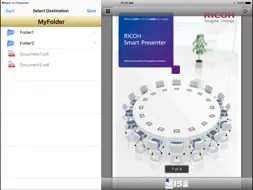
RICOH TAMAGO InOut Tool for Smart Presenter is the iPad app that allows you to save file to a shared folder on Windows, or to browse a file on a shared folder on Windows. ・InOut Tool supports only PDF files currently. ・This has the built-in viewer and you can browse a PDF file with it. ・InOut Tool can open a PDF file that is passed from another app. How to use 1.You set up a shared folder on your PC. 2.You open a PDF File that is passed from another app such as Evernote and Dropbox, on InOut Tool. 3.You access a shared folder(SMB) on Windows from InOut Tool. 4.You specify a destination folder, and then save the PDF file. System Requirements Device:iPad Air, iPad(5th/4th/3rd/2nd gen.), iPad mini, iPad Pro OS:iOS 9.0 or later WindowsOS that have been confirmed to operate properly: Windows 7, Windows 8.1, Windows 10, Windows Server 2008R2, Windows Server 2012, Windows Server 2012R2 Supported authentication method: InOut Tool can access the shared folder corresponding to the NTLM and NTLMv2 authentication. Supported SMB version: SMB v1, SMB v2. Restrictions ・When using multiple iPads, saving a file with the same name in the same shared folder at the same time may result in the file being damaged. ・A file will be saved even if the file size is larger than the free space of the destination folder, and a corrupted file will be created. Please be conscious of the free space on the device. "RICOH Smart Presenter" is paperless meeting and presentation application for iPad/iPhone/iPod Touch (iOS device) When used in combination with Smart Presenter, InOutTool provides "Smart Presenter" user with more usability for free. ・You can directly save the PDF file that you created in saving documents function of Smart Presenter, to a shared folder on your PC. ・You can import a PDF file in the shared folder of your own PC to Smart Presenter for casual meetings using InOut Tool.
What's New
Version 1.2.0 2018-04-26
Added support for SMB v2. To access the shared folder of the PC participating in the domain, please enter it in the form of "domainname\username" in "User name:...Added support for SMB v2. To access the shared folder of the PC participating in the domain, please enter it in the form of "domainname\username" in "User name:" on the "New Connection" screen. Technical Analysis
Package Overview Basic metadata
Bundle ID
jp.co.ricoh.tamago.InOutTool Current Version 1.2.0
Minimum iOS 9.0
Package Size Latest Recorded Package Size
Package Metadata 1 / 5 version records
0.0 / 5.0 (0 ratings)
Detailed binary, privacy manifest, framework, and Info.plist results have not been indexed for this package yet. The verified App Store and archive metadata above remains available.
Known Version Records
1 version record with stored package metadata • 5 known version records
Stored metadata does not guarantee a package is currently available to download.
| Details | Version / IDs | Version date | Action |
|---|---|---|---|
 2.62 MB | v1.2.0 App Store ID: 841451908Build: 1.2.0.9478 | 2021-04-15 21:52:50 | Get Version |
| Not archived | App Store ID: 817665163 | Unknown | Request Version |
| Not archived | App Store ID: 761852722 | Unknown | Request Version |
| Not archived | App Store ID: 613275087 | Unknown | Request Version |
| Not archived | App Store ID: 389742666 | Unknown | Request Version |