Preview





Description
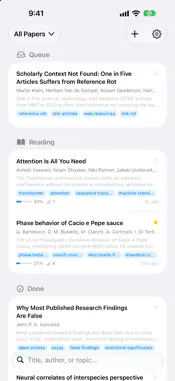
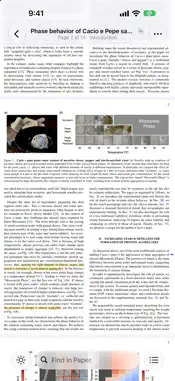
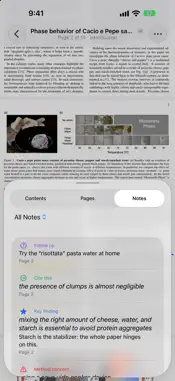
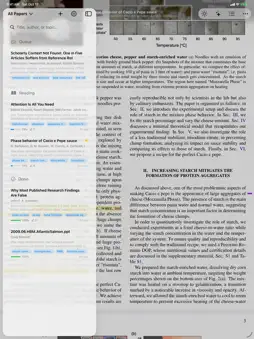
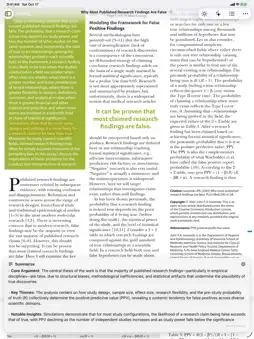
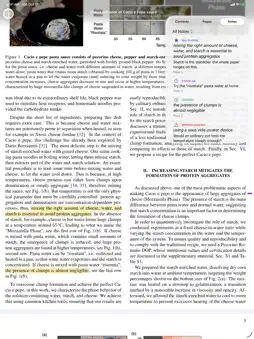
A reader for the papers you actually have to read: for a class, a lab meeting, a review or your own research. More than a plain PDF viewer, less work than a reference manager. READ COMFORTABLY • Pages fill the screen. Trim Margins crops away blank borders so the text is bigger. • Double-tap a column to zoom into it; double-tap again to zoom back out. • Light, dark and sepia reading, and two pages side by side on a wide screen. • The title bar shows where you are: page, and the section you're in. • Jump to any section, page or note from Contents. • Find in Paper shows every match and steps through them. KEEP WHAT MATTERS • Highlight and add notes from the text selection menu. • Tag them: Key finding, Method concern, Cite this, Follow up, Disagree, Connects to. Filter your notes by tag. • Copy with citation: copied text comes with an in-text citation, like (Bartolucci et al., 2025, p. 4). • On iPad, highlight and write with Apple Pencil. • Export your notes as Markdown or text, grouped by tag, or as an annotated PDF. COMPARE PAPERS • The literature matrix puts a group of papers in one table: each paper's aim, material, approach, result and your own notes. • Fill it in with AI, then edit any cell. • Export it as CSV or copy it as a table into Numbers, Excel, Pages or Word. A LIBRARY THAT ORGANIZES ITSELF • Paper details (exact title, authors, journal, year) are looked up from the paper's DOI or arXiv ID. • On-device intelligence writes a one-line summary, finds the paper's sections and picks out its topics. • Group papers into Queue, Reading and Done, star favorites, and browse by topic. Reading progress is shown for every paper. • Search by title, author or topic, or describe what you're looking for and let on-device AI find it. ASK ABOUT A PAPER • Summarize a paper or ask questions about it with Apple Intelligence, on your device. • Or add your own Claude API key for deeper answers. EVERYWHERE YOU READ • Papers, highlights and notes sync through your iCloud across iPhone, iPad and Mac. • Add PDFs from Files, from the share sheet in any app, or with File ▸ Import on the Mac. • On a Mac, keep Contents open in an inspector and the literature matrix in its own window. • On iPhone Duo, an unfolded phone becomes an open book, with two pages on either side of the fold. PRIVATE BY DESIGN • No accounts, no tracking, no analytics, no servers. • Summaries, sections and topics are made on your device. • To look up paper details, only the paper's public DOI or arXiv ID is sent (to Crossref, DataCite or arXiv). You can turn this off in Settings. • Paper text is sent to Anthropic only if you add a Claude API key and use Ask Claude. My Reading Stack is free, made by one developer. If it helps your reading, there's a tip jar in Settings.
What's New
Version 2.3 2026-10-27
Made for iPhone Duo, plus a place for your own notes on a paper. • On an unfolded iPhone Duo, facing pages fill the screen with only a narrow gap at the fold, ... Technical Analysis
Package Overview Basic metadata
Bundle ID
com.paperstack.app Current Version 2.3
Minimum iOS 26.0
Package Size App Store Size
Package Metadata 0 / 6 version records
Detailed binary, privacy manifest, framework, and Info.plist results have not been indexed for this package yet. The verified App Store and archive metadata above remains available.
Known Version Records
0 version records with stored package metadata • 6 known version records
Stored metadata does not guarantee a package is currently available to download.
| Details | Version / IDs | Version date | Action |
|---|---|---|---|
| Not archived | App Store ID: 884476384 | Unknown | Request Version |
| Not archived | App Store ID: 884371740 | Unknown | Request Version |
| Not archived | App Store ID: 884206080 | Unknown | Request Version |
| Not archived | App Store ID: 884093436 | Unknown | Request Version |
| Not archived | App Store ID: 884064411 | Unknown | Request Version |
| Not archived | App Store ID: 883929014 | Unknown | Request Version |