
Granny Hand — Sheepshead App Icon

Granny Hand — Sheepshead

Games • Richard Koopmann
4+ v2026.10.21 Recorded price: Free App Store →
IPA Analysis
Technical Specs
Bundle ID com.rkoopmann.sheepshead
Version 2026.10.21
App Store Size 18.27 MB
Minimum iOS 26.1
Devices iPhone, iPad, iPod touch
Catalog release date 2026-01-27
Latest recorded version date 2026-10-24
Features & Support
Game Center
Advisory 4+
Languages (1)
EN
Top In App Purchases
No In App Purchases Listed

Preview

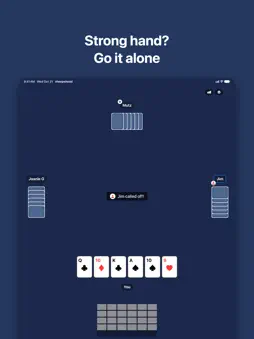
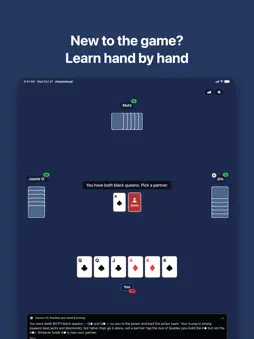
Granny Hand — Sheepshead screenshot 1 Granny Hand — Sheepshead screenshot 2 Granny Hand — Sheepshead screenshot 3 Granny Hand — Sheepshead screenshot 4 Granny Hand — Sheepshead screenshot 5 Granny Hand — Sheepshead screenshot 6 Granny Hand — Sheepshead screenshot 7 Granny Hand — Sheepshead screenshot 8 Granny Hand — Sheepshead screenshot 9 Granny Hand — Sheepshead screenshot 10 Granny Hand — Sheepshead screenshot 11 Granny Hand — Sheepshead screenshot 12

Description

Granny Hand is four-handed Sheepshead with the 24-card deck: queens, jacks, aces, tens, kings, and nines. The black queens are partners. Call an ace when you need help, go it alone when you don’t. It’s the version played at family holidays for decades, built by someone who couldn’t find an app that played it this way. PLAY • Three computer opponents with eight distinct personas, from Rookie to Gambler to Team Player. Set each seat yourself, or let the table reshuffle the seating. • Opponents that reason about partnerships: as the cards fall, each computer player tracks who is likely on which side and plays its seat accordingly. • Called ace, play alone, call it off, doubles after a 60–60 tie, and an optional house rule that forces a call-off with five or six trump. • A live score bar and a trick-by-trick history grid during the hand. Both can be switched off. LEARN • A guided tutorial in three lessons: reading your hand and picking, winning tricks and schmearing, the called ace and identifying teams. • Table talk: after a hand, a player at the table points out your costliest plays, with the numbers to back it up. On devices with Apple Intelligence the remark is phrased by the on-device model; otherwise it uses built-in wording. Either way it only ever comments on what the hand actually shows. REMEMBER • Every hand is recorded: who picked, what was called, and every card in the order it was played. Star the decks worth keeping, and share any deal as a challenge link so someone else can play the same cards and compare results with yours. • Player statistics with sparklines for stakes and final scores, win rates, and breakdowns by role, for you and, with the Player Stats purchase, for each computer player. • Game Center leaderboards for total wins, total games, win rate, and win rate when playing alone, plus dozens of achievements for the hands worth bragging about, like being dealt a granny hand. • Your history syncs through iCloud, so it follows you between devices. You can clear it any time. MAKE IT YOURS • Five table colors, four card backs, and an optional four-color deck. • Sort your hand by power or by point value. Choose which side the table sits on in landscape. • Designed for iPhone and iPad, with a layout for each. Free for your first week, then five decks a day. A one-time Unlimited Play purchase removes the daily limit and unlocks deck replay; Player Stats unlocks statistics for the computer players. No ads. Your game data lives in your own iCloud account and Game Center, nowhere else.

What's New

Version 2026.10.21 2026-10-24
The biggest update since launch. Here’s what’s changed since 2026.5.22. TABLE TALK After each hand, a player at the table points out your costliest plays: the ...The biggest update since launch. Here’s what’s changed since 2026.5.22. TABLE TALK After each hand, a player at the table points out your costliest plays: the card you played, the card that would have done better, and what it cost in points and chips. The judgment comes from replaying your hand against every legal alternative, not from guesswork. On devices with Apple Intelligence the remark is phrased by the on-device model; otherwise built-in wording is used. Up to two remarks per hand, on by default, off in Settings. LEARN TO PLAY A guided tutorial in three lessons, offered on first launch and any time from Settings: reading your hand and picking, winning tricks and schmearing, the called ace and identifying teams. MADE FOR IPAD A real table on iPad: opponents seated on three sides with their hands turned toward the middle, the trick in the center, your hand along the bottom with room above it, and the history grid and score bar in a panel beside or below the table. LANDSCAPE ON IPHONE Turn the phone sideways and the table takes one side while your stats, history grid, and score bar take the other. Pick which side in Settings. SETTINGS A proper Settings screen, synced through iCloud: five table colors, four card backs, an optional four-color deck, hand sort order, show or hide the score bar, history grid, and game clock, haptics, and a “Highlight teams” toggle for players who’d rather track partnerships themselves. CPU names and personas moved here too, with an option to reshuffle the seating every few rotations. HOUSE RULE Optional forced call-off: a player dealt five or six trump must play alone. CHALLENGES Challenge links now carry the creator’s time. At the end of a challenge you see a side-by-side of team points, tricks, your points, and time against the original. FAVORITES Star a deck on the result card or in Game History to find it again, and filter the history to starred decks only. Stars sync through iCloud. STATISTICS New breakdowns by day of the week, time of day, hand duration, and singles versus doubles. Player Statistics now opens instantly, even with thousands of recorded hands. FIXES • Clearing game history could lock up the app. Fixed. • The result card no longer overlaps your name and badges, and it fits the screen with table talk showing. • Calling announcements stay on screen longer and carry the loaner badge, so “called off” is harder to miss. • On narrower iPhones the opponents’ hands no longer push the layout past the screen edges. • Silent loners, called-off hands, and 60–60 ties now pay out correctly and show the real result. • Game history from two devices merges instead of one device’s hands being dropped. • Your Game Center scores retry after a failed report instead of being lost. • The dealer and seating now resume where you left off after relaunching.

Technical Analysis

Package Overview Basic metadata
Bundle ID com.rkoopmann.sheepshead
Current Version 2026.10.21
Minimum iOS 26.1
Package Size App Store Size
Package Metadata 0 / 2 version records
Detailed binary, privacy manifest, framework, and Info.plist results have not been indexed for this package yet. The verified App Store and archive metadata above remains available.

Developer Information

Known Version Records

0 version records with stored package metadata • 2 known version records

Stored metadata does not guarantee a package is currently available to download.

Details Version / IDs Version date Action
Granny Hand — Sheepshead icon
Not archived
App Store ID: 885989783 Unknown Request Version
Granny Hand — Sheepshead icon
Not archived
App Store ID: 880394033 Unknown Request Version