
Preview




Description
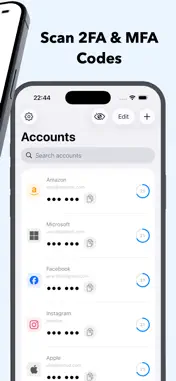
Authenticator keeps your online accounts safe with secure, time-based two-factor authentication (2FA) codes generated right on your iPhone. No SMS, no waiting, and no sign-up. Your codes work even when you're offline. Add a login in seconds by scanning its QR code or entering the setup key by hand, then get fresh verification codes every 30 seconds. Works with thousands of services including Google, Apple, Microsoft, Facebook, Instagram, Amazon, PayPal, GitHub, Discord, Coinbase, Binance, and Dropbox. KEY FEATURES Secure 2FA codes (TOTP) Generate time-based one-time passwords on your device for a strong second layer of protection on every login. Scan or enter manually Add accounts by scanning a QR code or typing the setup key. Simple and quick. Encrypted backup and restore Export a password-protected backup secured with AES-256-GCM encryption, and restore your codes if you switch or lose your phone. Only your password can unlock it. There is no server and no account. App lock with Face ID and Touch ID Keep your codes private behind Face ID, Touch ID, or your device passcode, with auto-lock when you leave the app. Hide codes instantly Tap to hide your codes behind dots so no one nearby can read them. Private by design Everything stays on your device. No account, no tracking, and it works fully offline. Clear, recognizable icons Popular services show their brand icon so you can spot the right code at a glance. SUPPORT Questions or a feature request? Open Settings then Send Feedback in the app and we'll get back to you. SUBSCRIPTION Authenticator offers an optional auto-renewing subscription that unlocks unlimited accounts and all premium features. - Payment is charged to your Apple Account at purchase confirmation. - Your subscription renews automatically unless auto-renew is turned off at least 24 hours before the end of the current period. - Your account is charged for renewal within 24 hours before the end of the current period. - Manage or cancel anytime in your App Store account settings. - Any unused portion of a free trial, if offered, is forfeited when you purchase a subscription. Privacy Policy: https://authentication2fa.vercel.app/privacy Terms of Use: https://www.apple.com/legal/internet-services/itunes/dev/stdeula/
Technical Analysis
Package Overview Basic metadata
Bundle ID
com.my-authenticator Current Version 1.10.21
Minimum iOS 26.2
Package Size App Store Size
Package Metadata 1 / 1 version records
Detailed binary, privacy manifest, framework, and Info.plist results have not been indexed for this package yet. The verified App Store and archive metadata above remains available.
Developer Information
Known Version Records
1 version record with stored package metadata
Stored metadata does not guarantee a package is currently available to download.
| Details | Version / IDs | Version date | Action |
|---|---|---|---|
| 13.0 MB | v1.10.21 App Store ID: 886289356Build: 1.10.21 | 2026-06-03 10:41:18 | Get Version |