
Preview









Description
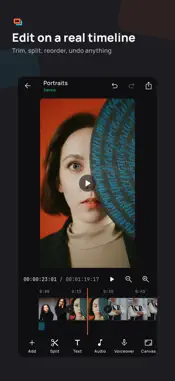
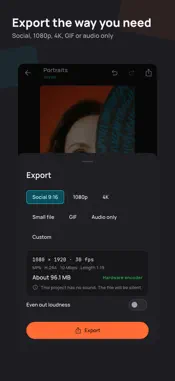
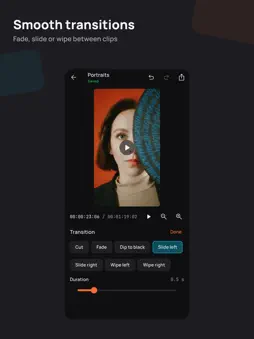
Clipforge is a video editor and converter that does its work on your device. There is no account to create and your videos are never uploaded: you pick a video, edit or convert it, and save the result. EDIT ON A TIMELINE • Trim, split, reorder, duplicate and delete clips with direct touch • Speed from 0.25× to 4×, reverse, freeze frames • Transitions, text with outlines and shadows, color looks and adjustments • Music, voiceover recording, volume and fades • Photos with slow zoom, any canvas shape: 16:9, 9:16, 1:1, 4:5, 4:3 • Undo and redo for everything; your project is saved as you work QUICK TOOLS • Convert between MP4, MOV, MKV and WebM, one file or many • Compress to a size you choose • Trim and cut without re-encoding when possible • Merge clips • Split into parts by length, count or chapters • Resize, crop, rotate and mirror • Change speed, reverse, stabilize • Extract, remove, replace or mix audio; normalize loudness • Make a GIF or an animated WebP • Grab a frame or a contact sheet • Turn photos into a slideshow with music • Add subtitles or a watermark • Put two videos side by side EXPORT THE WAY YOU NEED IT • Presets for social video, 1080p, 4K, small files, GIF and audio only • Or choose format, resolution, frame rate and quality yourself • See the estimated size before you start, and what will be re-encoded and why • Save to Photos, to a folder, or share MADE TO BE CLEAR AND FAST • Uses your device's hardware video encoder • Tells you when an operation is lossless • Every video can be played and compared with its original • A queue for longer jobs, with progress and time remaining • Dark and light themes, large text and screen readers supported, phones and tablets PRIVATE BY DESIGN • Your media stays on your device • No account, no ads, no tracking • Crash reports help fix problems; switch them off in Settings Clipforge uses FFmpeg under the LGPL. The app lists its open-source licenses and where to get FFmpeg's source.
Technical Analysis
Package Overview Basic metadata
Bundle ID
resoftware.clipForge Current Version 1.0.0
Minimum iOS 15.0
Package Size App Store Size
Package Metadata 0 / 0 version records
Detailed binary, privacy manifest, framework, and Info.plist results have not been indexed for this package yet. The verified App Store and archive metadata above remains available.
Known Version Records
0 version records with stored package metadata
Stored metadata does not guarantee a package is currently available to download.
| Details | Version / IDs | Version date | Action |
|---|