Preview



Description
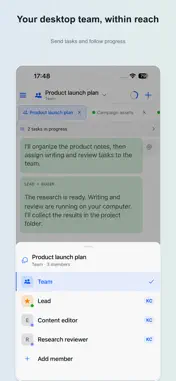
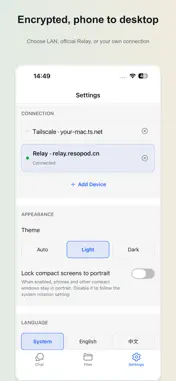
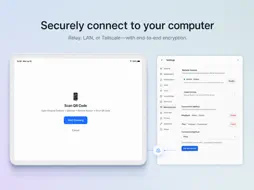
Hivepod for iPhone and iPad is the companion remote client for Hivepod Desktop on your own computer. Send a task, follow its progress, review the result and respond when your desktop needs your approval. YOUR COMPUTER DOES THE WORK Pair with your computer by scanning the desktop's QR code. The agents and tools configured on that computer carry out your tasks. The iOS app displays their messages and results; it does not include a language model, a model-service login or model API credentials. FOLLOW INDIVIDUAL TASKS AND TEAMS Continue desktop conversations, send instructions and attachments, and follow multiple agents working together. Review updates and approval requests while away from your desk. Available agents, tools and capabilities depend on your desktop setup. OPEN YOUR PROJECT FILES Browse files on the paired computer and review documents, images and other supported previews. Keep the context of a task close to the work it produces. VOICE INPUT Record a message and use the speech configuration on your desktop to transcribe it. Review the text before sending, or use direct-send mode. Local speech runs on your computer; configured third-party speech services receive the audio needed for transcription. Optional Hive-managed speech sends audio through regional Hive Cloud to its speech provider and keeps account-linked usage records. ENCRYPTED PHONE-TO-DESKTOP CONNECTION Use the optional official Relay, direct local-network access, or a user-operated connection such as Tailscale or a self-hosted tunnel. Phone-to-desktop payloads are end-to-end encrypted, and the Relay cannot decrypt them. Subsequent model and speech requests are processed by the services configured for that task. YOUR DESKTOP WORKSPACE Conversation history, project files and model credentials stay in your desktop environment. Content needed for a task may be sent to your configured providers. Hivepod does not provide account-based cloud conversation history. BEFORE YOU START Install and run Hivepod Desktop on macOS, Windows or Linux, configure the agents and tools you want to use, then pair your iPhone or iPad. Remote tasks and files require that paired computer to remain available. Without pairing, you can open Settings, About, legal information and pairing guidance. The iOS download is free and has no in-app purchase UI. The optional official Relay and Hive-managed cloud features depend on desktop account membership or entitlements; legacy Relay activation codes are also supported. LAN and user-operated connections do not require official Relay membership. Third-party services have their own availability, terms and charges. Get Hivepod Desktop: https://resopod.ai/products/hivepod/download Mobile guide: https://resopod.ai/products/hivepod/mobile Support: [email protected] Privacy: https://resopod.ai/products/hivepod/privacy Terms: https://resopod.ai/products/hivepod/terms Developed by Shenzhen Resopod Technology Limited Company (深圳市念舱科技有限公司).
What's New
Version 1.3.2 2026-10-26
• Added Manager conversations to coordinate sessions and teams across a project, a Space, or all your work, with a central place for tasks and followed conversa... Technical Analysis
Package Overview Basic metadata
Bundle ID
ai.resopod.hivepod Current Version 1.3.2
Minimum iOS 16.4
Package Size App Store Size
Package Metadata 0 / 0 version records
Detailed binary, privacy manifest, framework, and Info.plist results have not been indexed for this package yet. The verified App Store and archive metadata above remains available.
Developer Information
Known Version Records
0 version records with stored package metadata
Stored metadata does not guarantee a package is currently available to download.
| Details | Version / IDs | Version date | Action |
|---|